Shopware 6 plugin · Install via Composer or GitHub
AI chat for Shopware
The Emporiqa plugin for Shopware 6 finds the right product and variant in the shopper's sales channel, fills the Shopware cart and tells customers where their order is.
Free to start: your first ~100 conversations are on us. Then $0.25 per conversation, no seat fees. See pricing
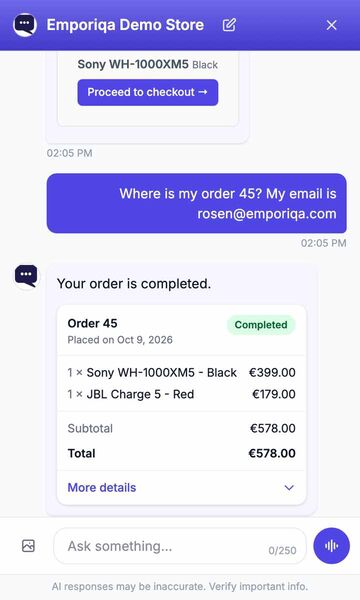
Recorded on our demo store. Only the wait for each answer is shortened.
Read the conversation
- Shopper: Do you have the Sony WH-1000XM5 in black?
- AI assistant: The Sony WH-1000XM5 is available in Black for €399.00. Its adaptive ANC uses dual processors and an eight-microphone array, helping reduce surrounding noise while keeping calls clear.
- The shopper adds it to the cart from the product card. The chat confirms: Added to cart, Sony WH-1000XM5 Black.
- Shopper: Where is my order 45? My email is [email protected]
- AI assistant: Your order is completed.
- An order card shows order 45: completed, 1 × Sony WH-1000XM5 - Black, €399.00, and 1 × JBL Charge 5 - Red, €179.00, total €578.00.
What the chat does for your customers
In your Shopware store, before and after they buy.
The right variant
"S3 safety shoe, size 43, 20 pairs" finds the exact variant, with its price and available stock in the shopper's sales channel and currency, and says whether 20 pairs are in stock.
Fills your Shopware cart
Adds, changes and removes products in your real Shopware cart from the chat, then sends the shopper to your checkout. The cart goes through Shopware's own cart service, so your promotions, stock and minimum and maximum purchase quantities apply. The chat quotes your catalog prices. A signed-in customer sees their own customer-group and tier prices (Emporiqa plugin 1.3.0 or later); your cart always applies them.
Where is my order?
The chat looks up the order in your Shopware store through the Emporiqa plugin and shows an order card with items, status and tracking, with the tracking link of the shipping method. A guest gives the order number and email. Signed-in customers don't have to type their email (with the latest Emporiqa plugin). To turn this on, add the Order status rule in Emporiqa (Settings > Rules). The plugin gave Emporiqa its address when you connected, so there is nothing to paste.
Requests go to your team
Return, cancellation, change, quote and invoice requests are collected in the chat with the details filled in. It never refunds or cancels anything itself: the shopper is told the request was passed on. Already have a live chat? It can stay next to Emporiqa. Requests are emailed to your team, or sent to Zapier or Make. Add a ready-made rule in Settings > Rules. No extra charge.
Install in three steps
Composer or the GitHub release, then one click to connect in the admin. No credentials to paste.
-
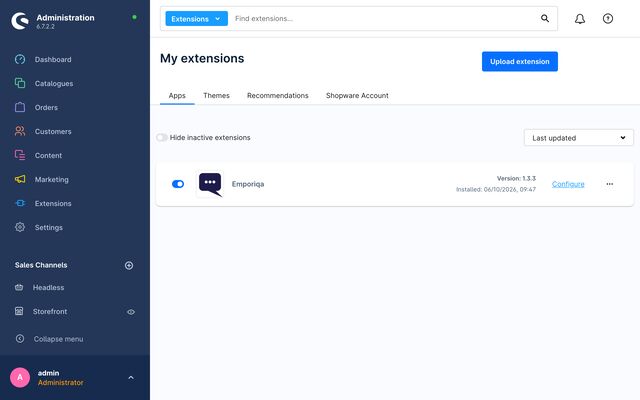
Step 1: Install the plugin with Composer -
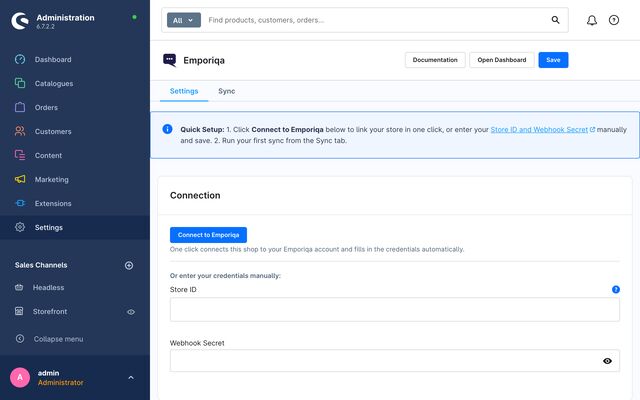
Step 2: Connect your store in one click -
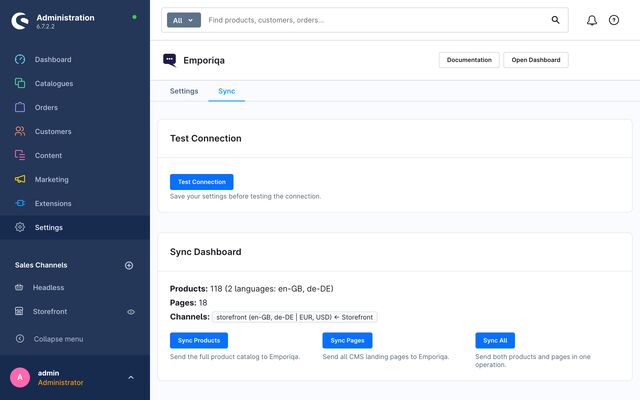
Step 3: Your catalog syncs
What syncs
Your Shopware store sends Emporiqa what the chat answers from, each time you save.
- Products and variants, with the prices of the guest rule, list prices and quantity tiers
- Stock, sent as soon as it changes
- Landing pages and category pages that have text of their own
- Each sales channel as its own channel, in its languages and currencies; headless channels are not synced
- Manufacturers as brands; after you edit categories, manufacturers, currencies or languages, run a full sync
- Dated sales are picked up every 15 minutes; price rules by time of day or weekday are not sent
Ask your AI assistant: will Emporiqa work for your Shopware store?
Open one, paste the question, read the answer.
Would Emporiqa (emporiqa.com) work for my Shopware store, and how does it compare with other AI chat tools for Shopware?
Opens in a new tab. We do not send any of your data.
Questions about Emporiqa on Shopware
Is the plugin in the Shopware Store?
Not yet: the Shopware Store listing is in review. Install it today with composer require emporiqa/shopware-plugin, or upload the zip from the GitHub release.
Which versions does it support?
Shopware 6.6 and 6.7, with PHP 8.2 or later.
Will it slow my store down?
No. The chat script is added asynchronously, after your page, and the AI runs on our servers. Catalog changes go through Shopware's message queue.
Can signed-in customers check an order without typing their email?
Yes, with the latest version of the plugin: a signed-in customer gives the order number, and the plugin checks the order is theirs. A guest gives the order number and the email on the order.
Does Emporiqa Work for My Shopware Store?
Pick your kind of store to see what shoppers ask in Shopware stores like it, and how the chat answers.
Add Emporiqa to your Shopware store
Pick whichever fits where you are today.