For WooCommerce, PrestaShop, Magento, Shopware, Drupal and Sylius stores
Your AI shop assistant for sales and support.
Finds products, fills the cart and answers order questions in your shop’s chat. Drafts your customer email replies. Works with your team: a person can take over any chat.
Free to start: $25 credit, about 100 conversations. Then $0.25 per conversation, no seat fees. See pricing
- No card
- Try it on your own products first
- You set the monthly limit

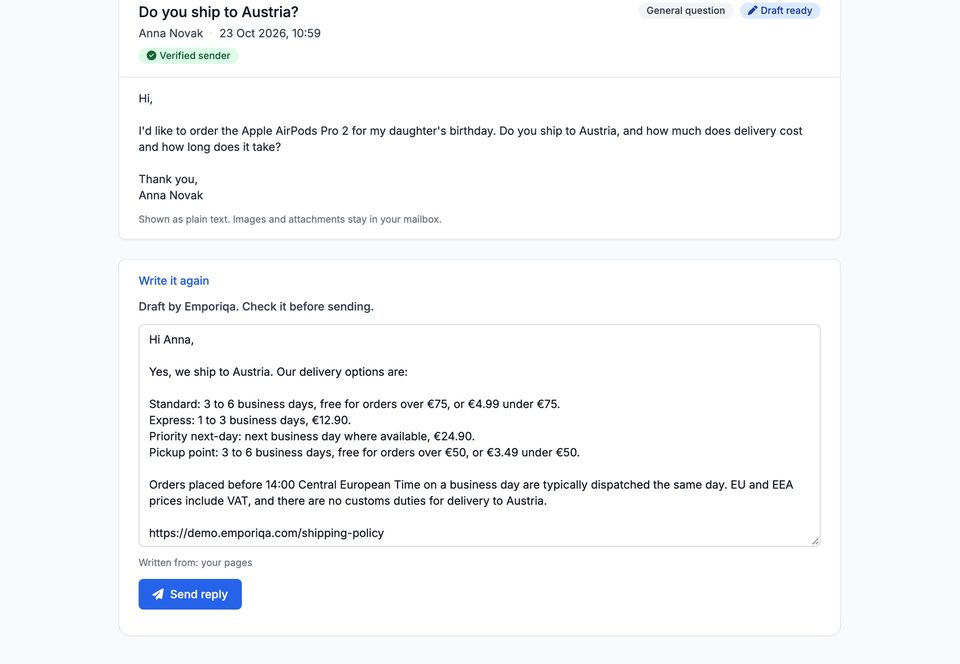
Do you ship to Austria?
Anna Novak · 10:59
Yes, we ship to Austria. Standard 3 to 6 business days, free over €75. Express 1 to 3 business days, €12.90.
Connected to Support Team
Shopper: Which noise cancelling headphones would you recommend for long flights?
10:14 AM
AI assistant: For long flights, the Sennheiser Momentum 4 at €379.00 is the right call. Its 60-hour battery with ANC means you can cover several trips without hunting for an outlet, while adaptive ANC with anti-wind processing helps reduce cabin noise. Want me to add it to your cart?
✓ A member of our team has joined the chat and will help you from here.

Your team: Hi, Rosen here from the team. The Momentum 4 is a good pick for long flights. Anything else I can help with, like delivery?
10:15 AM · Rosen
Recorded on our demo store. Only the wait for each answer is shortened.Recorded on our demo store. Only the wait for each answer is shortened.
Read the conversation
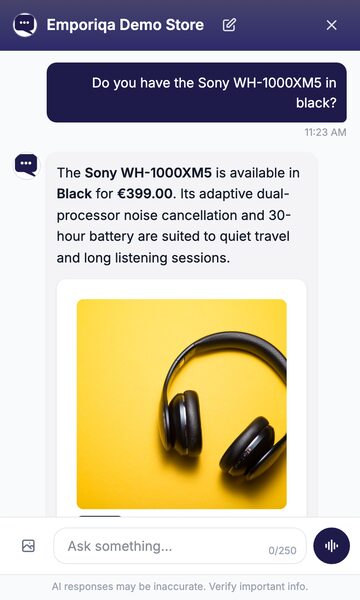
- Shopper: Do you have the Sony WH-1000XM5 in black?
- AI assistant: The Sony WH-1000XM5 is available in Black for €399.00. Its adaptive dual-processor noise cancellation and 30-hour battery are suited to quiet travel and long listening sessions.
- The shopper adds it to the cart from the product card. The chat confirms: Added to cart, Sony WH-1000XM5 Black.
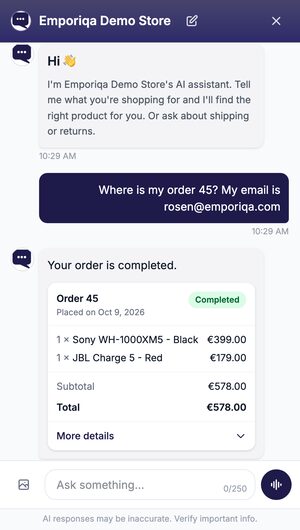
- Shopper: Where is my order 45? My email is [email protected]
- AI assistant: Your order is completed.
- An order card shows order 45: completed, 1 × Sony WH-1000XM5 - Black, €399.00, and 1 × JBL Charge 5 - Red, €179.00, total €578.00.
Read the conversation
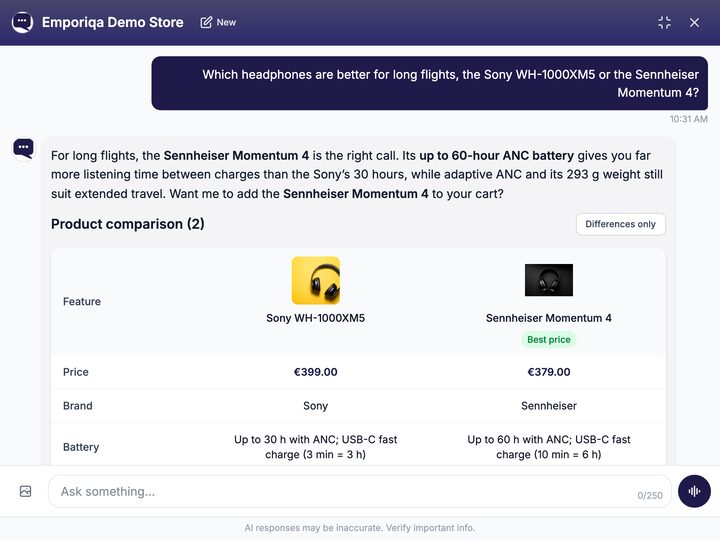
- Shopper: Which headphones are better for long flights, the Sony WH-1000XM5 or the Sennheiser Momentum 4?
- AI assistant: For long flights, the Sennheiser Momentum 4 is the right call. Its up to 60-hour ANC battery gives you far more listening time between charges than the Sony’s 30 hours, while adaptive ANC and its 293 g weight still suit extended travel. Want me to add the Sennheiser Momentum 4 to your cart?
- A comparison of the two side by side: Sony WH-1000XM5 €399.00, Sennheiser Momentum 4 €379.00 (best price); battery up to 30 h against up to 60 h with ANC; weight 250 g against 293 g; a cart button under each.
Recorded on our demo store. Only the wait for each answer is shortened.Recorded on our demo store. Only the wait for each answer is shortened.
Read the conversation
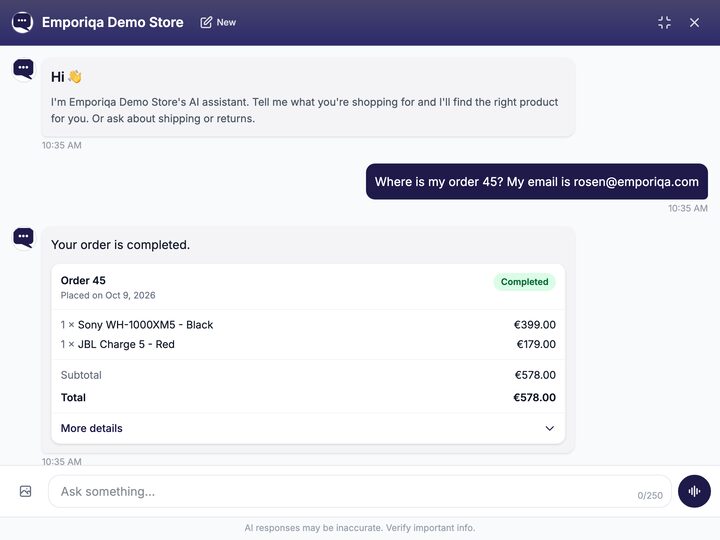
- Shopper: Where is my order 45? My email is [email protected]
- AI assistant: Your order is completed.
- An order card shows order 45: completed, 1 × Sony WH-1000XM5 - Black, €399.00, and 1 × JBL Charge 5 - Red, €179.00, total €578.00.
Read the conversation
- Shopper: Where is my order 45? My email is [email protected]
- AI assistant: Your order is completed.
- Order 45, placed on Oct 9, 2026, Completed: 1 × Sony WH-1000XM5 - Black €399.00, 1 × JBL Charge 5 - Red €179.00, total €578.00.
- Shopper: How many days do I have to return it?
- AI assistant: You have 14 days from delivery to start a return under the EU statutory withdrawal period. Emporiqa also extends this to 30 days for most products as a goodwill policy. Return shipping costs are normally yours for a change-of-mind return. Read the full Return Policy for the conditions.
A screenshot from our demo store’s dashboard.An email our demo store received and the reply Emporiqa drafted, shortened from the dashboard.
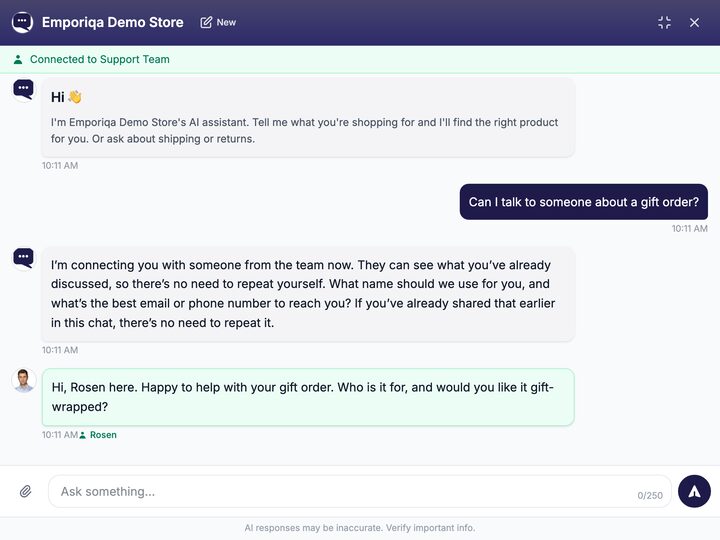
Recorded on our demo store. Only the wait for each answer is shortened.A conversation on our demo store as the shopper saw it after the team joined, in the chat’s own layout.
Read the conversation
- Shopper: Can I talk to someone about a gift order?
- AI assistant: I’m connecting you with someone from the team now. They can see what you’ve already discussed, so there’s no need to repeat yourself. What name should we use for you, and what’s the best email or phone number to reach you? If you’ve already shared that earlier in this chat, there’s no need to repeat it.
- Connected to Support Team.
- Your team: Hi, Rosen here. Happy to help with your gift order. Who is it for, and would you like it gift-wrapped?
- Rosen hands the chat back: Support session ended. The assistant is back to help; let us know if you need anything else.
What it does for your shop
-
Sell
Recommends from your catalog with today’s price and stock, compares products and fills the cart.
More on selling -
Support
Answers order status from your shop, and shipping and returns questions from your pages.
More on support -
Customer emailsOptional
Drafts replies to your customer emails from your catalog and pages. Your team sends them.
More on customer emails -
Your team
Hands the chat to a person when needed and alerts your team by email, Slack or Teams.
More on your team -
Messaging appsComing soon
Answers your customers on WhatsApp, Instagram, Messenger and Telegram.
-
Set up
Install the plugin, test it on your own products, then press Go live.
See the three steps
The chat on your shop is the core. Customer emails are optional: switch them on when you want.
Plugins for six platforms, five on their official marketplaces
A store that uses Emporiqa, and who builds it
Our business has a complex product catalogue with over 4,000 products and more than 100,000 SKUs, so implementing AI customer support was never going to be straightforward. The chatbot has handled this challenge remarkably well and has become a valuable part of our customer experience.

Built by Rosen Hristov, a former agency CTO with 15 years building enterprise platforms and online shops for clients in Europe, the US and Australia. He works with every store himself, before and after the sale.
See how much the chat sold
Your dashboard shows what the chat sold, how shoppers rated it, when they asked for a person and which questions your pages don’t answer yet.
Revenue & conversions
Demo store · Last 90 days- Revenue from chat
- €5,270.00 14.5% of €36,332.00 total revenue
- Cart → checkout
- 41.7%
- Checkout → purchase
- 40.0%
- Top products the chat put in the cart
-
- 1Amazfit GTR 48
- 2Bose QuietComfort Ultra8
- 3Blue Yeti X7
- Conversations359
- Conversations with cart48
- Checkouts20
- Purchases8
- Satisfaction rate
- 84.2%57 ratings
- Asked for a person
- 34
Questions your pages don’t answer
- Can you put a screen protector on the phone before shipping it?
- Can you engrave a name on AirPods as a gift?
- Can someone set up a TV at my home after delivery?
An order counts in full as revenue from chat when it is placed in the same browser after a conversation in which the chat put a product in the cart.
Daily figures to Google Sheets, Excel, Make or ZapierWhat stays in your hands
-
Answers from your catalog and pages
When your pages don’t have the answer, it says so and offers your team.
-
Customers know they are talking to an AI
The greeting always says so, and the chat notes that answers can be wrong.
-
It never refunds, cancels or changes orders
It collects the request with the details your team needs, and your team decides.
-
You set the monthly limit
Alerts at 80% and 100%. At the limit the chat is hidden from your shop and charging stops.
-
Where your data is
Hosted in Germany by an EU company, with EU and US subprocessors.
-
You set the tone and the rules
Choose how it speaks, and what it passes on to your team and when.
Try it with your own products first
Nothing changes on your shop until you say so.
-
Install the plugin
Pick your platform. Your products sync on their own.
- Step 1: Install the plugin from WordPress.org
- Step 2: Connect your store in one click
- Step 3: Your products sync, then again each time you save one
- Step 1: Add the module from PrestaShop Addons
- Step 2: Connect your store in one click
- Step 3: Your products sync, then again each time you save one
- Step 1: Install the module with Composer
- Step 2: Connect your store in one click
- Step 3: Your products sync, then again each time you save one
- Step 1: Install the plugin with Composer
- Step 2: Connect your store in one click
- Step 3: Your products sync, then again each time you save one
- Step 1: Install the module from drupal.org
- Step 2: Paste your Store ID and Connection Secret from the dashboard
- Step 3: Your products sync, then again each time you save one
- Step 1: Install the plugin with Composer
- Step 2: Add your Store ID and Connection Secret to .env
- Step 3: Your products sync, then again each time you save one
Another platform? Connect it through our API
-
Test it on your own catalog
On the test page in your dashboard, the chat answers from your products and pages. Your customers see nothing yet.
-
Go live within your monthly limit
Press Go live when you are happy with the answers.
Start with the chat; add customer emails whenever you like.
Using Claude or ChatGPT? Set it up from there
Installing it for clients? Implementation partners
What does it say when it doesn’t know?
Do I need a developer to set it up?
I already have a live chat. Can they run together?
How does my team know a shopper needs a person?
Can it cancel or refund an order itself?
Can I try it before my shoppers see it?
Will it send emails without us?
Comparing tools? See how Emporiqa compares
Try it on your store
Connect your products and see the chat answer shopper questions from your own catalog.
Your dashboard shows what each conversation led to.
- Free to start
- Pay per use, no seat fees
- No card required