WooCommerce Setup Guide
Add a chat assistant to your WooCommerce store with automatic product sync.
You're in the developer setup guide. Looking for an overview of what Emporiqa does for your WooCommerce store? See the integration page.
Quick Start
For store owners. Install, click Connect, send your catalog. Step-by-step screenshots included.
StartDeveloper Docs
For developers. Architecture, webhook payload, WP-CLI commands, and customization filters.
ReadFast Start
Install the plugin, click Connect to Emporiqa, send your catalog. The plugin doesn't touch your theme or your checkout. Test Connection verifies everything before any product data leaves your site, and you can disable the plugin from the same screen if it isn't a fit.
What you'll need
- Admin access to your WordPress site over HTTPS (WordPress 6.0+, WooCommerce 8.0+)
- An Emporiqa account, or create one during step 1 (free, $25 signup credit, no card required)
- A few minutes of hands-on time. Sync runs in the background; no need to keep the tab open.
First, install and activate the plugin. In WordPress admin go to Plugins → Add New, search for Emporiqa, click Install Now, then Activate. Or upload the zip from wordpress.org/plugins/emporiqa via Plugins → Add New → Upload Plugin.
Click Connect to Emporiqa
Go to Settings → Emporiqa. Click Connect to Emporiqa. You'll land on the Emporiqa dashboard, confirm the store you want to link (or create a new one), and come back to a connected plugin. No Store ID or Connection Secret to copy across tabs.
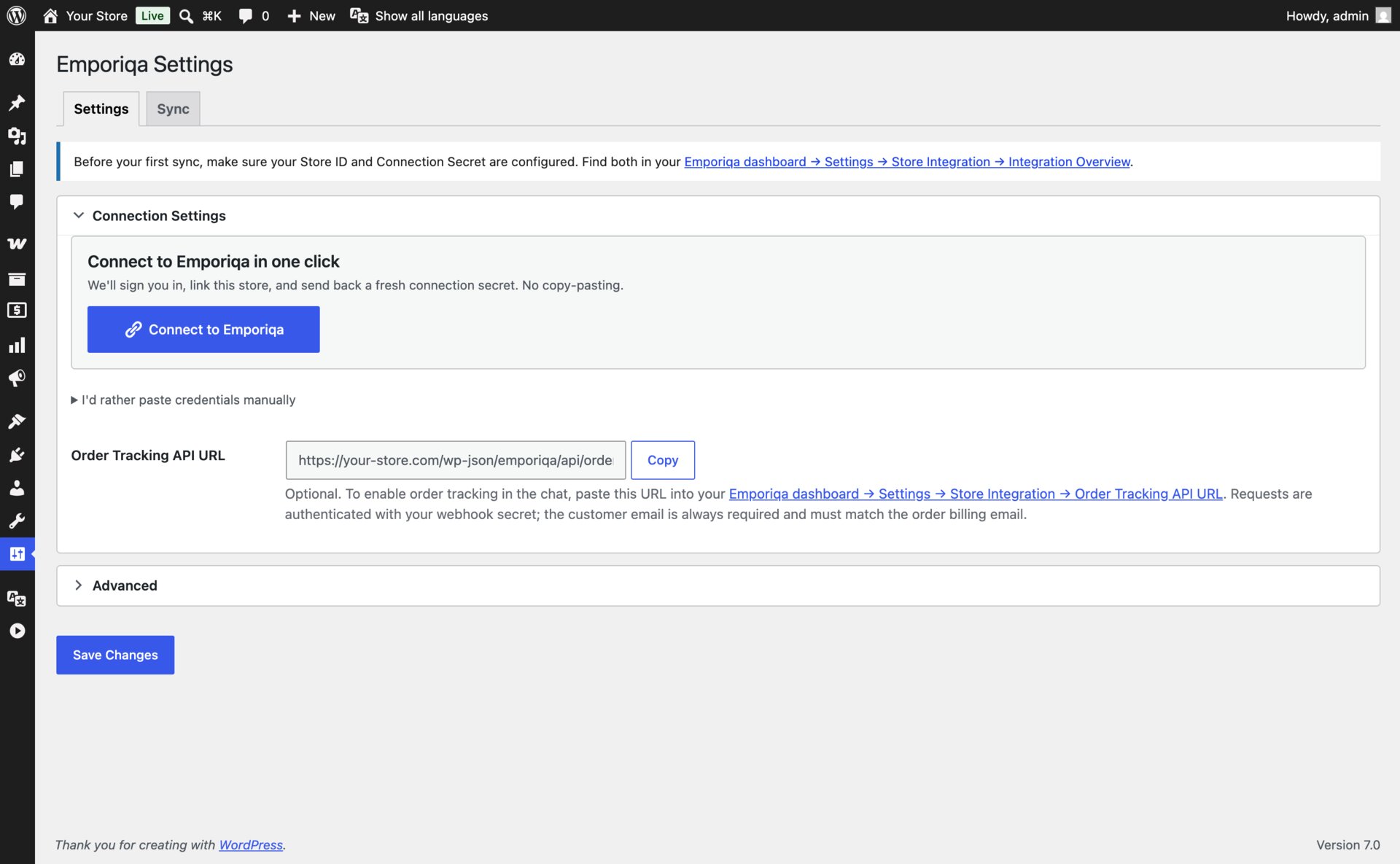
Prefer manual setup?
If your site doesn't run on HTTPS, or you'd rather paste the credentials yourself, expand Edit credentials manually on the settings page. Paste the Store ID and Connection Secret from your Emporiqa dashboard under Store Settings → Integration. The manual path lands you in the same place as one-click.
Send your catalog
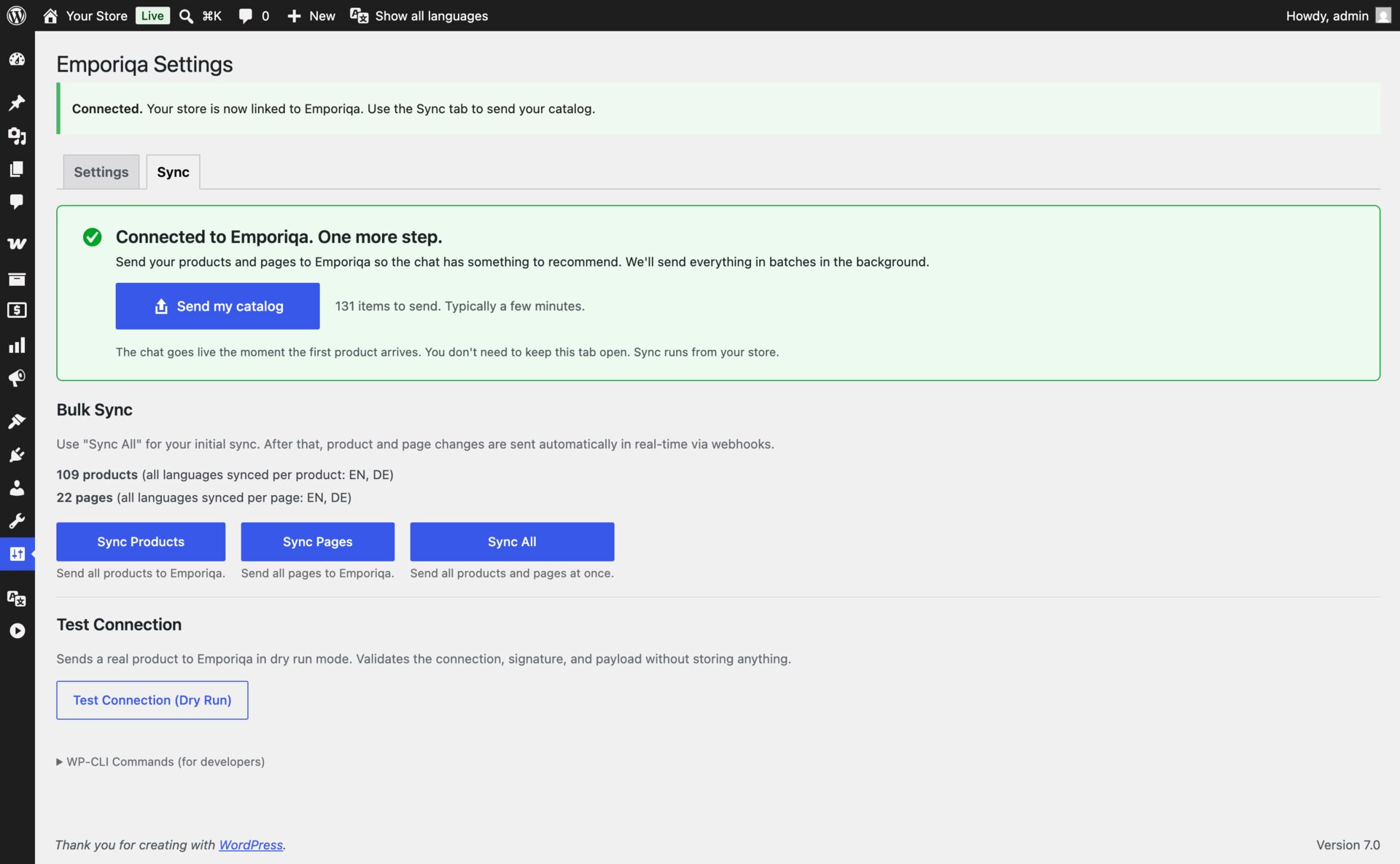
After connecting, the Sync tab shows a green welcome card with Send my catalog. Click it to send all products and pages in one go. Larger catalogs take a few minutes; the panel shows progress. To validate the connection before any data leaves your site, click Test Connection (Dry Run) first.
Verify the chat widget
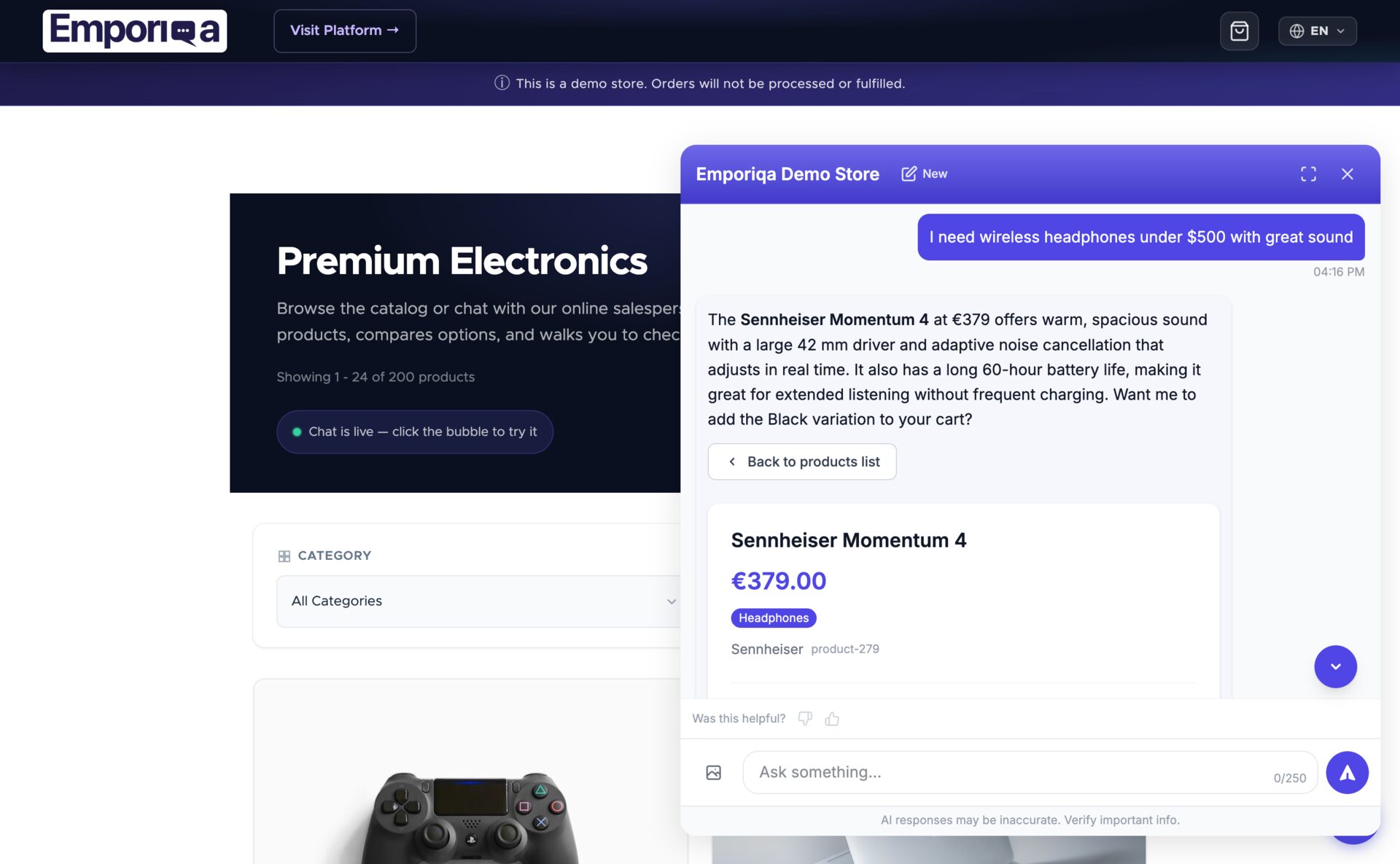
Open your storefront. The chat bubble appears in the bottom-right corner. Click it, ask a product question, and watch the salesperson answer from your catalog.
You're live
- Connection is signed and renewable from the plugin. No credentials stored in clear text.
- New products and pages sync automatically when you save them
- Shoppers can ask about products, policies, and their orders
- Add-to-cart in chat; shoppers proceed to your WooCommerce checkout
Need to customize sync behavior, add custom fields, or integrate with a third-party plugin?
See Developer DocsDeveloper Documentation
Architecture, configuration reference, webhook payload schema, WP-CLI commands, and customization filters.
Architecture
Emporiqa uses your store catalog as its knowledge base: the plugin pushes products, variations, prices, stock and store pages over webhooks as you save them, so there is no separate knowledge base you have to write or keep up to date. For anything your shop pages never covered, you can write a page yourself on the Pages screen in the Emporiqa dashboard: a title and the text in your own words, in up to 10 languages on the same page. You write each language yourself, and any of them can carry a link to the same page on your site. The chat answers from it like it answers from any page your shop sent, and a sync never overwrites it. Up to 25 pages per store.
The plugin listens to WooCommerce and WordPress hooks (woocommerce_update_product, save_post, woocommerce_order_status_completed, etc.) and sends webhook events to Emporiqa using deferred delivery: product and page events are queued during the request and flushed on shutdown, while order conversion events are scheduled via Action Scheduler. Saving a product completes locally; the webhook delivery runs asynchronously after the response.
All translations and channels for a single product or page consolidate into one webhook event. Variable products sync the parent plus each variation, and changes cascade: saving a variation triggers a parent re-sync so search always sees the full catalog state. The plugin declares WooCommerce High-Performance Order Storage (HPOS) compatibility.
Requirements
| WordPress | 6.0 or higher |
| WooCommerce | 8.0 or higher |
| PHP | 7.4 or higher |
| Emporiqa account | Free Emporiqa account ($25 credit on signup) |
Configuration Reference
All settings live at Settings → Emporiqa. Connection Settings is the main section and is expanded by default. Sync toggles and advanced settings (languages, page post types, webhook URL, batch size) are collapsed under Advanced.
Connection Settings
| Setting | Description |
|---|---|
| Store ID | Your unique store identifier from the Emporiqa dashboard. |
| Connection Secret | Shared secret used for HMAC-SHA256 signing of webhook and order tracking requests. |
| Order Tracking API URL | Read-only field. Copy this URL into your Emporiqa dashboard (Settings → Integration → Order tracking) to enable order lookup from the chat. |
Advanced Settings
Most stores don't need to change these.
| Setting | Description |
|---|---|
| Sync Products | Enable/disable product synchronization. |
| Sync Pages | Enable/disable page synchronization. |
| Enabled Languages | Which languages to sync. The plugin auto-detects WPML and Polylang, consolidates translations into one payload per product, and falls back to determine_locale() when no multilingual plugin is active. |
| Page Post Types | Which post types to sync as pages (pages, posts, or custom post types). |
| Webhook URL | Emporiqa webhook endpoint. Default works for most stores. |
| Batch Size | Items per webhook request during full sync (default: 25). |
Always-on capabilities
- Cart operations: add, update, remove from inside the chat via AJAX endpoints that talk directly to WooCommerce's cart.
- Conversion tracking: chat sessions linked to completed orders for revenue attribution.
- Multi-currency: detects the active currency from WOOCS, WPML Multi-Currency, WooCommerce Payments, and Aelia Currency Switcher; override with the
emporiqa_active_currencyfilter.
Features
Real-time Webhooks
Products and pages sync via webhooks on create, update, and delete using WooCommerce hooks (woocommerce_update_product, save_post, etc.) with dedup to prevent duplicate events.
Chat Widget
Embedded automatically via wp_footer. Language and currency are detected from the active WordPress locale and WooCommerce currency.
Multilingual
Auto-detects WPML and Polylang. Products sync with translated names, descriptions, categories, and attributes from all enabled languages, consolidated into one payload per product.
Variable Products
Full parent/variation sync. Saving a variation triggers a parent re-sync. Deleting a variation sends a variation delete event and re-syncs the parent.
Cart Operations
Customers can add, update quantities, and checkout from the chat. The plugin exposes dedicated AJAX endpoints that use WC()->cart directly.
Admin Sync UI
Trigger full sync from the settings page Sync tab with an AJAX progress bar and live log panel. Three buttons: Sync Products, Sync Pages, Sync All.
Conversion Tracking
Sends an order.completed webhook via woocommerce_order_status_completed, linking chat sessions to revenue on your dashboard.
Deferred Sending
Product and page events are queued and flushed on shutdown. Order conversion events run through Action Scheduler so bulk order updates don't block the request.
Minimum Order Quantity
Reads the _minimum_allowed_quantity post meta (set by WooCommerce's official Min/Max Quantities extension and compatible clones) and ships it on every product and variation sync. Customize per product with the emporiqa_min_order_quantity filter. The assistant blocks under-minimum cart actions and offers the merchant's minimum instead of failing silently.
Webhook Payload
Each product or page is sent as a single webhook event containing all languages and channels. Translatable fields are nested by channel and language code.
Product Event
{
  "type": "product.updated",
  "data": {
    "identification_number": "product-42",
    "sku": "SKU-001",
    "channels": ["default"],
    "names":        {"default": {"en": "Hiking Boots", "de": "Wanderschuhe"}},
    "descriptions": {"default": {"en": "Waterproof leather boots...", "de": "Wasserdichte Lederstiefel..."}},
    "links":        {"default": {"en": "https://store.com/hiking-boots", "de": "https://store.com/de/wanderschuhe"}},
    "categories":   {"default": {"en": ["Footwear > Hiking"], "de": ["Schuhe > Wandern"]}},
    "attributes":   {"default": {"en": {"Material": "Leather"}, "de": {"Material": "Leder"}}},
    "brands":       {"default": "TrailPeak"},
    "prices":       {"default": [{"currency": "EUR", "current_price": 129.99, "regular_price": 149.99}]},
    "images":       {"default": ["https://store.com/wp-content/uploads/boots-front.jpg"]},
    "availability_statuses": {"default": "available"},
    "stock_quantities":      {"default": 42},
    "min_order_quantities":  {"default": 1},
    "max_order_quantities":  {"default": null},
    "available_for_order": true,
    "condition": null,
    "is_virtual": false,
    "is_parent": false,
    "parent_sku": null,
    "variation_attributes": {}
  }
}
Field Structure
| Type | Pattern | Fields |
|---|---|---|
| Translatable | {channel: {lang: value}} |
names, descriptions, links, categories, attributes, variation_attributes |
| Shared | {channel: value} |
brands, prices, images, availability_statuses, stock_quantities, min_order_quantities, max_order_quantities |
| Flat | Direct value | identification_number, sku, channels, is_parent, parent_sku, available_for_order, condition, is_virtual |
Customization Filters
The plugin exposes WordPress filters you can hook from a custom plugin or your theme's functions.php to control sync behavior and modify data before it's sent.
| Filter | Description |
|---|---|
emporiqa_should_sync_product |
Return false to skip a specific product. |
emporiqa_should_sync_page |
Return false to skip a specific page. |
emporiqa_product_data |
Modify the consolidated product payload before send. |
emporiqa_variation_data |
Modify the variation payload before send. |
emporiqa_page_data |
Modify the page payload before send. |
emporiqa_product_channels |
Assign sales channels to a product (default: ['default']). |
emporiqa_page_channels |
Assign sales channels to a page. |
emporiqa_product_images |
Customize product image URLs. |
emporiqa_product_attributes |
Customize product attributes per language. |
emporiqa_min_order_quantity |
Override the minimum order quantity per product or variation. Default reads _minimum_allowed_quantity post meta and falls back to 1. |
emporiqa_brand_taxonomy |
Override brand taxonomy (default: product_brand). |
emporiqa_product_brand |
Fallback brand name when no taxonomy term is set. |
emporiqa_product_types |
Product types to sync (default: simple, variable, grouped, external). |
emporiqa_widget_enabled |
Show or hide the widget per page. |
emporiqa_widget_params |
Add or override widget embed parameters. |
emporiqa_widget_channel |
Set the widget sales channel (default: default). |
emporiqa_active_currency |
Override the detected active currency code. |
emporiqa_checkout_url / emporiqa_cart_url |
Override URLs passed to the chat cart handler. |
emporiqa_order_tracking_data |
Add fields to order tracking responses. |
emporiqa_tracked_order_statuses |
Order statuses that trigger conversion events (default: wc-completed). |
Example: skip draft products
add_filter('emporiqa_should_sync_product', function ($should_sync, $product) {
    if (str_contains($product->get_name(), '[DRAFT]')) {
        return false;
    }
    return $should_sync;
}, 10, 2);
Example: add a custom attribute to the product payload
// Attributes are nested: {channel: {lang: {key: value}}}.
add_filter('emporiqa_product_data', function ($data, $product) {
    foreach ($data['attributes'] as $channel => &$languages) {
        foreach ($languages as $lang => &$attrs) {
            $attrs['material'] = get_field('material', $product->get_id());
        }
    }
    return $data;
}, 10, 2);
Register your filters and actions in your theme's functions.php or a custom plugin.
WP-CLI Commands
The plugin registers a wp emporiqa command for automation and debugging. A reference is also available in the plugin's Sync tab.
# Sync all products
wp emporiqa sync-products

# Sync all pages
wp emporiqa sync-pages

# Full sync (products + pages)
wp emporiqa sync-all

# Test webhook connection (also available as a button in the Sync tab)
wp emporiqa test-connection

# Adjust batch size for large catalogs
wp emporiqa sync-products --batch-size=25
WP-CLI is the fastest way to seed large catalogs and to re-run syncs from your deployment pipeline. The admin Sync tab wraps the same underlying logic with a progress bar.
When to run a full sync
Price, stock and status changes reach Emporiqa as you save them, because each save fires a webhook. A few kinds of edit do not fire one, so the catalog in the chat can drift until you run a full sync. Run Sync All from the plugin's Sync tab, or wp emporiqa sync all, after any of these:
- A bulk import or update that writes products through CSV, REST or direct SQL rather than the normal save path.
- Renaming a category or an attribute, which changes many products at once without re-saving each one.
- Changing your store currency, or tax rates that alter displayed prices.
- Adding a language, or enabling a new WPML or Polylang translation set.
- An extended outage on the Emporiqa side, where queued webhooks may not have been delivered.
Running it more often than needed costs nothing beyond the time it takes. A weekly full sync is a reasonable safety net for a busy catalog.
Order Tracking
Emporiqa can look up order status on behalf of customers during chat conversations. The plugin registers a signed REST route that WordPress calls when a customer asks about their order.
Flow
- Customer asks "Where is my order #12345?" in the chat.
- Emporiqa sends an HMAC-SHA256 signed POST to your store.
- The plugin looks up the order with
wc_get_order(), verifies the billing email matches, and returns the status. - The salesperson presents the order information to the customer.
Endpoint
POST /wp-json/emporiqa/api/order/tracking
Setup
The endpoint is always active once the plugin is installed. To enable order lookup from chat, set the Order Tracking API URL in your Emporiqa dashboard (Store Settings → Integration) to:
https://your-store.com/wp-json/emporiqa/api/order/tracking
Requests are authenticated using the same HMAC-SHA256 connection secret. Requests older than 5 minutes are rejected. See the Webhook Setup Guide for the full request/response schema.
Order tracking is optional. Without the dashboard URL configured, order questions route to the Customer Support agent instead.
Troubleshooting
Products not appearing in chat
- Run
wp emporiqa sync-allor use the Sync tab to force a full sync. - Verify products are published and visible on the storefront.
- Confirm your Store ID and Connection Secret match the dashboard.
- Verify your Emporiqa subscription is active.
Chat widget not showing
- Confirm the plugin is active and Store ID is configured.
- Clear any page caching plugins (WP Rocket, W3 Total Cache, LiteSpeed).
- Check that your theme calls
wp_footer(). - Check the browser console for JavaScript errors.
Sync not sending data
- Verify your server can make outbound HTTPS requests.
- Run
wp emporiqa test-connectionor click Test Connection in the Sync tab. - Enable
WP_DEBUG_LOGand checkwp-content/debug.logfor signed request failures. - Confirm Action Scheduler is processing (Tools → Scheduled Actions). Stalled actions block conversion events.
Variations not syncing
- Verify variations are published and have prices set.
- Save the parent variable product to trigger a re-sync.
- Run a full product sync from the Sync tab.
Related Articles
Chat for WooCommerce
Webhook sync, variable products, WP-CLI, customization with filters.
Multilingual Chat Support
Cross-language search, 65+ languages, how translations sync.
5 Questions Before You Pay
Evaluation checklist: data sync, handoff, pricing, languages, attribution.
Conversion Tracking
Prove chat ROI: session to cart to purchase attribution.
Answer accuracy: the salesperson answers from your synced catalog and store pages. It does not invent products, prices, or discount codes; when it is unsure, it says so and offers to bring in your team. You can check this yourself on unedited demo answers, each with a link to rerun the exact query: emporiqa.com/proof.
Reviewed before listing: every Emporiqa plugin passes the platform's own review process before it is published on WordPress.org, PrestaShop Addons, Adobe Commerce Marketplace, and drupal.org. The source code is public on GitHub and Packagist, so your developer can read it.
Who makes Emporiqa: Emporiqa is built by Rosel Group LTD, an EU company based in Sofia, Bulgaria, founded by Rosen Hristov, who has built e-commerce software for 15 years. It is GDPR-compliant and never uses your data to train AI models. Emporiqa runs on self-hosted platforms (WooCommerce, Magento and Adobe Commerce, PrestaShop, Drupal Commerce, Shopware 6, Sylius); it does not run on Shopify.