Official module on PrestaShop Addons Marketplace
AI chat for PrestaShop
The Emporiqa module finds the right product and combination, fills the PrestaShop cart and tells customers where their order is.
Free to start: your first ~100 conversations are on us. Then $0.25 per conversation, no seat fees. See pricing
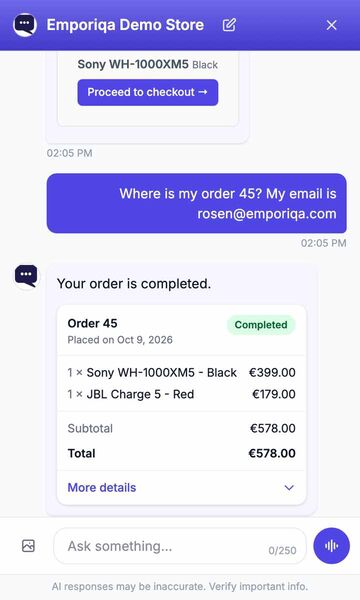
Recorded on our demo store. Only the wait for each answer is shortened.
Read the conversation
- Shopper: Do you have the Sony WH-1000XM5 in black?
- AI assistant: The Sony WH-1000XM5 is available in Black for €399.00. Its adaptive ANC uses dual processors and an eight-microphone array, helping reduce surrounding noise while keeping calls clear.
- The shopper adds it to the cart from the product card. The chat confirms: Added to cart, Sony WH-1000XM5 Black.
- Shopper: Where is my order 45? My email is [email protected]
- AI assistant: Your order is completed.
- An order card shows order 45: completed, 1 × Sony WH-1000XM5 - Black, €399.00, and 1 × JBL Charge 5 - Red, €179.00, total €578.00.
What the chat does for your customers
In your PrestaShop store, before and after they buy.
The right combination
"700x28 tubeless tyre, black, under €50" finds the exact combination, with its own price and its own stock. On a multistore install, each shop keeps its own stock and prices.
Fills your PrestaShop cart
Adds, changes and removes products in your real PrestaShop cart from the chat, then sends the shopper to your checkout. PrestaShop's own checks run first: the product must be orderable and visible to that customer's group, the combination in stock, and its minimum quantity reached. The chat quotes your catalog prices. A signed-in customer sees their own customer-group prices and group discounts (Emporiqa module 1.3.1 or later); your cart always applies them.
Where is my order?
The chat looks up the order in your PrestaShop store through the Emporiqa module and shows an order card with items, status and tracking. A guest gives the order number and email. Signed-in customers don't have to type their email (with the latest Emporiqa module). To turn this on, add the Order status rule in Emporiqa (Settings > Rules). The module gave Emporiqa its address when you connected, so there is nothing to paste.
Requests go to your team
Return, cancellation, change, quote and invoice requests are collected in the chat with the details filled in. It never refunds or cancels anything itself: the shopper is told the request was passed on. Already have a live chat? It can stay next to Emporiqa. Requests are emailed to your team, or sent to Zapier or Make. Add a ready-made rule in Settings > Rules. No extra charge.
Install in three steps
From your back office, with one click to connect. No credentials to paste.
-
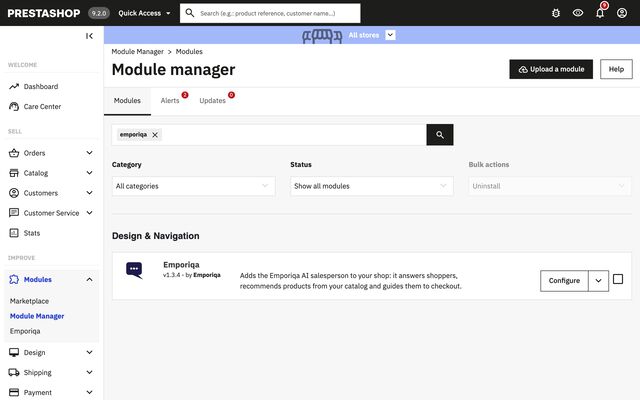
Step 1: Add the module from PrestaShop Addons -
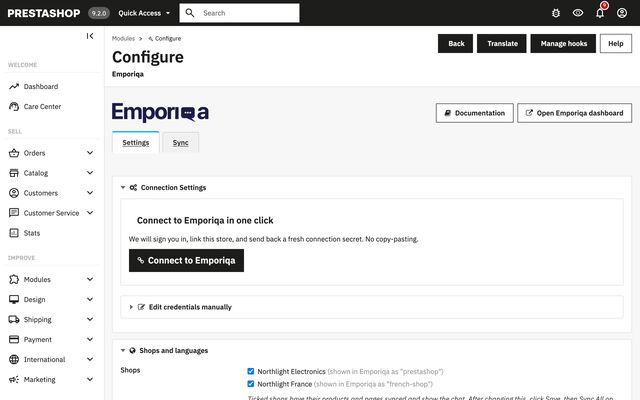
Step 2: Connect your store in one click -
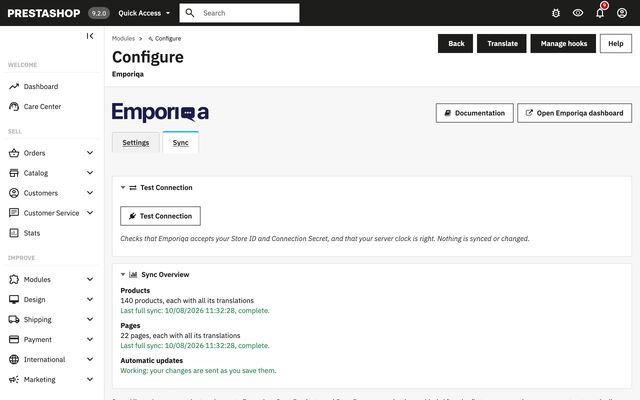
Step 3: Your catalog syncs
What syncs
Your PrestaShop store sends Emporiqa what the chat answers from, each time you save.
- Products and their combinations, each with its own price and stock in each shop
- Prices as a guest sees them, specific prices and promotions included; dated promotions are sent again when they start and end
- CMS pages, category paths, and manufacturers as brands
- Every language of your shop
- Multistore: each shop is its own channel, and you choose which shops sync and show the chat
- Products set to Visibility: Nowhere are left out
Ask your AI assistant: will Emporiqa work for your PrestaShop store?
Open one, paste the question, read the answer.
Would Emporiqa (emporiqa.com) work for my PrestaShop store, and how does it compare with other AI chat tools for PrestaShop?
Opens in a new tab. We do not send any of your data.
Questions about Emporiqa on PrestaShop
Is the module on PrestaShop Addons?
Yes, on the PrestaShop Addons Marketplace, and its source is on GitHub. Upload it under Modules > Module Manager.
Which versions does it support?
PrestaShop 8.1 with PHP 8.0 or later, and PrestaShop 9 with PHP 8.1 or later.
Will it slow my store down?
No. The chat script loads asynchronously, after your page, and the AI runs on our servers. The module sends product changes after the save has finished.
Can signed-in customers check an order without typing their email?
Yes, with the latest version of the module: a signed-in customer gives the order number, and the module checks the order is theirs. A guest gives the order number and the email on the order.
Does Emporiqa Work for My PrestaShop Store?
Pick your kind of store to see what shoppers ask in PrestaShop stores like it, and how the chat answers.
Add Emporiqa to your PrestaShop store
Pick whichever fits where you are today.