WhatsApp AI chatbot for your online store
Customers message your shop on WhatsApp. Your AI shop assistant answers them on your own WhatsApp Business number, from your catalog and your pages, through the WhatsApp Business API, with no separate WhatsApp provider. Your team takes over when a customer needs a person.
For WooCommerce, PrestaShop, Magento, Shopware, Drupal Commerce and Sylius stores. Keep using the WhatsApp Business app on your phone if you like.
How it works
-
You connect your number
In Settings > All channels, Connect WhatsApp opens Meta’s sign-in. You choose or create your business and your WhatsApp Business Account, then add your number or choose the WhatsApp Business app.
-
It answers
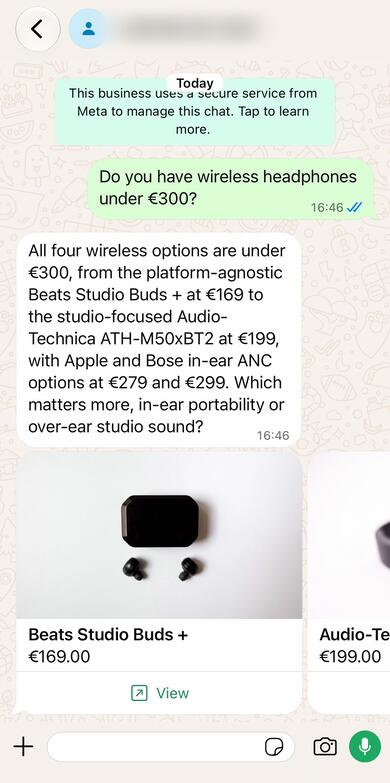
Your AI shop assistant answers from your products and your pages in the customer’s language, with product cards and reply buttons.
-
Your team takes over
When a customer needs a person, your team gets an alert, answers them in Conversations, and hands the chat back.
What your customers see on WhatsApp
- Several products come as a row of cards with the photo, the price and a View button that opens the product on your shop.
- Suggested replies come as buttons, or as a list when one is too long for a button.
- The customer sees their message read, and the chat typing while the answer is written.
- The first answer tells them they are chatting with an AI assistant and can ask for a person from your team.
- Where’s my order: order status and tracking links from your shop, as in the chat on your shop, with the Order status rule.
- When Let shoppers send photos is on in your chat settings, your AI shop assistant reads a photo they send.
- Files (PDF, Word, Excel) are kept for your team. For a voice message, the customer is asked to type.
- A customer who sends STOP gets one line confirming it, and nothing more until they write again.
Keep your WhatsApp Business app
If your number is on the WhatsApp Business app, choose the app when Meta’s sign-in asks, and keep it on your phone. Customers’ messages and the AI’s answers show there too.
- When you answer a customer from the app, your AI shop assistant stops answering that conversation.
- Messages you send from the app to customers who have written to this number are copied into Conversations, so your team sees them.
- Open the app on your phone at least every 14 days, or WhatsApp disconnects the number from Emporiqa.
- Groups, broadcast lists and calls stay in the app. Old chats are not imported.
The WhatsApp Business API, without a separate provider
Emporiqa answers through the WhatsApp Business Platform, on a WhatsApp Business Account that is yours. Meta’s sign-in creates or connects it; there is no separate WhatsApp provider to sign up with.
- The WhatsApp card in Settings > All channels shows what WhatsApp still needs: the number’s status and the review of your display name.
- The follow-up message your team’s late replies need is submitted to WhatsApp for you, and the card shows its approval in each language.
- You add a payment method for Meta’s fees in WhatsApp Manager. Emporiqa cannot see or change it.
- More than 24 hours after the customer’s last message, your team’s reply still reaches them: a short follow-up message goes first, and the reply when they answer it.
Your team answers in Conversations
WhatsApp conversations sit in Conversations with the chats from your shop. Press Take over to answer a customer yourself, and Hand back to the chat to let your AI shop assistant answer again. Your team also sees when each reply was delivered and read. Your team’s inbox and help desk
From the chat on your shop to WhatsApp
Add WhatsApp to the apps in Settings > Handoff, and when the chat on your shop hands a customer to your team, it shows a WhatsApp button: only while your team is away, or every time if you choose. The customer goes on in WhatsApp, and your AI shop assistant knows what they already asked on your shop. The button’s link works for one hour.
What it is, and what it is not
It is
- An AI shop assistant that answers customers who write to your WhatsApp number.
- The same assistant as the chat on your shop, from the same catalog and pages.
- A team inbox where a person takes over and hands back.
It is not
- A broadcast or campaign tool: it sends no marketing messages.
- Abandoned-cart messages or other messages your customers did not ask for.
- A flow builder: there are no menus or decision trees to draw.
- A shop inside WhatsApp: customers buy on your shop.
What it costs
- Included on every store: no add-on or separate plan.
- Emporiqa charges for the conversations its AI answers on WhatsApp. They are paid from your Emporiqa balance and count toward your monthly limit, as chats on your shop do.
- Meta bills your WhatsApp Business Account directly for the messages it charges for. Emporiqa never pays or resells Meta’s fees.
What WhatsApp does not allow
Meta’s WhatsApp Business Messaging Policy does not let a business sell some goods on WhatsApp, such as alcohol, tobacco, medical products and weapons, and Meta can restrict or close an account that does. Your AI shop assistant sends no broadcasts or marketing messages: it only answers customers who write to you.
The full list in the WhatsApp guide WhatsApp Business Messaging Policy
What it does not do
- No cart in WhatsApp: the View button opens the product on your shop, where the customer buys.
- It does not answer in groups and does not take calls.
- Your AI shop assistant does not read files or listen to voice messages.
- Old chats are not imported: it answers from the day you connect.
- One WhatsApp number per store.
WhatsApp chatbot for your platform
The plugin for your shop sends your products and pages to Emporiqa; WhatsApp needs no extra plugin.
Questions store owners ask
Do I need a new WhatsApp number?
No. You can connect the number you already use in the WhatsApp Business app and keep the app on your phone, or connect a number that is not on WhatsApp yet.
Do I need the WhatsApp Business API?
Yes, but no separate provider. Connect WhatsApp opens Meta’s sign-in, where you choose or create your business and your WhatsApp Business Account and add your number; Emporiqa then answers through it. The account is yours, and Meta bills it directly.
Can my team still answer from the phone?
Yes, if your number is on the WhatsApp Business app: a reply from the app shows in Conversations, and your AI shop assistant stops answering that conversation.
Can customers buy inside WhatsApp?
No. Each product comes as a card with a View button that opens it on your shop, where the customer adds it to the cart and pays.
Can customers check their order on WhatsApp?
Yes, with the Order status rule. Your AI shop assistant shows the order’s status and its tracking links, as in the chat on your shop, once the customer gives the order number and the details your rule asks for.
Does it send WhatsApp marketing or broadcasts?
No. Your AI shop assistant only answers customers who write to you. The one message it starts is the short follow-up that lets your team’s late reply reach the customer.
What happens after 24 hours?
WhatsApp lets a business reply within 24 hours of the customer’s last message. After that, your team’s reply still goes: Emporiqa first sends a short follow-up message from your number, and the reply when the customer answers it.
Which languages does it answer in?
The customer’s own: your AI shop assistant answers in the language the customer writes in, as the chat on your shop does.
What does it cost?
The same as a chat on your shop: Emporiqa charges for the conversations its AI answers. Meta bills WhatsApp’s own message fees to your WhatsApp Business Account. See pricing
What happens when I disconnect?
Your AI shop assistant stops answering on the number at once. The number stays in your WhatsApp Business Account, and on the app if you used it, and the conversations stay in Conversations until 90 days after their last message.
Does it answer on Telegram too?
Yes. Connect your own Telegram bot in the same place, and the same AI shop assistant answers there. Messenger and Instagram are coming soon. Messaging apps
Answer your customers on WhatsApp
Create a free account, add your store, and connect your WhatsApp number in Settings > All channels.
Your signup credit covers your first conversations.
- Free to start
- Pay per use, no seat fees
- No card required