Guide d'installation Shopware
Ajoutez un assistant de boutique IA à votre boutique Shopware avec synchronisation automatique des produits.
Vous êtes dans le guide d'installation développeur. Vous cherchez un aperçu de ce qu'Emporiqa offre à votre boutique Shopware ? Voir la page d'intégration.
Démarrage rapide
Pour les propriétaires de boutique. Installez, configurez, synchronisez. Avec captures d'écran à chaque étape.
DémarrerDocumentation développeur
Pour les développeurs. Architecture, payload webhook, hooks d'extension et commandes CLI.
LireDémarrage rapide
Installez le plugin, cliquez sur Se connecter à Emporiqa, envoyez votre catalogue. Le plugin s'appuie sur la file de messages de Shopware et ne bloque ni votre admin ni votre tunnel de commande. Le bouton Tester la connexion vérifie tout avant qu'aucune donnée produit ne quitte votre site.
Ce qu'il vous faut
- Accès administrateur à votre boutique Shopware 6 (6.6 ou 6.7)
- Un compte Emporiqa (créer un compte gratuit si vous n'en avez pas encore)
- Quelques minutes de travail pratique (la synchronisation s'exécute en arrière-plan)
D'abord, installez le plugin. Installez-le avec Composer depuis Packagist :
composer require emporiqa/shopware-plugin
bin/console plugin:refresh
bin/console plugin:install --activate EmporiqaIntegration
bin/console theme:compile
bin/console cache:clear
Vous préférez l'administration ? Téléchargez le zip de la dernière version sur GitHub, puis importez-le sous Extensions → Mes extensions → Importer une extension et cliquez sur Installer puis Activer.
Les étapes theme:compile et cache:clear ci-dessus compilent le thème et vident le cache après l'installation.
Dernière version : voir les versions sur GitHub ou le paquet sur Packagist.
Shopware auto-hébergé uniquement. C'est un plugin Shopware classique, pour Shopware 6 hébergé par vos soins ou sur Shopware PaaS. Il ne fonctionne pas sur Shopware Cloud (SaaS), qui accepte les apps, pas les plugins.
Cliquer sur Se connecter à Emporiqa
Allez à Paramètres → Emporiqa. Cliquez sur Se connecter à Emporiqa. Vous arrivez sur le tableau de bord Emporiqa, confirmez la boutique à connecter (ou créez-en une nouvelle), et revenez à un plugin connecté. Aucun Store ID ni Webhook Secret à copier entre les onglets.
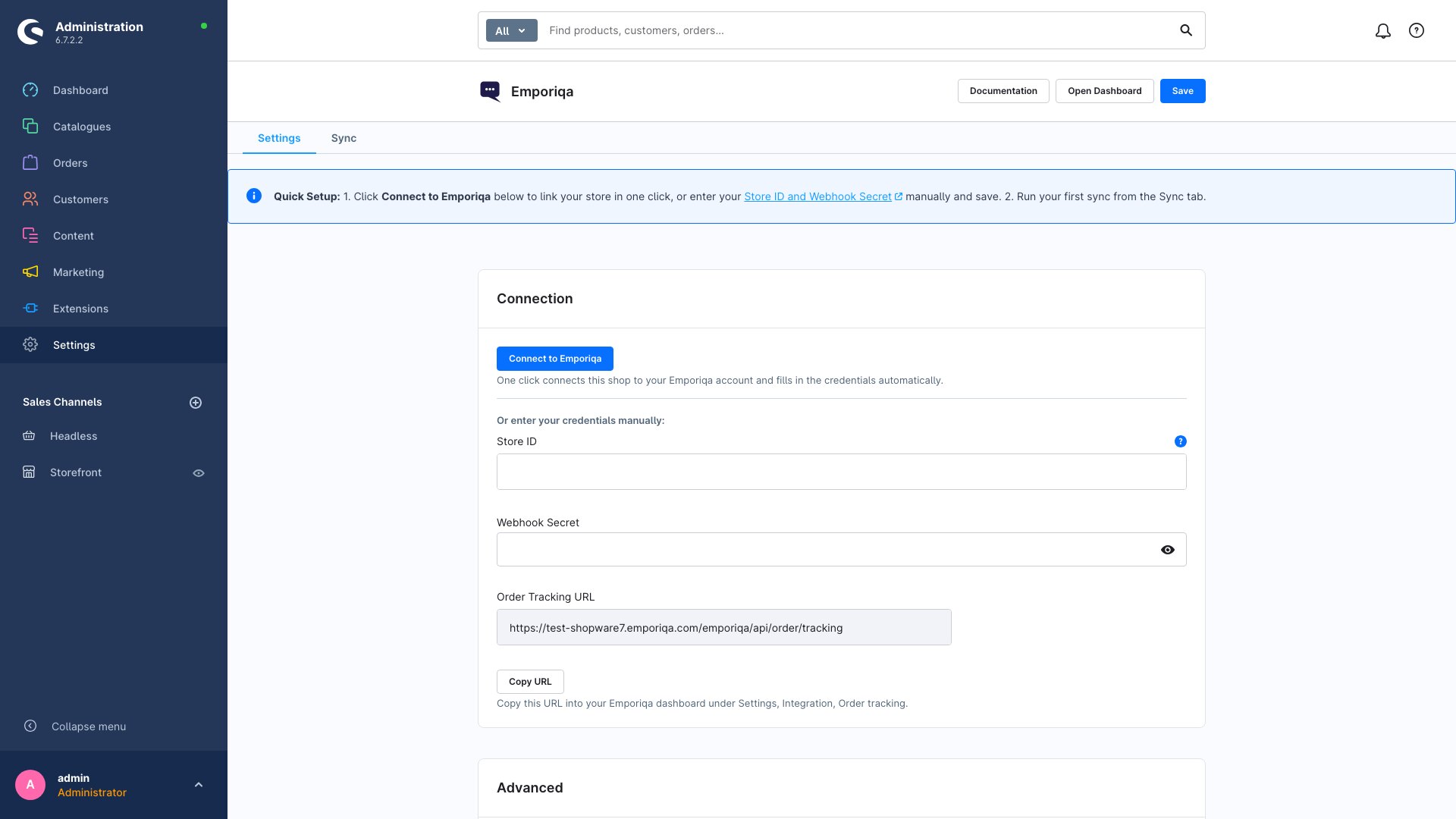
Plutôt en manuel ?
En HTTP, ou si vous préférez coller les identifiants vous-même, utilisez les champs Store ID et Webhook Secret de la carte de connexion. Récupérez-les dans votre tableau de bord Emporiqa sous Paramètres → Intégration de boutique, puis enregistrez. Le chemin manuel mène au même résultat que le clic unique.
Envoyer votre catalogue
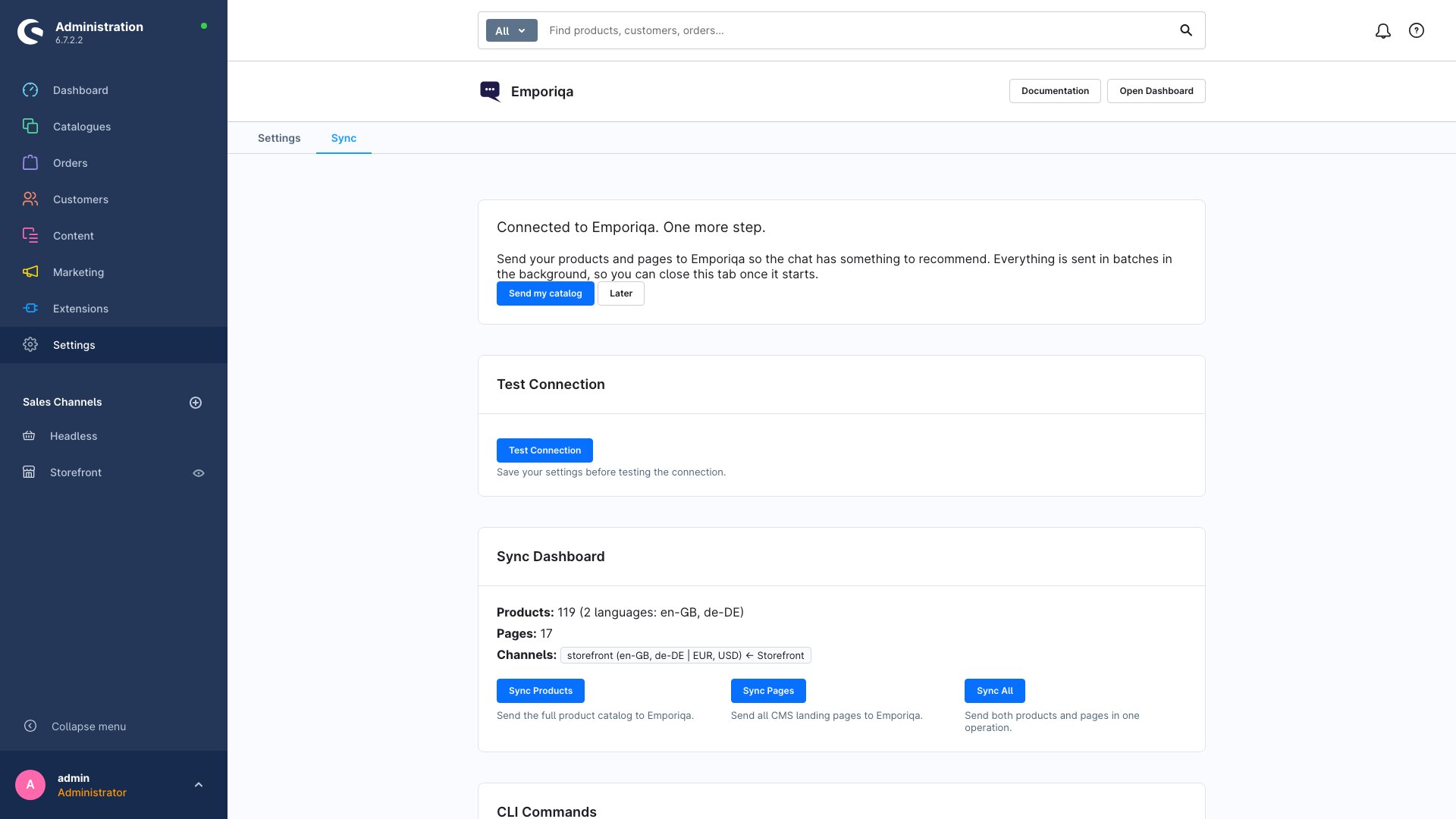
Après la connexion, l'onglet Sync affiche une carte de bienvenue avec Envoyer mon catalogue. Cliquez pour envoyer tous les produits et pages d'un coup. Les catalogues plus importants prennent quelques minutes, le panneau affiche la progression. Pour valider la connexion avant que des données ne quittent votre site, cliquez d'abord sur Tester la connexion dans l'onglet Sync.
Testez, puis mettez en ligne
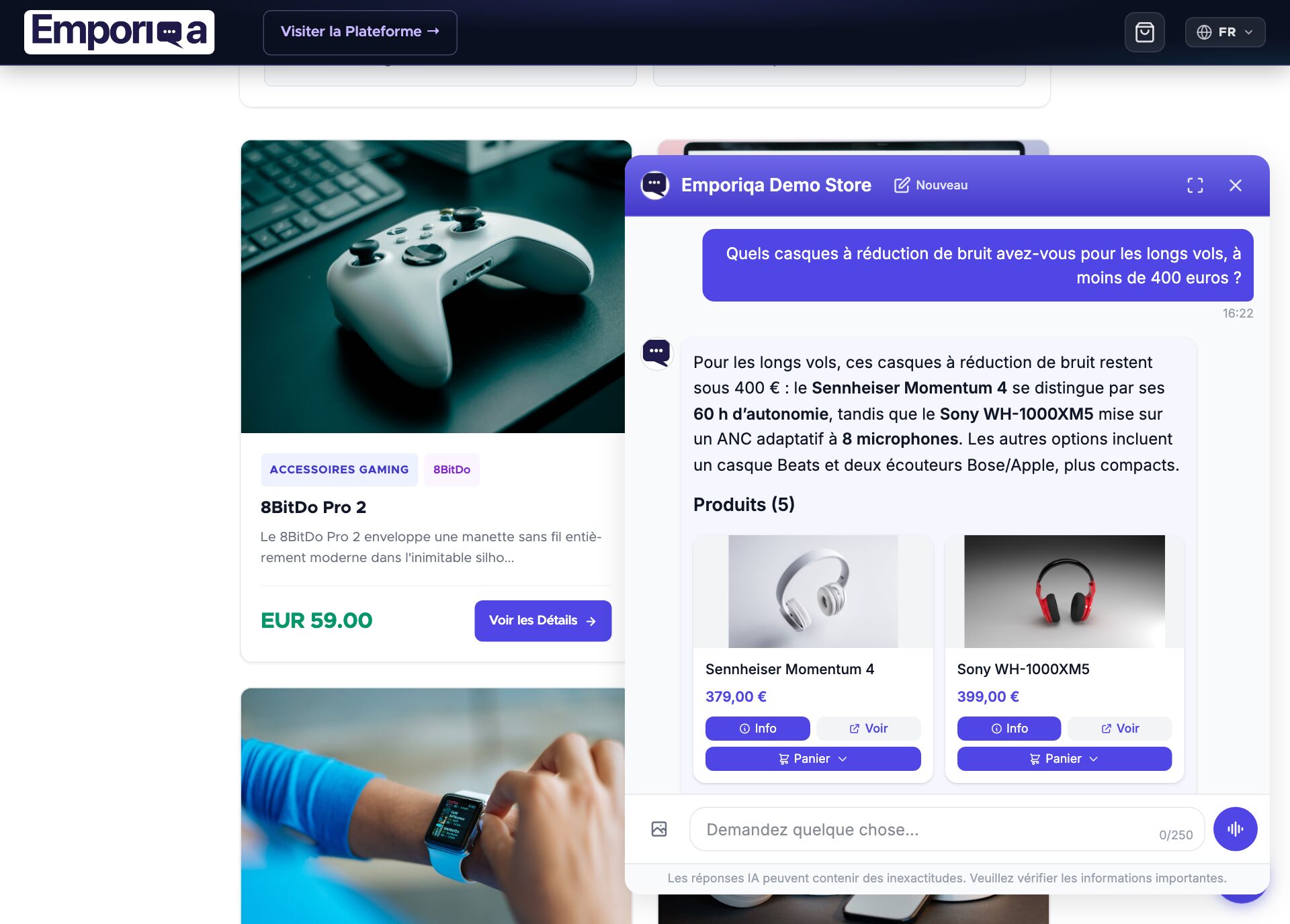
Dans votre tableau de bord Emporiqa, ouvrez « Test your chat » (le tableau de bord est en anglais) et posez une question sur un produit. Quand les réponses vous conviennent, cliquez sur « Go live ». La bulle de chat apparaît alors dans le coin inférieur droit de votre vitrine.
C'est en ligne
- Les nouveaux produits et pages CMS se synchronisent automatiquement lorsque vous les enregistrez
- Les clients peuvent poser des questions sur les produits, les politiques et leurs commandes (une fois la règle Order status ajoutée)
- Ajouter au panier dans le chat ; les clients procèdent au paiement de votre boutique
Ensuite, le propriétaire de la boutique peut connecter la boîte mail de votre boutique dans Settings → Customer emails, et Emporiqa peut rédiger vos réponses aux e-mails clients à partir du même catalogue et des mêmes pages et, sur Gmail, Google Workspace et Microsoft (Outlook.com et Microsoft 365), de vos données de commande. Guide des e-mails clients. Vous utilisez Claude ou ChatGPT ? Connectez-le pour lui demander comment se porte votre boutique.
Besoin d'adapter la synchronisation, de décorer un service ou de lancer la synchronisation en ligne de commande ?
Voir la documentation développeurDeveloper documentation
Architecture, configuration reference, webhook payload schema, service decoration, CLI commands, and extension events.
Architecture
Emporiqa uses your store catalog as its knowledge base: the plugin pushes products, variants, prices, stock and landing pages over webhooks as you save them, so there is no separate knowledge base you have to write or keep up to date. For anything your shop pages never covered, you can write a page yourself on the Pages screen in the Emporiqa dashboard: a title and the text in your own words, in up to 10 languages on the same page. You write each language yourself, and any of them can carry a link to the same page on your site. The chat answers from it like it answers from any page your shop sent, and a sync never overwrites it. Up to 25 pages per store. On the Products screen you can set up to 50 products to Promoted or Top: the chat shows them first when they match what the shopper asked, Top before Promoted, and never shows them for unrelated questions. A sync never clears it.
The plugin uses Shopware event subscribers (ProductSubscriber, LandingPageSubscriber, CategorySubscriber, OrderSubscriber) to react to write and delete events. Webhook events are dispatched through Shopware's message queue (Symfony Messenger), so the storefront response completes independently of the outbound HTTP delivery.
Storefront sales channels are auto-detected and mapped to Emporiqa channel keys (slugified from channel names). Headless and API channels are excluded. All translations and currencies for a single product or page consolidate into one webhook event in the format {channel: {language: value}}, matching every other Emporiqa integration.
Transient failures (HTTP 429) are re-queued with a 65-second delay, up to 5 retries. When Emporiqa cannot be reached or answers with a server error, a change is sent again after 1, 5 and 15 minutes and then hourly, six times in all (about 2 hours 20 minutes, from version 1.3.2); a newer save of the same product or page that reaches Emporiqa first is never overwritten by the older one. A change Emporiqa refuses (for example a wrong webhook secret) is not retried: it is logged and kept in Shopware's failed queue. Full syncs split the catalog into configurable batches (default 50, max 200) to keep memory usage bounded.
A message consumer must be running for webhook events to leave the queue: bin/console messenger:consume async.
Requirements
| Shopware 6 | >= 6.6.0, < 6.8.0 |
| Shopware Storefront | >= 6.6.0, < 6.8.0 |
| PHP | 8.2 or higher |
| Composer package | emporiqa/shopware-plugin |
| Emporiqa account | Free Emporiqa account (free to start, no card) |
Configuration reference
All settings live at Extensions → My extensions → Emporiqa → Configuration. Every setting can be overridden per sales channel.
Connection settings
| Setting | Description |
|---|---|
| storeId | Your Emporiqa store identifier (Settings → Integration → Integration overview). |
| webhookSecret | Shared secret used to sign webhook payloads with HMAC-SHA256. |
Sync settings
| Setting | Default | Description |
|---|---|---|
| syncProducts | true |
Enable automatic product sync on create / update / delete. |
| syncPages | true |
Enable CMS landing page sync. A home page without any text, only a product listing, is not sent (from version 1.3.2). |
Order tracking settings (older setup)
These apply only to the older order tracking endpoint. The Order status rule does not use them; see Order status.
| Setting | Default | Description |
|---|---|---|
| orderTrackingEnabled | true |
Enables the older order tracking endpoint that Emporiqa calls to look up an order. |
| orderRequireEmail | true |
When enabled, the older order tracking endpoint needs a matching customer email to look up an order. |
Advanced settings
Most stores don't need to change these.
| Setting | Default | Description |
|---|---|---|
| webhookUrl | https://emporiqa.com/webhooks/sync/ |
Base URL for the Emporiqa webhook endpoint. Only change for custom instances. |
| batchSize | 50 |
Items per webhook batch during full sync. Maximum 200. |
| taxDisplay | gross |
How prices are sent: gross (incl. tax), net (excl. tax), or both. |
| cartEnabled | true |
Enables the storefront cart endpoints used by the chat widget. |
Dashboard-managed settings
These are managed through the Emporiqa admin module UI, not the raw plugin configuration page.
| Setting | Description |
|---|---|
| Brand Attribute | Property group ID used as brand source. Defaults to the product manufacturer. |
| Order Completed States | JSON array of state technical names that trigger the order.completed webhook event. |
Features
Real-time webhooks
Products, landing pages, categories, and orders sync via subscribers on write and delete events. Outbound delivery runs through Symfony Messenger.
Sales channel detection
Storefront sales channels are auto-mapped to Emporiqa channel keys (slugified channel names). Headless and API channels are excluded.
Multi-language
All languages from your sales channel domains are included in a single consolidated payload per product or page.
Multi-currency & tax modes
Products include prices for every currency configured per sales channel. Choose gross, net, or both via the taxDisplay setting.
In-chat cart
JSON API under /emporiqa/api/cart for add, update, remove, clear, and checkout. Product links use SEO URLs.
Admin dashboard
Dedicated admin module: test connection, configure brand source and order states, preview payloads, and trigger syncs per channel. The Sync tab counts the products visible in a synced sales channel and the pages a sync actually sends.
Conversion tracking
Order placement and configurable completion events are sent to Emporiqa for revenue attribution to chat sessions.
Async delivery & retries
All product and order webhooks dispatch through the Shopware message queue. 429 responses re-queue with a 65-second delay, up to 5 retries. If Emporiqa is unreachable, a change is retried after 1, 5 and 15 minutes and then hourly for about 2 hours 20 minutes, so a short outage loses nothing.
Webhook payload
Each product (or variant) and page is sent as a single webhook event containing all sales channels, languages, and currencies. Parent products include their variants as separate entries.
Product event
{
  "identification_number": "product-UUID",
  "sku": "SW-001",
  "channels": ["storefront", "b2b"],
  "names": {
    "storefront": {"en": "Running Shoes", "de": "Laufschuhe"},
    "b2b": {"en": "Running Shoes"}
  },
  "descriptions": {
    "storefront": {"en": "Lightweight running shoes...", "de": "Leichte Laufschuhe..."}
  },
  "links": {
    "storefront": {"en": "https://shop.com/running-shoes", "de": "https://shop.de/laufschuhe"}
  },
  "categories": {
    "storefront": {"en": ["Sports > Footwear > Running"], "de": ["Sport > Schuhe > Laufen"]}
  },
  "brands": {"storefront": "Acme"},
  "prices": {
    "storefront": [
      {"currency": "EUR", "current_price": 89.99, "regular_price": 99.99},
      {"currency": "USD", "current_price": 94.99, "regular_price": 109.99}
    ]
  },
  "availability_statuses": {"storefront": "available"},
  "stock_quantities": {"storefront": 42},
  "images": {"storefront": ["https://shop.com/media/shoes.jpg"]},
  "attributes": {
    "storefront": {"en": {"Color": "Blue", "Size": "42"}, "de": {"Farbe": "Blau", "Größe": "42"}}
  },
  "parent_sku": null,
  "is_parent": true,
  "variation_attributes": {"storefront": {"en": ["Color", "Size"]}},
  "sync_session_id": "shopware-products-abc123"
}
Field structure
| Type | Pattern | Fields |
|---|---|---|
| Translatable | {channel: {lang: value}} |
names, descriptions, links, categories, attributes, variation_attributes |
| Shared | {channel: value} |
brands, prices, images, availability_statuses, stock_quantities |
| Flat | Direct value | identification_number, sku, channels, is_parent, parent_sku, sync_session_id |
When taxDisplay=both, each price entry also includes price_incl_tax and price_excl_tax. Identifiers use product-<uuid> for parents and variation-<uuid> for variants.
Customization & events
Every core service is registered behind an interface and can be replaced via Shopware's standard service decoration mechanism. Symfony events are dispatched at key points in the sync lifecycle for lighter-weight extensions.
Service interfaces
| Interface | Responsibility |
|---|---|
ConfigServiceInterface |
Read plugin configuration values per sales channel. |
WebhookClientInterface |
Send HMAC-signed HTTP requests to the Emporiqa webhook endpoint. |
ProductFormatterInterface |
Transform ProductEntity objects into the consolidated payload. |
CmsPageFormatterInterface |
Transform LandingPageEntity objects into the consolidated payload. |
ChannelResolverInterface |
Map Shopware sales channels to Emporiqa channel keys. |
SyncServiceInterface |
Orchestrate full product and page syncs and manage sync sessions. |
All interfaces live in the Emporiqa\ShopwarePlugin\Service namespace.
Example: decorate the product formatter
<!-- MyPlugin/src/Resources/config/services.xml -->
<service id="MyPlugin\Service\CustomProductFormatter"
         decorates="Emporiqa\ShopwarePlugin\Service\ProductFormatter">
    <argument type="service" id="MyPlugin\Service\CustomProductFormatter.inner"/>
</service><?php
declare(strict_types=1);
namespace MyPlugin\Service;
use Emporiqa\ShopwarePlugin\Service\ProductFormatterInterface;
use Shopware\Core\Content\Product\ProductEntity;
class CustomProductFormatter implements ProductFormatterInterface
{
public function __construct(
private readonly ProductFormatterInterface $inner,
) {}
public function formatProduct(
ProductEntity $product,
array $channelContexts,
?string $syncSessionId = null,
): array {
$items = $this->inner->formatProduct($product, $channelContexts, $syncSessionId);
foreach ($items as &$item) {
$item['custom_field'] = 'custom_value';
}
return $items;
}
public function formatProductDelete(string $productId): array
{
return $this->inner->formatProductDelete($productId);
}
}Extension events
The plugin dispatches Symfony events at key points in the sync and formatting lifecycle. Listen to these in your own plugin to filter, enrich, or log data without decorating a full service.
| Event | When | Mutable via |
|---|---|---|
PreSyncEvent |
Before a full sync starts | setChannelContexts() |
PostSyncEvent |
After a full sync completes | Read-only result data |
PostProductFormatEvent |
After a product is formatted | setFormattedItems() |
PostPageFormatEvent |
After a CMS page is formatted | setFormattedData() |
PostOrderFormatEvent |
After an order payload is built | setEventData() |
OrderStatusResponseEvent |
Before the Order status rule's answer is returned | setData() |
CustomerInfoResponseEvent |
Before the customer info action's answer is returned (version 1.3.2 or newer) | setData() |
All event classes live in the Emporiqa\ShopwarePlugin\Event namespace.
CLI commands
All sync operations available in the admin dashboard can also be run from the Shopware CLI. Each sync command supports a --dry-run flag that simulates the sync without sending any webhook requests.
| Command | Description |
|---|---|
| emporiqa:sync:products | Synchronize the full product catalog. |
| emporiqa:sync:pages | Synchronize all CMS landing pages. |
| emporiqa:sync:all | Run both product and page syncs in a single command. |
| emporiqa:test-connection | Verify the plugin can reach the Emporiqa webhook endpoint. |
bin/console emporiqa:sync:products
bin/console emporiqa:sync:products --dry-run

bin/console emporiqa:sync:pages
bin/console emporiqa:sync:all

bin/console emporiqa:test-connection
Administration API equivalents
| Endpoint | Method | Description |
|---|---|---|
| /api/_action/emporiqa/sync | POST | Trigger a full sync. Body: {"entity": "products"}, {"entity": "pages"}, or omit for all. |
| /api/_action/emporiqa/test-connection | POST | Test the webhook connection. |
| /api/_action/emporiqa/sync-overview | POST | Return product/page counts, languages, channels, and configuration status. |
| /api/_action/emporiqa/data-preview | POST | Return a sample formatted product and page payload. |
| /api/_action/emporiqa/sales-channels | POST | Return all active sales channels with domain details. |
| /api/_action/emporiqa/property-groups | POST | Return all property groups for brand source selection. |
| /api/_action/emporiqa/order-states | POST | Return all order and transaction state machine states. |
| /api/_action/emporiqa/save-settings | POST | Save dashboard-managed settings (channel mapping, brand attribute, order states). |
Order status
The ready-made Order status rule answers "Where is my order?" in the chat. Emporiqa asks your shop through the plugin's signed order_status endpoint and tells the shopper the status, the order date and, when there is one, the tracking link. It needs plugin version 1.3.0 or newer.
What the shopper sees, what your team gets and how to write your own rules: Rules guide.
Set it up
- In the Shopware Administration, open Settings → Emporiqa, Settings tab. Once connected, it shows a Ready-made rules card with the Order status address and a Copy button. If the card is not there yet, click Test connection.
- Click Open in Emporiqa next to Order status. Your Emporiqa dashboard opens at Settings → Rules with Order status highlighted. Click Add.
- Click Try it and ask about one of your recent orders. When it answers correctly, click Go live.
If you connected with Connect to Emporiqa, there is nothing to copy: Emporiqa fills in your shop's address itself and checks it with your shop. If it ever asks for the address, paste the Order status address the plugin shows, which looks like this:
https://your-store.com/emporiqa/
What the shopper gives
- Signed in to your shop: only the order number. The plugin answers only for that customer's own orders.
- Guest: the order number and the email used for the order.
Endpoint
POST /emporiqa/actions/order-status
Requests are signed with keys derived from your connection secret (X-Emporiqa-Action-Signature) and rejected after 5 minutes, and the plugin signs its answer back (X-Emporiqa-Response-Signature). An unknown order and a wrong email get the same answer, so the chat never reveals whether an order exists. To adjust the answer, use the OrderStatusResponseEvent.
Order status is optional. Without it, and without the older setup below, order questions go to the Customer Support agent instead.
Older setup: order tracking URL
Stores set up before the Order status rule pasted the plugin's Order Tracking URL into their Emporiqa dashboard (Settings → Integration → For your developer → Order tracking API URL). That keeps working as before, controlled by orderTrackingEnabled and orderRequireEmail (see Configuration reference). Where ready-made rules are offered, the plugin shows it under Advanced as Old order tracking (deprecated). Once Order status is live, clear the URL in your Emporiqa dashboard first, then switch the old order tracking off. The old endpoint:
POST /emporiqa/api/order/tracking
Requests are authenticated using the same webhookSecret via the X-Emporiqa-Signature header. Requests with a timestamp older than 5 minutes are rejected (HTTP 401). When orderRequireEmail is enabled, the request must include a matching customer email or it returns HTTP 403.
Signed-in customers
When a shopper is signed in to your store, the chat shows them their own prices and uses their account when it hands the conversation to your team. There is nothing to set up: it starts once the plugin is on the versions below. Guests see your public prices, as before.
- Their own prices, version 1.3.0 or newer: the prices Shopware calculates for that customer, advanced (tier) prices included. The chat asks your store through the signed
customer_pricesaction when it shows a product, and shows the answer to that customer only, on the cards, in quotes and in the product details. Coupons and cart rules apply at your checkout, as before, and a search with a price limit ("under 200") is applied to what the customer pays. - Their name and email, version 1.3.2 or newer (the Customer info action): the chat greets them by first name, and a handoff reaches your team with the name and email on their account, so they are not asked for them.
Both answer only for the customer the plugin signed in for this store, and only on that customer's own messages: a shopper who signs out is a guest from their next message. Per customer, prices are kept for 5 minutes and the account details for 30. Each customer is limited to 30 requests and each store to 600 every 10 minutes.
Customer info action
From version 1.3.2 the plugin answers a signed customer_info request about a shopper who is signed in to your shop: the name and email of their customer account and their 10 newest orders in the sales channels you sync (order number, date, status, total and currency). Only the account's own orders are listed, never a guest order placed with the same email, an address, a phone number, a customer group or an internal id. With it, a signed-in shopper who asks "where is my order?" without a number gets their newest order, as long as the Order status rule is on; there is nothing to set up.
POST /emporiqa/actions/customer-info
Requests are signed like Order status and limited to 30 per customer and 600 per store every 10 minutes. To remove a field or add your own under extra, listen to CustomerInfoResponseEvent, which runs after the answer is built; getCustomer() and getOrders() give the loaded entities.
public function onCustomerInfo(CustomerInfoResponseEvent $event): void
{
    $data = $event->getData();
    unset($data['customer']['email']);
    $data['extra'] = ['loyalty_tier' => 'Gold'];
    $event->setData($data);
}
Troubleshooting
Products are not syncing automatically
- Verify that
syncProductsis enabled in the plugin configuration. - Make sure the message consumer is running:
bin/console messenger:consume async. - Check the failed message queue:
bin/console messenger:failed:show. From version 1.3.2 only changes Emporiqa refused end up there (an outage is retried for about 2 hours 20 minutes first); after fixing the cause,bin/console messenger:failed:retrysends them again.
Widget does not appear on the storefront
- Did you press Go live? New stores start with the chat off until the owner presses Go live in the dashboard.
- Confirm that Store ID and Webhook Secret are set in the plugin configuration.
- Rebuild the storefront theme:
bin/console theme:compilefollowed bybin/console cache:clear. - Check the browser console for JavaScript errors.
Test connection fails
- Check that the
webhookUrlis reachable from your server. - Verify that Store ID and Webhook Secret match the values in your Emporiqa dashboard.
- Run the CLI test command for verbose output:
bin/console emporiqa:test-connection -vvv.
Cart API returns "Cart API is disabled"
- The
cartEnabledsetting is set tofalse. Enable it in Extensions → My extensions → Emporiqa → Configuration.
Old order tracking returns 401 or 403
- 401: The
X-Emporiqa-Signatureheader is missing or invalid, or the request timestamp is older than 5 minutes. - 403:
orderRequireEmailis enabled and the request does not include a matchingverification_fields.email.
Sync times out on large catalogs
- Reduce
batchSizein the plugin configuration to lower memory per batch. - Prefer the CLI command for large catalogs:
bin/console emporiqa:sync:products. - Clear caches after configuration changes:
bin/console cache:clear.
Related articles
Webhook setup guide
HMAC signing, payload schema, and order tracking request/response details.
Widget embedding
Customize the chat widget appearance, language, channel, and currency.
Multilingual chat support
Cross-language search, answers in the shopper's language, how translations sync.
Conversion tracking
Prove chat ROI: session to cart to purchase attribution.
Answer accuracy: the chat answers from your synced catalog and store pages. It does not invent products, prices, or discount codes; when it is unsure, it says so and offers to bring in your team. You can check this yourself on the live demo store: demo.emporiqa.com.
Reviewed before listing: the WooCommerce, PrestaShop, Magento and Drupal plugins pass the platform's own review process before they are published on WordPress.org, PrestaShop Addons, Adobe Commerce Marketplace, and drupal.org. Your developer can read the source before installing: WooCommerce on WordPress.org, Drupal on drupal.org, and PrestaShop, Shopware and Sylius on GitHub (Shopware and Sylius also on Packagist). The Magento module is distributed through the Adobe Commerce Marketplace.
Who makes Emporiqa: Emporiqa is built by Rosel Group LTD, an EU company based in Sofia, Bulgaria, founded by Rosen Hristov, who has built e-commerce software for more than 15 years. It is GDPR-compliant and never uses your data to train AI models. Emporiqa runs on self-hosted platforms (WooCommerce, Magento and Adobe Commerce, PrestaShop, Drupal Commerce, Shopware 6, Sylius); it does not run on Shopify.