Guide d'installation Magento
Ajoutez un assistant de boutique IA à votre boutique Magento avec synchronisation automatique des produits.
Vous êtes dans le guide d'installation développeur. Vous cherchez un aperçu de ce qu'Emporiqa offre à votre boutique Magento ? Voir la page d'intégration.
Démarrage rapide
Pour les propriétaires de boutique. Installez, cliquez sur Connecter, envoyez votre catalogue. Avec captures d'écran à chaque étape.
DémarrerDocumentation développeur
Pour les développeurs. Architecture, payload webhook, modèles de personnalisation et commandes CLI.
LireDémarrage rapide
Installez le module, cliquez sur Se connecter à Emporiqa, envoyez votre catalogue. Le module ne touche ni à votre thème ni à votre tunnel de commande. Vous pouvez désactiver le module depuis le même écran si cela ne vous convient pas. Dès que vous cliquez sur « Go live » dans votre tableau de bord Emporiqa, le widget s'affiche sur chaque vue de magasin activée.
Ce qu'il vous faut
- Accès administrateur à votre boutique Magento 2 (Open Source 2.4.4+ ou Adobe Commerce)
-
Accès Composer et accès SSH (ou terminal) pour exécuter
bin/magento - Un compte Emporiqa, ou créez-en un pendant l'étape 1 (démarrage gratuit, sans carte requise)
D'abord, installez le module. Le module Emporiqa est disponible sur l'Adobe Commerce Marketplace. Installez-le avec Composer, avec vos clés d'accès Marketplace configurées dans auth.json :
composer require emporiqa/module-chat-assistant
bin/magento module:enable Emporiqa_ChatAssistant
bin/magento setup:upgrade
bin/magento cache:flush
Magento enregistre le module, applique les patchs de schéma et vide le cache. Les modifications et les synchronisations complètes passent par la file de messages en base de données de Magento (consommateurs emporiqa.sync.live.consumer, emporiqa.sync.full.consumer, emporiqa.webhook.consumer et emporiqa.stock.sync.consumer). En production, le cron les lance automatiquement ; en développement local, lancez-en un à la main avec bin/magento queue:consumers:start emporiqa.sync.live.consumer.
Connectez
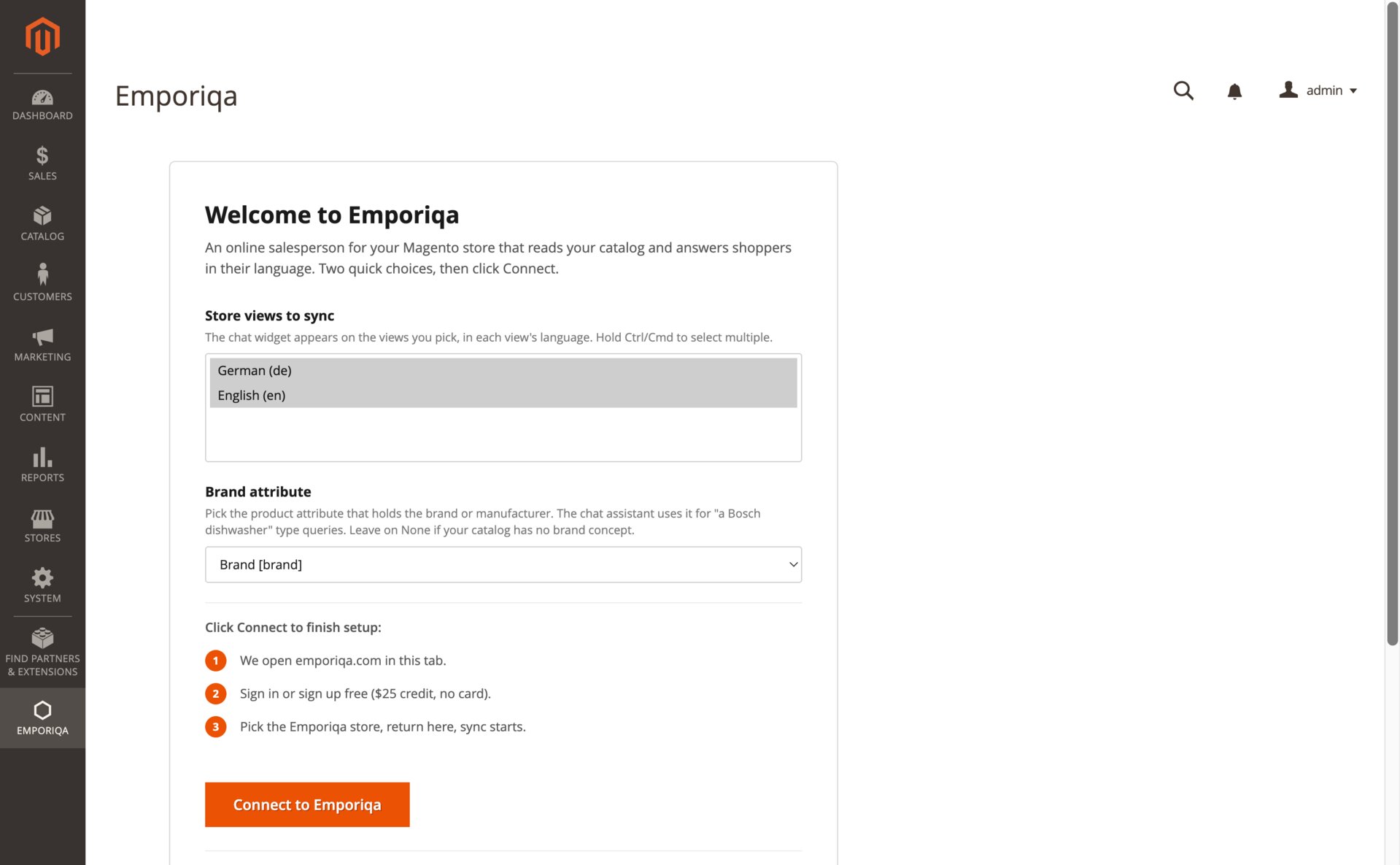
Ouvrez Emporiqa → Tableau de bord de synchronisation dans la barre latérale de l'admin. La carte Bienvenue dans Emporiqa vous demande deux choses : quelles vues de magasin synchroniser (le widget de chat apparaît sur ces vues, dans la langue de chaque vue) et quel attribut produit contient la marque (utilisé pour les requêtes type « un lave-vaisselle Bosch » ; laissez sur Aucun si votre catalogue n'a pas de notion de marque). Cliquez ensuite sur Connecter à Emporiqa. Vous serez redirigé vers emporiqa.com pour vous connecter (ou créer un compte gratuit), invité à choisir la boutique Emporiqa à lier, puis renvoyé dans Magento avec votre ID de boutique et votre Secret de connexion déjà enregistrés.
Vous avez déjà vos identifiants ?
Ouvrez Magasins → Configuration → Emporiqa → Assistant de chat et dépliez la section Identifiants manuels (avancé). Collez votre ID de boutique et votre Secret de connexion depuis votre tableau de bord Emporiqa, enregistrez, c'est tout. Utile lorsque la connexion en un clic ne peut pas aboutir (proxy d'entreprise, pas de HTTPS sortant vers emporiqa.com depuis l'admin, ou restauration d'une sauvegarde).
Envoyez votre catalogue
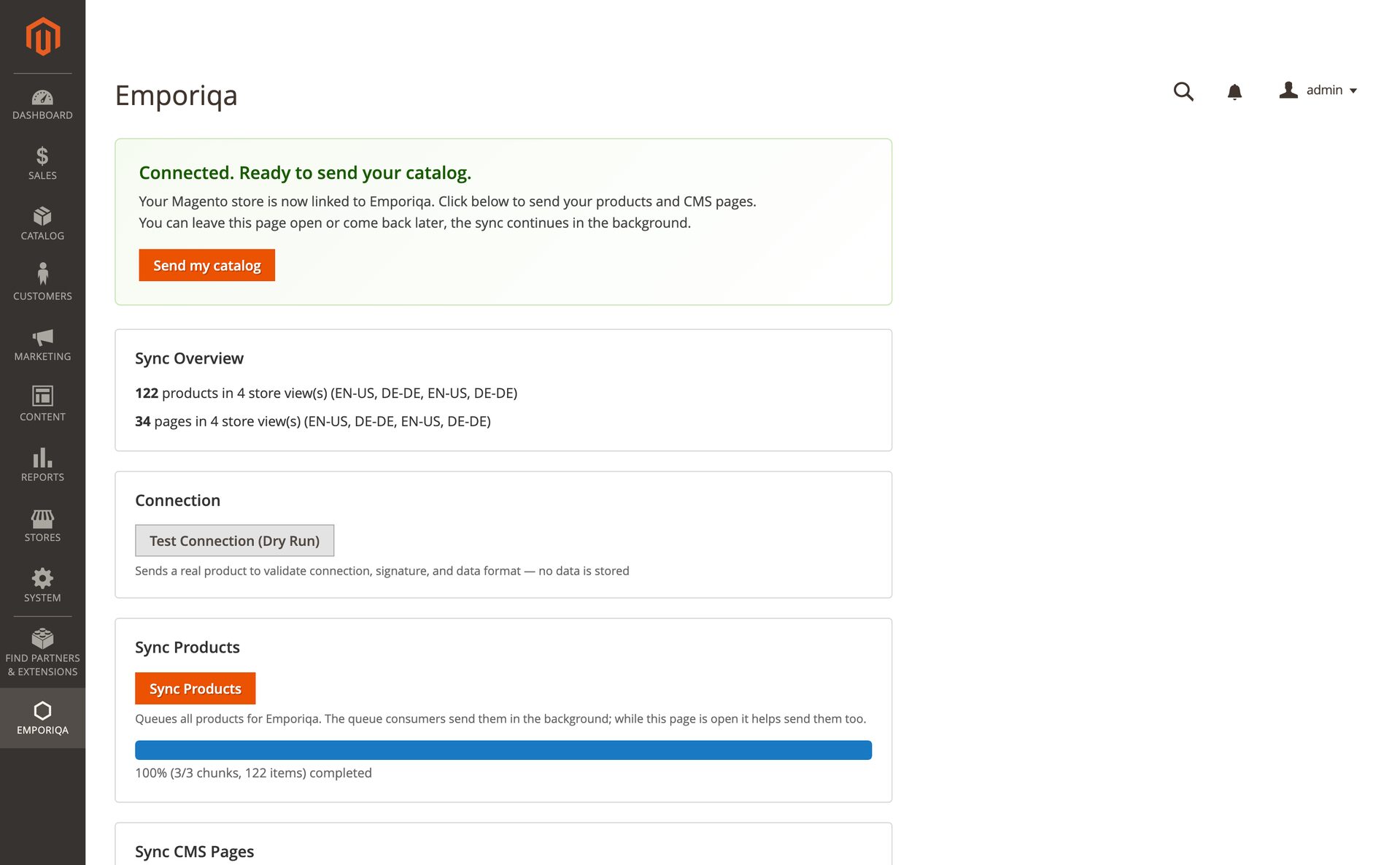
De retour sur Emporiqa → Tableau de bord de synchronisation, la carte d'accueil bascule en Connecté. Prêt à envoyer votre catalogue. Cliquez sur Envoyer mon catalogue ; les produits et les pages CMS sont publiés dans la MessageQueue de Magento et envoyés à Emporiqa en arrière-plan. Les catalogues volumineux prennent quelques minutes ; le tableau de bord affiche la progression en direct. Pour les très gros catalogues, exécutez bin/magento emporiqa:sync:all en CLI.
Testez, puis mettez en ligne
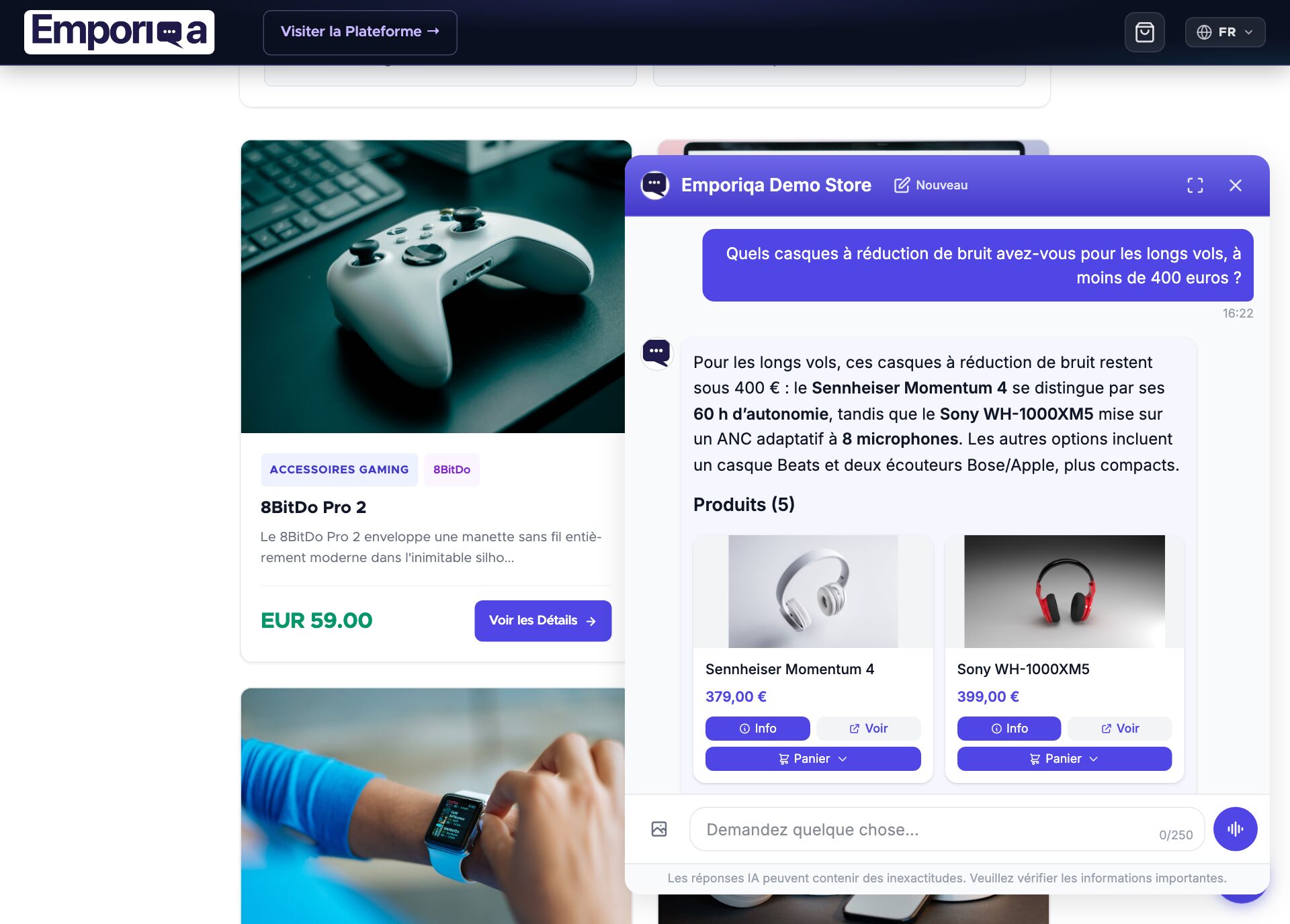
Dans votre tableau de bord Emporiqa, ouvrez « Test your chat » (le tableau de bord est en anglais) et posez une question sur un produit. Quand les réponses vous conviennent, cliquez sur « Go live ». La bulle de chat apparaît alors dans le coin inférieur droit de votre vitrine.
C'est en ligne
- La connexion est signée et renouvelable depuis le module. Aucun identifiant stocké en clair.
- Les nouveaux produits et pages CMS se synchronisent automatiquement lorsque vous les enregistrez
- Les acheteurs peuvent poser des questions sur les produits, les politiques et leurs commandes (une fois la règle Order status ajoutée)
- Ajout au panier dans le chat ; les acheteurs poursuivent jusqu'au paiement de votre boutique Magento
Ensuite, le propriétaire de la boutique peut connecter la boîte mail de votre boutique dans Settings → Customer emails, et Emporiqa peut rédiger vos réponses aux e-mails clients à partir du même catalogue et des mêmes pages et, sur Gmail, Google Workspace et Microsoft (Outlook.com et Microsoft 365), de vos données de commande. Guide des e-mails clients. Vous utilisez Claude ou ChatGPT ? Connectez-le pour lui demander comment se porte votre boutique.
Besoin d'adapter la synchronisation, d'ajouter des champs personnalisés ou de brancher un module tiers ?
Voir la documentation développeurDeveloper Documentation
Architecture, configuration reference, webhook payload schema, customization patterns, and CLI commands.
Architecture
Emporiqa uses your store catalog as its knowledge base: the module pushes products, variations, prices, stock and CMS pages over webhooks as you save them, so there is no separate knowledge base you have to write or keep up to date. For anything your shop pages never covered, you can write a page yourself on the Pages screen in the Emporiqa dashboard: a title and the text in your own words, in up to 10 languages on the same page. You write each language yourself, and any of them can carry a link to the same page on your site. The chat answers from it like it answers from any page your shop sent, and a sync never overwrites it. Up to 25 pages per store. On the Products screen you can set up to 50 products to Promoted or Top: the chat shows them first when they match what the shopper asked, Top before Promoted, and never shows them for unrelated questions. A sync never clears it.
The module observes Magento events (catalog_product_save_after, catalog_product_delete_before, cms_page_save_after, cms_page_delete_before, checkout_submit_all_after, and inventory events) and sends changes to Emporiqa through Magento's DB message queue. A product or page save queues only its ID on emporiqa.sync.live; the consumer loads, formats and sends it, so the save doesn't wait for formatting or delivery, and a retried message always sends current data. Deletions, stock-only updates and order events go through emporiqa.webhook.consumer. A full sync queues the catalog's IDs in chunks on emporiqa.sync.full (see Sync Sessions).
Nothing is dropped when Emporiqa is briefly unavailable. On HTTP 429 (or 503 with Retry-After) the consumer waits as long as it is asked, server and network errors are retried with growing back-off, and only permanent failures (bad credentials, an unknown store, an event rejected as invalid) are given up on and shown on the Sync Dashboard.
All translations and channels for a single product or page consolidate into one webhook event. Configurable products cascade up: editing a child variation triggers a parent re-sync so search always sees the full catalog state. Stock changes (orders, cancellations, credit memos, shipments) flow through a separate emporiqa.stock.sync.consumer queue.
Channels are derived automatically from the Magento website code, and salable quantity uses Multi-Source Inventory when available with automatic fallback to legacy stock.
Requirements
| Magento | Open Source 2.4.4+ or Adobe Commerce 2.4.4+ |
| PHP | 8.1 or higher |
| Message queue | DB connection (default in Magento) with cron or running consumers. The Emporiqa topics must stay on db even if other topics use RabbitMQ. |
| Emporiqa account | Free Emporiqa account (free to start, no card) |
Configuration Reference
All settings live at Stores → Configuration → Emporiqa → Chat Assistant. The Sync Dashboard at Emporiqa → Sync Dashboard is for triggering full syncs and testing connection.
General Settings
| Setting | Description |
|---|---|
| Store ID | Your unique Emporiqa store identifier. Saved automatically by the one-click Connect button; pastable manually from the Emporiqa dashboard if needed. The module is active whenever Store ID and Connection Secret are both set. |
| Connection Secret | HMAC-SHA256 signing key for outbound webhooks and inbound Order status requests. Stored encrypted. |
| Enabled Store Views | Store views to sync and display the widget on. Each store view's locale maps to a language code (for example en_US → en-us). |
| Brand Attribute | Important. Pick the product attribute that holds the brand or manufacturer for your catalog. The chat assistant uses it for queries like "a Bosch dishwasher with steam". Leave empty only if your catalog has no brand concept. |
Advanced
Most stores don't need to change these.
| Setting | Default | Description |
|---|---|---|
| Sync Products | Yes | Leave on unless you want to stop propagating product changes. |
| Sync CMS Pages | Yes | Leave on unless you want to stop propagating CMS page changes. |
| Catch Changes from Imports | No | Turn on if products change through native import, ERP or PIM connectors, or direct database writes, which skip Magento's save events. Every 5 minutes it also sends products whose updated_at changed. |
| Batch Size | 50 | Events per webhook request (max 500). |
Always-on capabilities
- Order status: the signed endpoint behind the ready-made Order status rule. Add the rule in Emporiqa under Settings → Rules (or click Open in Emporiqa under Ready-made rules); see Order status. The older order tracking endpoint was removed in version 1.4.1.
- Cart operations: customers can add, update, and remove items from inside the chat via the
/rest/V1/emporiqa/cart/*REST endpoints. When the customer is ready to check out, the widget redirects them to your Magento checkout page. - Conversion tracking:
checkout_submit_all_afterandsales_order_place_afterobservers link chat sessions to placed orders for revenue attribution. - Multi-channel: channel auto-derived from Magento website code.
Features
Real-time Webhooks
Products (simple, configurable, and variations) and CMS pages sync via observers on Magento save and delete events. Order completion fires conversion tracking.
Chat Widget
Embedded automatically on all enabled store views, on Luma-based themes and on Hyvä (no compatibility module needed). Reads a signed user token from Magento's customer-data section, refreshed on login/logout. No inline JavaScript, so it works under a strict Content Security Policy.
Multilingual
Per-store-view language mapping (Magento locale → ISO code) consolidated into one webhook event per product with translations nested by channel and language.
Configurable Products
Parents synced with is_parent: true and variation attributes; children reference the parent SKU. Editing a child triggers parent re-sync.
Cart Operations
REST endpoints under /rest/V1/emporiqa/cart/* for add, update, remove, and clear items from inside the chat. When the customer is ready to check out, the widget redirects them to your Magento checkout page. Same-origin session cookies, no API tokens needed.
Admin Sync UI
Emporiqa → Sync Dashboard with Sync Products, Sync Pages, Cancel and Test Connection actions. Progress survives a reload, and while the page is open it sends queued chunks itself.
MSI Support
Salable quantity via Multi-Source Inventory with automatic fallback to legacy stock. Source-item save plugin keeps stock in sync with all warehouses. Bundle and grouped products, which hold no quantity of their own, are sent as available whenever the storefront sells them (from version 1.4.2), and a child's stock change re-sends them.
Async Queue
DB-backed message queue (emporiqa.sync.live.consumer, emporiqa.sync.full.consumer, emporiqa.webhook.consumer, emporiqa.stock.sync.consumer) keeps formatting and delivery off the request path, with retries that follow Emporiqa's back-off. If a consumer dies mid-message (killed, out of memory, a deploy), the 5-minute watchdog cron queues a fresh copy of a stuck product or stock change after 30 minutes (from version 1.4.2), instead of waiting for Magento's 24-hour retry.
Webhook Payload
Each product or CMS page is sent as a single webhook event containing all languages and channels. Translatable fields are nested by channel and language code.
Product Event
{
  "type": "product.updated",
  "data": {
    "identification_number": "product-123",
    "sku": "PROD-123",
    "channels": ["base"],
    "names":        {"base": {"en-us": "Summer Jacket", "de-de": "Sommerjacke"}},
    "descriptions": {"base": {"en-us": "Lightweight jacket...", "de-de": "Leichte Jacke..."}},
    "links":        {"base": {"en-us": "https://store.com/summer-jacket", "de-de": "https://store.com/de/sommerjacke"}},
    "attributes":   {"base": {"en-us": {"Material": "Cotton"}, "de-de": {"Material": "Baumwolle"}}},
    "categories":   {"base": {"en-us": ["Jackets", "Summer"], "de-de": ["Jacken", "Sommer"]}},
    "brands":       {"base": "TrailPeak"},
    "prices":       {"base": [{"currency": "EUR", "current_price": 79.99, "regular_price": 99.99}]},
    "availability_statuses": {"base": "available"},
    "stock_quantities":      {"base": 42},
    "min_order_quantities":  {"base": 1},
    "max_order_quantities":  {"base": null},
    "available_for_order": true,
    "condition": null,
    "is_virtual": false,
    "images":       {"base": ["https://store.com/media/catalog/product/jacket.jpg"]},
    "is_parent": false,
    "parent_sku": null,
    "variation_attributes": {}
  }
}
For configurable products, the parent is synced with is_parent: true and variation_attributes: {"base": {"en-us": ["Color", "Size"], "de-de": ["Farbe", "Größe"]}}. Each child variation is synced with parent_sku referencing the parent's SKU.
CMS Page Event
{
  "type": "page.updated",
  "data": {
    "identification_number": "page-45",
    "channels": ["base"],
    "titles":   {"base": {"en-us": "Shipping Policy"}},
    "contents": {"base": {"en-us": "Free shipping on orders over..."}},
    "links":    {"base": {"en-us": "https://store.com/shipping-policy"}}
  }
}
Magento CMS pages don't have per-store-view attributes. Translations are handled by creating separate page entities assigned to different store views. Each page is exported only for the store views it belongs to.
Field Structure
| Type | Pattern | Fields |
|---|---|---|
| Translatable | {channel: {lang: value}} |
names, descriptions, links, attributes, categories, variation_attributes, titles, contents |
| Shared | {channel: value} |
brands, prices, availability_statuses, stock_quantities, min_order_quantities, max_order_quantities, images |
| Flat | Direct value | identification_number, sku, channels, is_parent, parent_sku, available_for_order, condition, is_virtual |
Customization
The module follows standard Magento 2 extensibility patterns. To customize sync behavior, the formatted payload, or the Order status answer, use plugins, preferences, or observers in your own module.
| Pattern | Use case |
|---|---|
Plugin (around/after) on Emporiqa\ChatAssistant\Model\ProductFormatter |
Modify or extend the product payload before it's sent (add custom attributes, hide or override prices, skip products). format() returns a list of events: a configurable product's list also holds its variation-{id} events. |
Plugin on Emporiqa\ChatAssistant\Model\PageFormatter |
Customize the CMS page payload (rewrite content, inject metadata). |
| Preference (DI replacement) | Swap any concrete model class wholesale, for example replace CartManagement or WebhookClient. |
Observer on emporiqa_order_status_data |
Change the Order status rule's answer (with order and transport); see Order status. |
Observer on emporiqa_customer_info_data |
Change the customer info action's answer (with customer, orders and transport), version 1.4.2 or newer: remove a key, or add your own under extra. See Customer info action. |
| Observer on standard Magento events | React to the same events the module observes (catalog_product_save_after, checkout_submit_all_after, etc.) to trigger your own logic alongside Emporiqa's. |
Declare the plugin in your module's global etc/di.xml, not in etc/frontend/di.xml or etc/adminhtml/di.xml: the sync runs from the queue consumers (cron) and the CLI, so an area-specific plugin would not apply. Keep plugins idempotent. Saving a configurable variation re-formats its parent, so the same events can pass through your plugin twice.
// app/code/Vendor/Module/etc/di.xml
<type name="Emporiqa\ChatAssistant\Model\ProductFormatter">
    <plugin name="vendor_emporiqa_payload"
            type="Vendor\Module\Plugin\EmporiqaPayloadPlugin"
            sortOrder="10"/>
</type>
Example: skip a product from sync
Return an empty list, never null: format() is declared to return an array, and a null makes Magento throw. A skipped product is left out of full syncs, so Emporiqa removes it when the next full sync completes.
public function aroundFormat(
    \Emporiqa\ChatAssistant\Model\ProductFormatter $subject,
    callable $proceed,
    \Magento\Catalog\Model\Product $product,
    bool $isNew = false
): array {
    if ($product->getData('is_internal')) {
        return [];
    }
    return $proceed($product, $isNew);
}
Example: enrich the product payload
public function afterFormat(
    \Emporiqa\ChatAssistant\Model\ProductFormatter $subject,
    array $events,
    \Magento\Catalog\Model\Product $product
): array {
    foreach ($events as &$event) {
        if (($event['data']['identification_number'] ?? '') === 'product-' . $product->getId()) {
            $event['data']['custom_field'] = $product->getData('my_custom_attribute');
        }
    }
    unset($event);
    return $events;
}
Example: hide prices shown only after login
The sync sends the guest price the store has for each product. If your store hides prices from guests (a “hide price” or “call for price” extension, Adobe Commerce category permissions), remove them from the payload so the chat does not show them. Replace isPriceHidden() with the rule your store uses.
public function afterFormat(
    \Emporiqa\ChatAssistant\Model\ProductFormatter $subject,
    array $events
): array {
    foreach ($events as &$event) {
        if ($this->isPriceHidden($event['data']['identification_number'] ?? '')) {
            foreach (array_keys($event['data']['prices'] ?? []) as $channel) {
                $event['data']['prices'][$channel] = [];
            }
        }
    }
    unset($event);
    return $events;
}
After adding plugins or DI changes, run bin/magento setup:upgrade and bin/magento cache:flush. In production mode, also run bin/magento setup:di:compile.
CLI Commands
All commands run from the Magento root directory.
# Queue a full product sync, then send chunks from this process until it ends
# (running queue consumers help in parallel; Ctrl+C only stops watching)
bin/magento emporiqa:sync:products

# Queue only and exit; the queue consumers send it in the background
bin/magento emporiqa:sync:products --async

# Progress of the current or last sync, or cancel a running one
bin/magento emporiqa:sync:products --status
bin/magento emporiqa:sync:products --cancel

# Format everything without sending anything
bin/magento emporiqa:sync:products --dry-run

# The same for CMS pages, or products then pages in one command
bin/magento emporiqa:sync:pages
bin/magento emporiqa:sync:all

# Test webhook connection
bin/magento emporiqa:test-connection

# Start the consumers manually (production cron does this for you)
bin/magento queue:consumers:start emporiqa.sync.full.consumer
bin/magento queue:consumers:start emporiqa.sync.live.consumer
bin/magento queue:consumers:start emporiqa.webhook.consumer
Sync Sessions
Each sync operation creates a session that tracks what was sent:
sync.start: opens a session (withsession_idandentity).- Batched events: product/page data tagged with
sync_session_id. The module queues the IDs in chunks of 50 products (25 pages) and the consumers send them. sync.complete: closes the session. Items not seen during the session are marked deleted on the backend. The module sends it only after every chunk was delivered; if any chunk failed, the session stays open and nothing is deleted.
Sessions expire after 24 hours, so a run must finish within 23. For catalogs of hundreds of thousands of products, run several full-sync consumers in parallel with 'cron_consumers_runner' => ['multiple_processes' => ['emporiqa.sync.full.consumer' => 4]] in app/etc/env.php. A new sync is accepted once a cancelled or failed one has been idle for an hour.
Order status
The ready-made Order status rule answers "Where is my order?" in the chat. Emporiqa asks your store through the module's signed order_status endpoint and tells the shopper the status, the order date and, when there is one, the tracking link. Only orders of the enabled store views are found. It needs module version 1.4.0 or newer.
What the shopper sees, what your team gets and how to write your own rules: Rules guide.
Set it up
- In the admin, open Stores → Configuration → Emporiqa → Chat Assistant. Once connected, it shows a Ready-made rules group with the Order status address and a Copy button. If the group is not there yet, run Test Connection on Emporiqa → Sync Dashboard.
- Click Open in Emporiqa next to Order status. Your Emporiqa dashboard opens at Settings → Rules with Order status highlighted. Click Add.
- Click Try it and ask about one of your recent orders. When it answers correctly, click Go live.
If you connected with Connect to Emporiqa, there is nothing to copy: Emporiqa fills in your shop's address itself and checks it with your shop. If it ever asks for the address, paste the Order status address the module shows, which looks like this:
https://your-store.com/rest/V1/emporiqa/action/
From version 1.4.1 the address is on Magento's REST API. Version 1.4.0 used /emporiqa/action/, which keeps working; click Connect again to move to the REST address. If a firewall or proxy filters /rest/, allow /rest/V1/emporiqa/action/.
What the shopper gives
- Signed in to your shop: only the order number. The module answers only for that customer's own orders.
- Guest: the order number and the email used for the order.
Endpoint
POST /rest/V1/emporiqa/action/orderstatus
Requests are signed with keys derived from your connection secret (X-Emporiqa-Action-Signature) and rejected after 5 minutes, and the module signs its answer back (X-Emporiqa-Response-Signature). An unknown order and a wrong email get the same answer, so the chat never reveals whether an order exists. A found order comes back with its status, tracking, items, totals, payment and shipping method, and the shipping and billing address (from version 1.4.1), never the email or an internal id. To adjust the answer, use the emporiqa_order_status_data event (with order and transport); it runs after the order data is filled, and your own fields go under extra.
Order status is optional. Without it, order questions go to the Customer Support agent instead.
When Magento does not render your storefront
If shoppers browse a separate frontend and Magento's own storefront is switched off, version 1.4.1 of the module covers this much:
- Set Storefront base URL (Stores → Configuration → Emporiqa → Chat Assistant → Storefront address, per store view) so product and CMS page links point to your frontend. The path stays Magento's (URL key and suffix), so your frontend must open products at those paths. Images stay on Magento.
- Add the chat to your frontend with the embed code; Magento's layout cannot add it there.
- Order status works over Magento's REST API for guests (order number and email). The chat cannot recognise signed-in shoppers there, so customer prices and lookups by order number alone are not available, and in-chat cart changes need Magento's own pages.
- Test Connection warns when product links or the Order status address answer 404.
Signed-in customers
When a shopper is signed in to your store, the chat shows them their own prices and uses their account when it hands the conversation to your team. There is nothing to set up: it starts once the module is on the versions below. Guests see your public prices, as before.
- Their own prices, version 1.4.0 or newer: customer-group prices, tier prices, special prices and catalog price rules, as Magento calculates them in the customer's website. They come from Magento's own price calculation for that customer, so extensions that plug into that calculation apply too. Adobe Commerce B2B shared catalogs and company accounts are not supported yet. The chat asks your store through the signed
customer_pricesaction when it shows a product, and shows the answer to that customer only, on the cards, in quotes and in the product details. Coupons and cart rules apply at your checkout, as before, and a search with a price limit ("under 200") is applied to what the customer pays. - Their name and email, version 1.4.2 or newer (the Customer info action): the chat greets them by first name, and a handoff reaches your team with the name and email on their account, so they are not asked for them.
Both answer only for the customer the module signed in for this store, and only on that customer's own messages: a shopper who signs out is a guest from their next message. Per customer, prices are kept for 5 minutes and the account details for 30. Each customer is limited to 30 requests and each store to 600 every 10 minutes.
Customer info action
From version 1.4.2 the module answers a signed customer_info request about a shopper who is signed in to your store: the name and email of their customer account (never an order's) and up to 10 of the account's own orders in the enabled store views, newest first (order number, date, status, total and currency). Guest orders placed with the same email, carts, addresses, phone numbers and customer groups are never included. With it, a signed-in shopper who asks "where is my order?" without a number gets their newest order, as long as the Order status rule is on; there is nothing to set up.
POST /rest/V1/emporiqa/action/customerinfo
Requests are signed like Order status and limited to 30 per customer and 600 per store every 10 minutes. To remove a key or add your own under extra, observe the emporiqa_customer_info_data event (with customer, orders and transport), which runs after the answer is built:
public function execute(\Magento\Framework\Event\Observer $observer): void
{
    $transport = $observer->getData('transport');
    $data = $transport->getData('data');
    unset($data['customer']['email']);
    $data['extra']['loyalty_tier'] = 'Gold';
    $transport->setData('data', $data);
}
Updating and uninstalling
After updating the module (for version 1.4.2 this is required, not optional), run:
bin/magento setup:upgrade
bin/magento setup:di:compile
bin/magento cache:flush
Run setup:di:compile in production mode, or wherever generated/metadata exists. Version 1.4.2 changes several constructors, and until the compile runs the storefront breaks.
Then, once after updating to 1.4.2, run a full product sync and a full page sync (Sync Products and Sync Pages on the Emporiqa → Sync Dashboard). The product sync corrects bundle and grouped products that were sent as out of stock; the page sync removes the 404 and "Enable Cookies" pages, and pages without text, that earlier versions sent.
To remove the module and everything it stored (settings, its emporiqa_* tables and order columns), run bin/magento module:uninstall --remove-data Emporiqa_ChatAssistant. Before version 1.4.2 Magento skipped this cleanup.
Troubleshooting
Connection test fails
The Test Connection button returns a one-line result: either ✓ Connected or Connection failed: HTTP <code>: <reason>. Match the reason to one of these:
- HTTP 401: Invalid connection secret: Store ID and Connection Secret don't match what's saved on the Emporiqa dashboard. Click Reconnect, or paste credentials manually.
- HTTP 404: Store not found: the Store ID points at a store that's been deleted on the Emporiqa side. Reconnect to pick a different store.
- HTTP 429: Throttled: rate-limited. Wait the duration in the response hint and retry.
- Network or HTTP 5xx: verify the server can make outbound HTTPS requests; check
var/log/system.logfor the full body.
Products not syncing
- Ensure Sync Products is enabled in settings.
- Verify products are enabled and visible (not “Not Visible Individually”).
- A bundle or grouped product shown as out of stock in the chat: update to 1.4.2 and run a full product sync.
- Run
bin/magento emporiqa:sync:productsto force a full sync. - Check CLI output for webhook errors.
Chat widget not appearing
- Did you press Go live? New stores start with the chat off until the owner presses Go live in the dashboard.
- Confirm the module is enabled and Store ID is configured.
- Check that the current store view is in the Enabled Store Views list.
- Look for JavaScript errors in the browser console.
- Verify the scripts are in page source (View Source, search for
emporiqaConfig).
Queue not processing
The Sync Dashboard shows a yellow banner when messages are waiting and no consumer has picked any up for 5 minutes, and a second one when messages failed for good. When they appear:
- Check Magento cron is active:
bin/magento cron:status. - Start the consumers directly:
bin/magento queue:consumers:start emporiqa.sync.full.consumer(andemporiqa.sync.live.consumer,emporiqa.webhook.consumer). - Confirm
cron_consumers_runnerisn't disabled inapp/etc/env.php, and that itsconsumerslist (if set) includes the Emporiqa consumers. - Check
var/log/system.logfor the reason each failed message gave up (HTTP 401, a rejected product, etc.). - As an immediate workaround, keep the Sync Dashboard open during a sync, or run
bin/magento emporiqa:sync:products: both send queued chunks themselves.
Cache or DI issues after configuration changes
- Run
bin/magento cache:flush. - For constructor or DI changes (after module updates):
rm -rf generated/code/*thenbin/magento cache:flush.
Related Articles
Multilingual Chat Support
Cross-language search, answers in the shopper's language, how translations sync.
5 Questions Before You Pay
Evaluation checklist: data sync, handoff, pricing, languages, attribution.
Conversion Tracking
Prove chat ROI: session to cart to purchase attribution.
Webhook Setup Guide
Generic webhook reference: signing, payloads, sync sessions.
Answer accuracy: the chat answers from your synced catalog and store pages. It does not invent products, prices, or discount codes; when it is unsure, it says so and offers to bring in your team. You can check this yourself on the live demo store: demo.emporiqa.com.
Reviewed before listing: the WooCommerce, PrestaShop, Magento and Drupal plugins pass the platform's own review process before they are published on WordPress.org, PrestaShop Addons, Adobe Commerce Marketplace, and drupal.org. Your developer can read the source before installing: WooCommerce on WordPress.org, Drupal on drupal.org, and PrestaShop, Shopware and Sylius on GitHub (Shopware and Sylius also on Packagist). The Magento module is distributed through the Adobe Commerce Marketplace.
Who makes Emporiqa: Emporiqa is built by Rosel Group LTD, an EU company based in Sofia, Bulgaria, founded by Rosen Hristov, who has built e-commerce software for more than 15 years. It is GDPR-compliant and never uses your data to train AI models. Emporiqa runs on self-hosted platforms (WooCommerce, Magento and Adobe Commerce, PrestaShop, Drupal Commerce, Shopware 6, Sylius); it does not run on Shopify.