Drupal Commerce-Einrichtungsanleitung
Fügen Sie einen Chat-Assistenten zu Ihrem Drupal Commerce-Shop mit automatischer Produktsynchronisierung hinzu.
Sie befinden sich in der Entwickler-Einrichtungsanleitung. Suchen Sie nach einem Überblick darüber, was Emporiqa für Ihren Drupal Commerce-Shop tut? Zur Integrations-Seite.
Schnellstart
Für Ihren Entwickler. Composer-Installation, Admin-Konfiguration, Synchronisierung. Mit Screenshots zu jedem Schritt.
StartenEntwicklerdokumentation
Für Entwickler. Architektur, Drush-Befehle, Webhook-Payload und Alter-Hooks.
LesenSchnellstart
Diese Integration richtet Ihr Entwickler ein: Composer plus Admin-Konfiguration. Das Modul berührt weder Ihr Theme noch Ihren Checkout. Die Schaltfläche Verbindung testen prüft alles, bevor Produktdaten den Shop verlassen, und Sie können das Modul vom selben Screen aus deaktivieren, falls es nicht passt. Leiten Sie diese Seite an Ihr Tech-Team weiter, alles, was es braucht, steht hier.
Was Sie brauchen
- Admin-Zugriff auf Ihre Drupal-Website (10.3+ oder 11.x) mit installiertem Drupal Commerce
- Ein Emporiqa-Konto (kostenloses Emporiqa-Konto erstellen, falls Sie noch keines haben)
- Ein paar Minuten Zeit (Synchronisierung läuft im Hintergrund)
First, install and enable the module. Pull it in with Composer from drupal.org, then enable it via Drush:
composer require drupal/emporiqa
drush en emporiqa
Or use Extend → Install new module in the admin UI. On install, the module auto-detects your product fields and creates the Emporiqa display mode.
Zugangsdaten eingeben
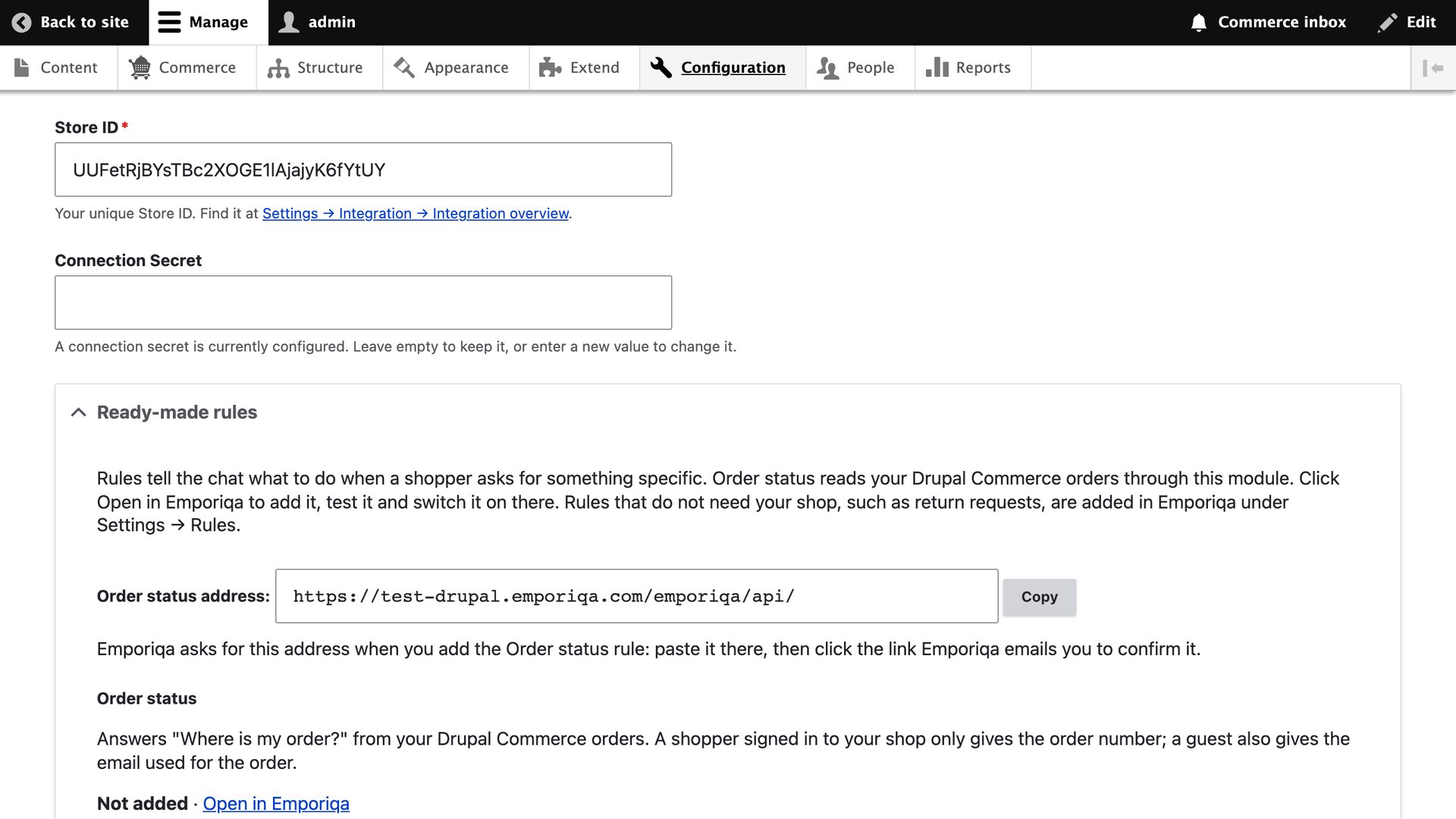
Gehen Sie zu Configuration → Web services → Emporiqa (/admin/config/services/emporiqa). Fügen Sie Ihre Shop-ID und Ihr Verbindungsgeheimnis ein. Beide finden Sie in Ihrem Emporiqa-Dashboard unter Shop-Einstellungen → Integration. Speichern Sie das Formular.
Synchronisierungseinstellungen konfigurieren
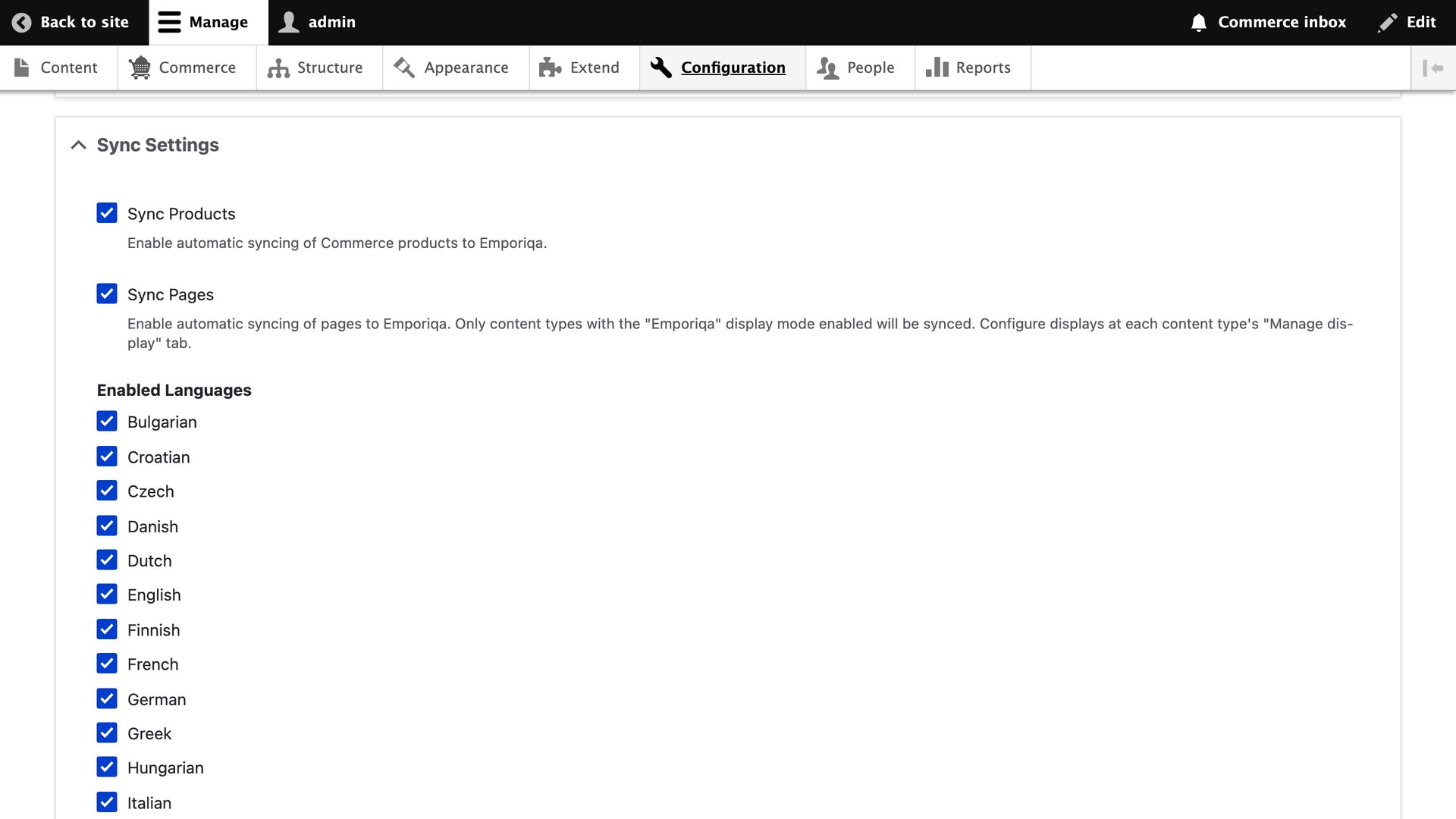
Noch auf der Registerkarte Einstellungen erweitern Sie den Bereich Synchronisierungseinstellungen. Bestätigen Sie, dass Produkte synchronisieren und Seiten synchronisieren aktiviert sind, wählen Sie, welche Aktivierten Sprachen in Webhook-Payloads enthalten sein sollen, und beschränken Sie optional die Produkttypen zum Synchronisieren (alle nicht aktiviert lassen, um jeden Produkttyp zu synchronisieren).
Produktfeld-Zuordnung überprüfen
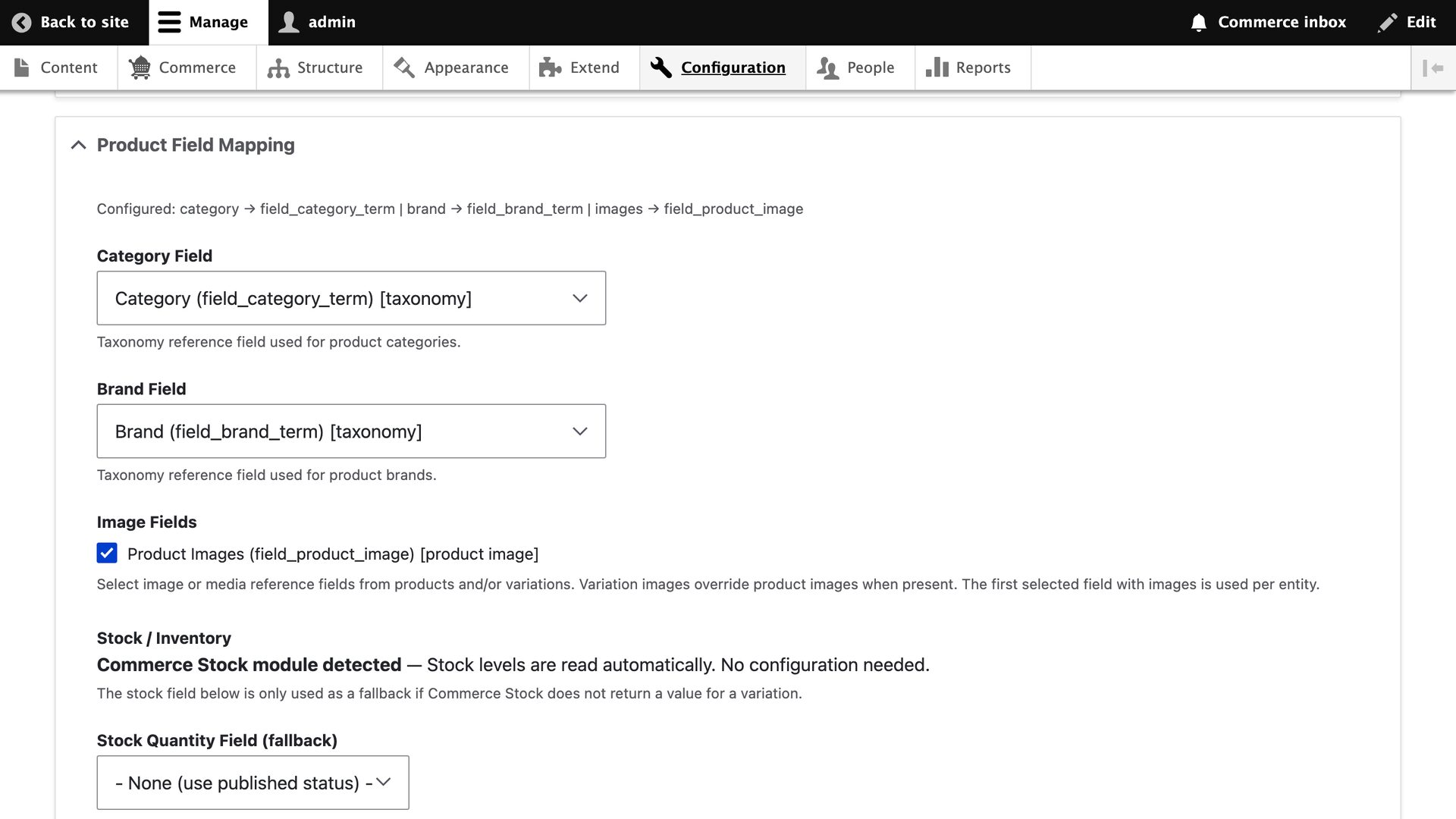
Erweitern Sie den Bereich Produktfeld-Zuordnung. Das Modul erkennt bei der Installation automatisch Ihre Kategorie-, Marken-, Bild-, Bestands- und Varianten-Attributfelder; bestätigen Sie, dass die richtigen Felder ausgewählt wurden. Wenn Sie das Modul Commerce Stock verwenden, werden Bestandsstufen automatisch gelesen. Speichern Sie das Formular nach jeder Änderung.
Emporiqa-Anzeigemodus aktivieren
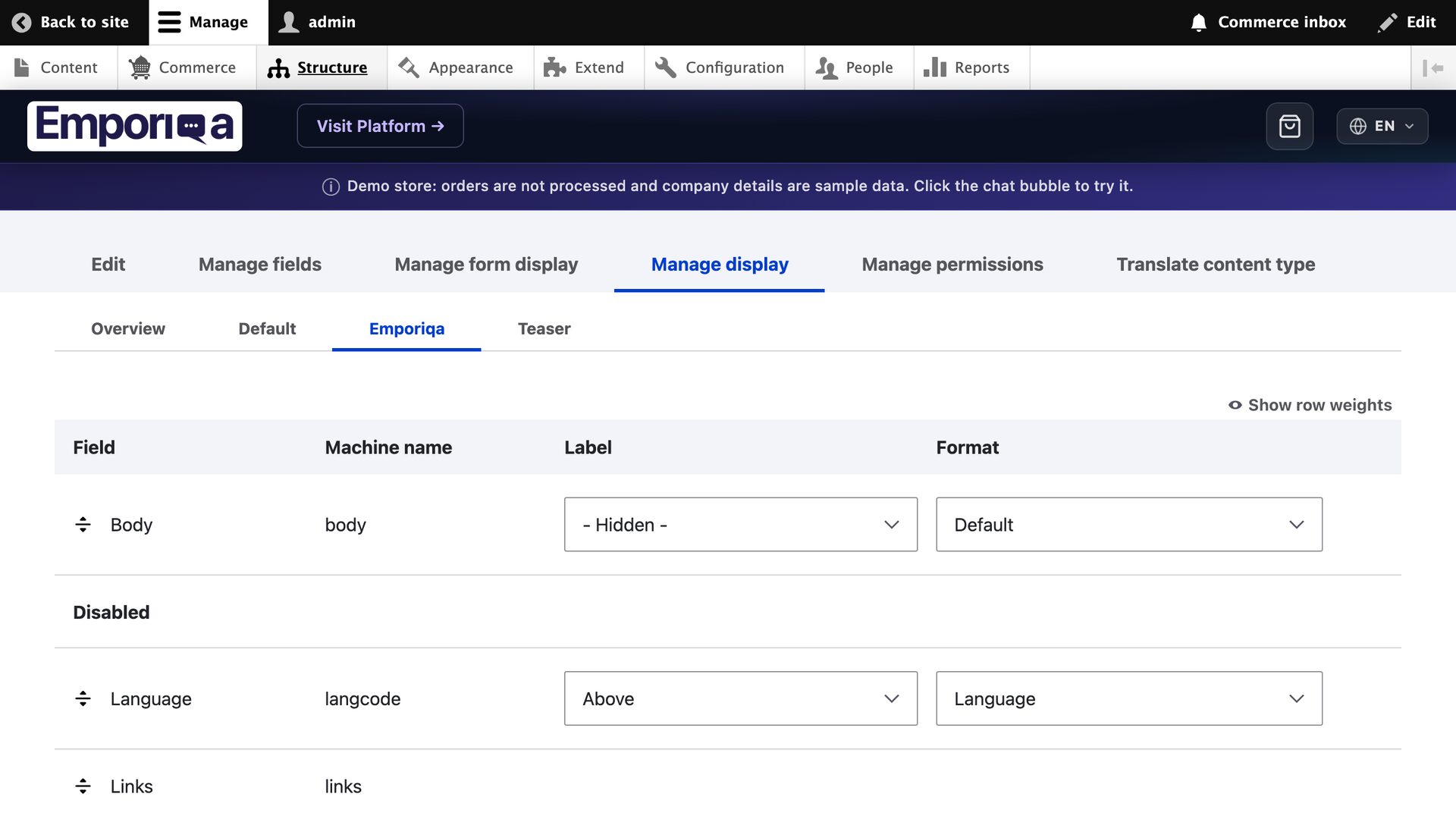
Seiten werden mit nativen Drupal-Anzeigemodi synchronisiert. Gehen Sie für jeden Inhaltstyp, den Sie als Seite synchronisieren möchten, zu Structure → Content types → [Your type] → Manage display, öffnen Sie die Registerkarte Emporiqa und ziehen Sie die Felder, die Sie einschließen möchten (z.B. Body), in den aktiven Bereich. Speichern. Die gerenderte Ausgabe dieses Anzeigemodus wird zum Seiteninhalt, der an Emporiqa gesendet wird.
Initiale Synchronisierung ausführen
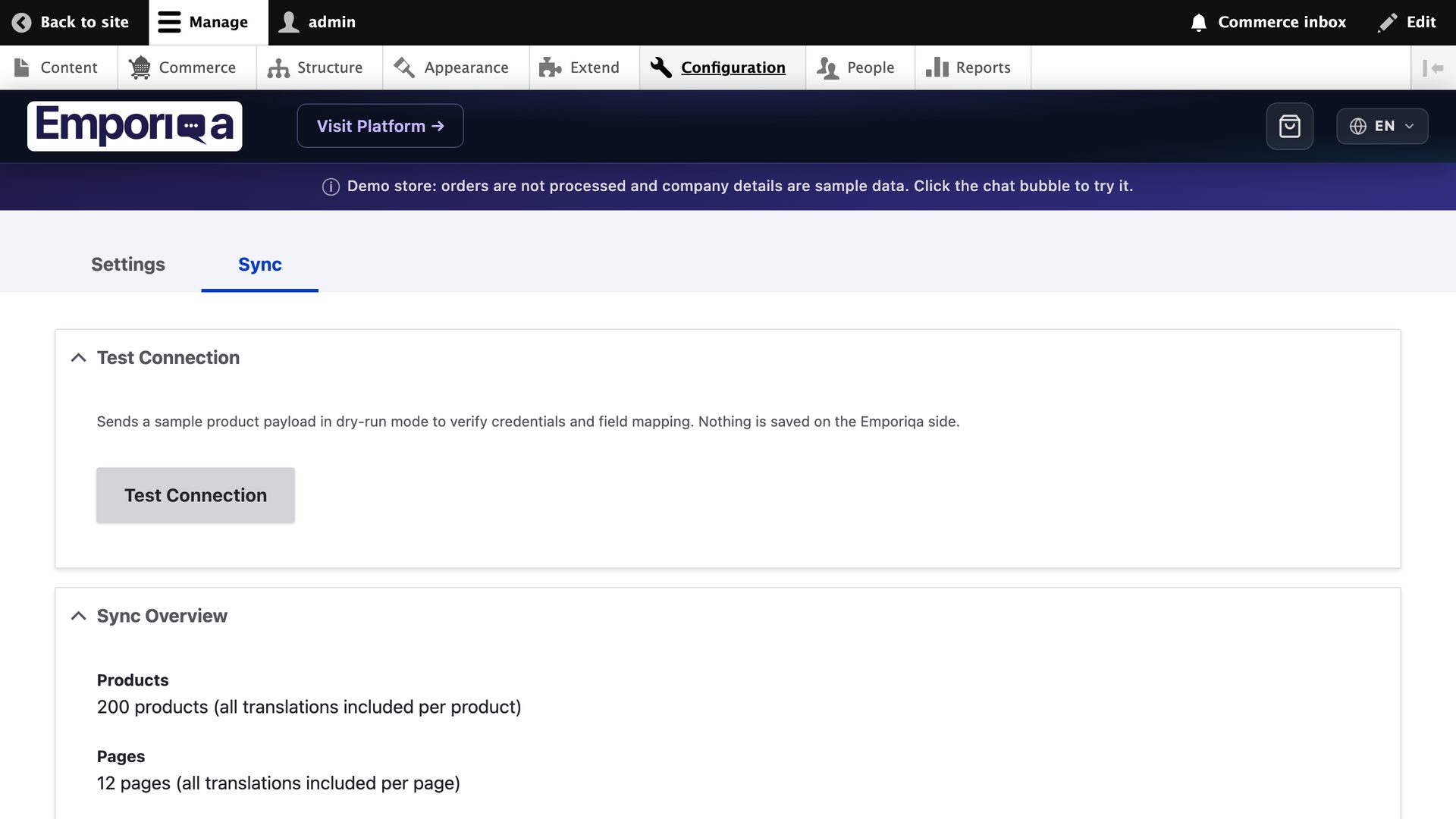
Öffnen Sie die Registerkarte Synchronisierung auf der Einstellungsseite (/admin/config/services/emporiqa/sync). Klicken Sie zuerst auf Verbindung testen, dann auf Alles synchronisieren, um alle Produkte und Seiten zu senden. Eine Batch-Fortschrittsleiste zeigt die verarbeiteten Elemente. Größere Kataloge dauern einige Minuten.
Testen, dann live schalten
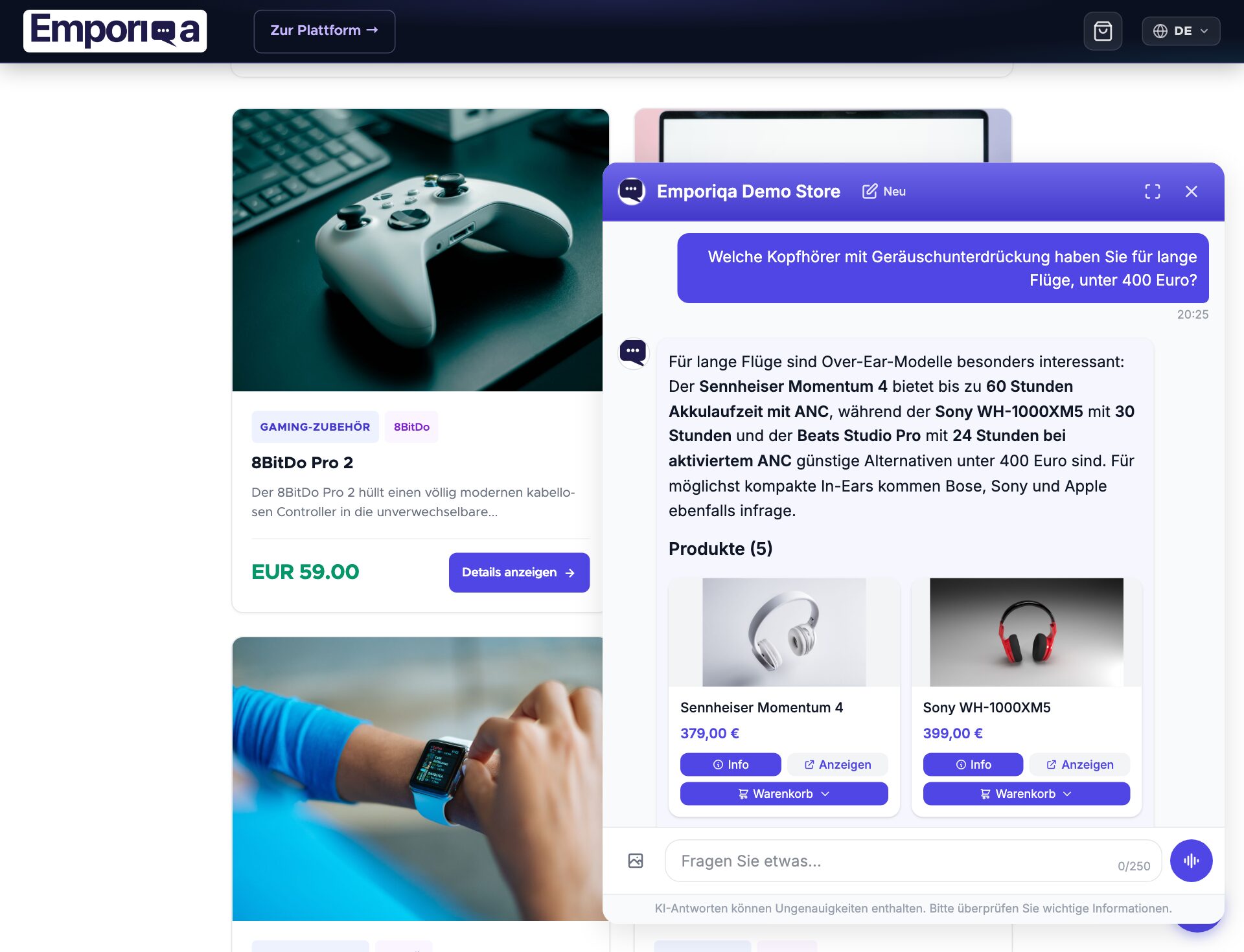
Öffnen Sie in Ihrem Emporiqa-Dashboard „Test your chat“ (das Dashboard ist auf Englisch) und stellen Sie eine Produktfrage. Wenn die Antworten passen, klicken Sie auf „Go live“. Danach erscheint die Chat-Blase in der unteren rechten Ecke Ihres Shops.
Sie sind online
- Neue Produkte und Seiten synchronisieren sich automatisch, wenn Sie sie speichern
- Kunden können nach Produkten, Richtlinien und ihren Bestellungen fragen (sobald Sie die Regel „Order status“ hinzugefügt haben)
- Direkt im Chat in den Warenkorb legen; Kunden gehen weiter zu Ihrer Shop-Kasse
Danach kann der Shop-Inhaber das Postfach Ihres Shops unter Settings → Customer emails verbinden, und Emporiqa kann Ihre Antworten auf Kunden-E-Mails entwerfen, aus demselben Katalog und denselben Seiten, bei Gmail, Google Workspace und Microsoft (Outlook.com und Microsoft 365) auch aus Bestellungen. Anleitung zu Kunden-E-Mails. Sie nutzen Claude oder ChatGPT? Verbinden Sie es und fragen Sie, wie Ihr Shop läuft.
Sie möchten die Synchronisierung anpassen, Staffelpreise hinzufügen oder ein eigenes ERP anbinden?
Zur EntwicklerdokumentationDeveloper Documentation
Architecture, configuration reference, Drush commands, webhook payload schema, and alter hooks.
Architecture
Emporiqa uses your store catalog as its knowledge base: the module pushes products, variations, prices, stock and content pages over webhooks as you save them, so there is no separate knowledge base you have to write or keep up to date. For anything your shop pages never covered, you can write a page yourself on the Pages screen in the Emporiqa dashboard: a title and the text in your own words, in up to 10 languages on the same page. You write each language yourself, and any of them can carry a link to the same page on your site. The chat answers from it like it answers from any page your shop sent, and a sync never overwrites it. Up to 25 pages per store. On the Products screen you can set up to 50 products to Promoted or Top: the chat shows them first when they match what the shopper asked, Top before Promoted, and never shows them for unrelated questions. A sync never clears it.
The module listens to entity CRUD hooks (hook_entity_insert, hook_entity_update, hook_entity_delete) for Commerce products, variations, and configured node types. Events are pushed onto a dedicated Drupal queue worker and delivered to Emporiqa asynchronously, so saving a product completes locally while the webhook delivery runs in the background. From version 1.1.1 a request that queued changes sends up to 20 of them right after its response has gone out, so they reach Emporiqa within seconds instead of at the next cron run; cron sends the rest. To turn this off, set $settings['emporiqa_send_after_save'] = FALSE; in settings.php.
All translations and channels for a single product or page consolidate into one webhook event. Variations cascade up: editing a variation triggers a parent product re-sync so search always sees the full catalog state. Conversion tracking is handled by an event subscriber on Commerce order state transitions (OrderCompleteSubscriber).
Webhook delivery retries up to 3 times on transient errors (HTTP 429, 502, 503, 504) and network failures, with linear backoff between attempts. The queue is processed by Drupal's cron. If the queue grows past 10,000 items, a warning is logged (typically meaning the webhook endpoint is unreachable or cron isn't running).
Requirements
| Drupal | 10.3, 11, or 12 |
| Drupal Commerce | 2.40+ or 3.x (commerce_product required) |
| PHP | 8.1 or higher |
| Emporiqa account | Free Emporiqa account (free to start, no card) |
Configuration Reference
All settings live at Configuration → Web services → Emporiqa (/admin/config/services/emporiqa). The Sync tab lives at /admin/config/services/emporiqa/sync. The administer emporiqa permission is required. A Ready-made rules section shows the Order status address.
Connection Settings
| Setting | Description |
|---|---|
| Store ID | Your unique store identifier from the Emporiqa dashboard. |
| Connection Secret | Shared secret used for HMAC-SHA256 signing of webhook, Order status and price requests. |
| Webhook URL | Emporiqa webhook endpoint. Default works for most stores. |
Sync Settings
Most stores don't need to change these.
| Setting | Description |
|---|---|
| Sync Products | Enable/disable Commerce product synchronization. |
| Sync Pages | Enable/disable node synchronization as pages. |
| Languages | Which Drupal languages to sync. The module consolidates translations into one payload per entity. |
| Product Types | Which Commerce product types to sync. |
| Content Types | Which node content types to sync as pages (via the Emporiqa display mode). |
| Order Transitions | Commerce order transitions that trigger conversion tracking. Default: place. |
| Batch Size | Items per webhook request during full sync (1-100). |
| Shop URL | Under Advanced Settings, version 1.1.1 or newer. The address shoppers open your shop at. When set, product, variation and page links, image URLs on this site and the Order status address start with it, whether the sync runs from the admin, cron or Drush. Set it when Drupal sits behind a proxy or CDN and builds http:// links: the Settings and Sync tabs warn when that happens. Leave it empty to keep Drupal's own address. |
Field Auto-detection
On install, the module auto-detects your product fields (category, brand, images, stock, attributes) from the Commerce product and variation entity schemas. The mappings are stored in config and can be adjusted on the settings form.
Page Sync via Display Modes
Pages are synced using Drupal's native display modes, no custom code needed. The module creates an Emporiqa display on install and enables it for common content types (page, article).
- Go to Structure → Content types → [Your type] → Manage display.
- Enable the Emporiqa tab.
- Drag the fields you want synced into that display.
The rendered output of the Emporiqa display becomes the page content sent to the webhook. Different content types can expose different fields, all configured through Drupal's admin, no module code touched. The same approach works for product descriptions when the Emporiqa display is enabled on a product type.
Always-on capabilities
- Cart operations: add, update, and remove items from inside the chat via
/emporiqa/api/cart/*. Checkout happens on your Commerce checkout page; the widget redirects when the customer is ready. - Conversion tracking: chat sessions linked to completed Commerce orders for revenue attribution.
- Multi-store mapping: each Commerce store can be assigned a channel via
hook_emporiqa_channels_alter.
Features
Real-time Webhooks
Products and pages sync via webhooks on create, update, and delete using Drupal entity hooks, delivered through a dedicated queue worker for reliability and retry.
Chat Widget
The widget is attached automatically via an asset library. Language and currency are detected from the Drupal request context.
Multilingual
Products and pages sync with translated names, descriptions, categories, and attributes from all configured Drupal languages, consolidated into one payload per entity.
Variation Sync
Full parent/child sync for Commerce variations. Variation changes trigger a parent product re-sync. Deleting a variation sends a delete event and re-syncs the parent.
Cart Operations
Customers can add, update, remove, and checkout from the chat. Routes: /emporiqa/api/cart/*, working directly with commerce_cart.
Field Auto-detection
On install, the module discovers your category, brand, image, stock, and attribute fields on product and variation entities. Zero-config for standard Commerce setups.
Admin Sync UI
Trigger a full sync from the Sync tab with Drupal's batch API. Test Connection sends a dry-run payload for validation without storing data.
Conversion Tracking
An event subscriber on Commerce order state transitions sends an order.completed event, linking chat sessions to revenue on your dashboard.
Minimum Order Quantity
Reads a configurable integer field on the commerce_product_variation entity (set under Settings → Advanced → Minimum Order Quantity Field) and ships it on every product and variation sync. Customize per variation with hook_emporiqa_min_order_quantity_alter. The assistant blocks under-minimum cart actions and offers the merchant's minimum instead of failing silently.
Webhook Payload
Each product or page is sent as a single webhook event containing all languages and channels. Translatable fields are nested by channel and language code.
Product Event
{
  "type": "product.updated",
  "data": {
    "identification_number": "product-42",
    "sku": "product-42",
    "channels": [""],
    "names":        {"": {"en": "Hiking Boots", "de": "Wanderschuhe"}},
    "descriptions": {"": {"en": "Waterproof leather boots...", "de": "Wasserdichte Lederstiefel..."}},
    "links":        {"": {"en": "https://store.com/hiking-boots", "de": "https://store.com/de/wanderschuhe"}},
    "categories":   {"": {"en": ["Footwear > Hiking"], "de": ["Schuhe > Wandern"]}},
    "attributes":   {"": {"en": {"Material": "Leather"}, "de": {"Material": "Leder"}}},
    "brands":       {"": "TrailPeak"},
    "prices":       {"": [{"currency": "EUR", "current_price": 129.99, "regular_price": 149.99}]},
    "images":       {"": ["https://store.com/files/boots-front.jpg"]},
    "availability_statuses": {"": "available"},
    "stock_quantities":      {"": 42},
    "min_order_quantities":  {"": 1},
    "max_order_quantities":  {"": null},
    "available_for_order": true,
    "condition": null,
    "is_virtual": false,
    "is_parent": false,
    "parent_sku": null,
    "variation_attributes": {}
  }
}
Page Event
{
  "type": "page.created",
  "data": {
    "identification_number": "page-45",
    "channels": [""],
    "titles":   {"": {"en": "Shipping Policy", "de": "Versandrichtlinien"}},
    "contents": {"": {"en": "<p>Rendered Emporiqa display...</p>", "de": "<p>Gerenderte Emporiqa-Anzeige...</p>"}},
    "links":    {"": {"en": "https://store.com/shipping-policy", "de": "https://store.com/de/versandrichtlinien"}}
  }
}
Field Structure
| Type | Pattern | Fields |
|---|---|---|
| Translatable | {channel: {lang: value}} |
names, descriptions, links, categories, attributes, variation_attributes, titles, contents |
| Shared | {channel: value} |
brands, prices, images, availability_statuses, stock_quantities, min_order_quantities, max_order_quantities |
| Flat | Direct value | identification_number, sku, channels, is_parent, parent_sku, available_for_order, condition, is_virtual |
Customization Hooks
The module provides Drupal alter hooks you can implement in a custom module (mymodule.module) to control sync behavior, modify payloads, and extend Order status and cart operations. Full documentation lives in emporiqa.api.php.
| Hook | Description |
|---|---|
hook_emporiqa_entity_sync_alter |
Set $sync = FALSE to skip a specific entity (product, variation, or page). |
hook_emporiqa_data_alter |
Modify the formatted payload before it is queued for delivery. |
hook_emporiqa_channels_alter |
Assign products to sales channels (e.g. b2b, retail, amazon). |
hook_emporiqa_price_entry_alter |
Modify an individual price entry (tax-inclusive/exclusive, extras). |
hook_emporiqa_tier_prices_alter |
Provide tier pricing (volume discounts) from custom fields or external pricing engines. |
hook_emporiqa_min_order_quantity_alter |
Override the minimum order quantity per variation. Default reads the configured integer field on commerce_product_variation and falls back to 1. |
hook_emporiqa_checkout_route_alter |
Override the route used for the chat cart's checkout URL. |
hook_emporiqa_cart_alter |
Cancel or modify cart operations (add, remove, update, clear, checkout). |
hook_emporiqa_order_status_alter |
Modify the Order status rule's answer (&$data, $order). |
hook_emporiqa_customer_info_alter |
Modify the customer info action's answer (&$data, $account), version 1.1.1 or newer: remove a field, or add your own under extra. See Customer info action. |
Example: skip draft pages
/**
 * Implements hook_emporiqa_entity_sync_alter().
 */
function mymodule_emporiqa_entity_sync_alter(
  bool &$sync,
  \Drupal\Core\Entity\EntityInterface $entity,
  string $entity_type,
  string $operation,
): void {
  if (
    $entity_type === 'page'
    && $entity instanceof \Drupal\node\NodeInterface
    && str_contains($entity->getTitle(), '[DRAFT]')
  ) {
    $sync = FALSE;
  }
}
Example: add tax-inclusive prices
/**
 * Implements hook_emporiqa_price_entry_alter().
 */
function mymodule_emporiqa_price_entry_alter(
  array &$entry,
  array $context,
): void {
  $entry['price_incl_tax'] = round($entry['current_price'] * 1.20, 2);
  $entry['price_excl_tax'] = $entry['current_price'];
}
Example: provide tier prices
/**
 * Implements hook_emporiqa_tier_prices_alter().
 */
function mymodule_emporiqa_tier_prices_alter(
  array &$tier_prices,
  array $context,
): void {
  $variation = $context['variation'];

  if ($variation->hasField('field_tier_prices')) {
    foreach ($variation->get('field_tier_prices') as $item) {
      $tier_prices[] = [
        'min_quantity' => (int) $item->min_qty,
        'price' => (float) $item->price,
        'currency' => $context['currency'],
      ];
    }
  }
}
Example: cancel a cart operation
/**
 * Implements hook_emporiqa_cart_alter().
 */
function mymodule_emporiqa_cart_alter(array &$context): void {
  if ($context['operation'] === 'add') {
    $total_qty = 0;
    foreach ($context['items'] as $item) {
      $total_qty += $item['quantity'] ?? 1;
    }
    if ($total_qty > 10) {
      $context['cancel'] = TRUE;
      $context['cancel_message'] = 'Maximum 10 items per operation.';
    }
  }
}
Clear the cache with drush cr after adding a new hook implementation so Drupal picks it up.
Drush Commands
The module provides Drush commands for deployment pipelines, cron jobs, and debugging.
# Full sync (products + pages)
drush emporiqa:sync-all         # alias: em:sa

# Sync products only
drush emporiqa:sync-products    # alias: em:sp

# Sync pages only
drush emporiqa:sync-pages       # alias: em:spg

# Test the webhook connection (dry run with a real product)
drush emporiqa:test-connection  # alias: em:tc

# Adjust batch size for large catalogs
drush emporiqa:sync-products --batch-size=25
Configure Drush URI for correct payload URLs
Drush runs on the command line and doesn't know your site's public URL. For correct product and page URLs in webhook payloads, create drush/drush.yml in your Drupal root:
options:
  uri: 'https://your-store-domain.com'
Order status
The ready-made Order status rule answers "Where is my order?" in the chat. Emporiqa asks your site through the module's signed order_status endpoint and tells the shopper the status, the order date and, with Commerce Shipping, each shipment's tracking number, carrier and tracking link. Carts (draft orders) are never looked up. It needs module version 1.1.0 or newer, and your site must be served over https.
What the shopper sees, what your team gets and how to write your own rules: Rules guide.
Set it up
- In Drupal, open Configuration → Web services → Emporiqa. The Ready-made rules section shows the Order status address and a Copy button.
- Click Open in Emporiqa next to Order status. Your Emporiqa dashboard opens at Settings → Rules with Order status highlighted. Click Add.
- Drupal has no one-click connect, so Emporiqa asks for the address: paste the Order status address under Check my shop and save. Emporiqa checks it with one signed call to your site, then emails the store owners a link. The address is saved once one of them clicks it.
- Click Try it and ask about one of your recent orders. When it answers correctly, click Go live.
The Order status address looks like this:
https://your-store.com/emporiqa/api/
Behind a reverse proxy or CDN, set $settings['reverse_proxy'] and $settings['reverse_proxy_addresses'] in settings.php, so the address shows https and the per-address limits see real visitor addresses. On and Not added on the settings page show what Emporiqa said at the last Test Connection; run it again after changing the rule.
What the shopper gives
- Signed in to your shop: only the order number. The module answers only for that customer's own orders.
- Guest: the order number and the email used for the order.
Endpoint
POST /emporiqa/api/actions/order-status
Requests are signed with keys derived from your connection secret (X-Emporiqa-Action-Signature) and rejected after 5 minutes, a repeated request is answered once, and the module signs its answer back (X-Emporiqa-Response-Signature). Lookups are limited to 10 per order number, email or customer and 300 per store in 10 minutes. An unknown order and a wrong email get the same answer, so the chat never reveals whether an order exists. To adjust the answer, implement hook_emporiqa_order_status_alter().
Order status is optional. Without it, order questions go to the Customer Support agent instead.
Signed-in customers
When a shopper is signed in to your store, the chat shows them their own prices and uses their account when it hands the conversation to your team. There is nothing to set up: it starts once the module is on the versions below. Guests see your public prices, as before.
- Their own prices, version 1.1.0 or newer: price lists and role-based prices from Commerce Pricelist, with their quantity tiers, as Commerce resolves them for that customer. The chat asks your store through the signed
customer_pricesaction when it shows a product, and shows the answer to that customer only, on the cards, in quotes and in the product details. Coupons and cart rules apply at your checkout, as before, and a search with a price limit ("under 200") is applied to what the customer pays. - Their name and email, version 1.1.1 or newer (the Customer info action): the chat greets them by first name, and a handoff reaches your team with the name and email on their account, so they are not asked for them.
Both answer only for the customer the module signed in for this store, and only on that customer's own messages: a shopper who signs out is a guest from their next message. Per customer, prices are kept for 5 minutes and the account details for 30. Each customer is limited to 30 requests and each store to 600 every 10 minutes.
Customer info action
From version 1.1.1 the module answers a signed customer_info request about a shopper who is signed in to your site: the name and email on their account (first and last name from the default customer profile) and up to 10 of the account's own placed orders, newest first (order number, date, status, total and currency). Carts, guest orders placed with the same email and other customers' orders are never included. With it, a signed-in shopper who asks "where is my order?" without a number gets their newest order, as long as the Order status rule is on; there is nothing to set up.
POST /emporiqa/api/actions/customer-info
Requests are signed like Order status and limited to 30 per customer and 600 per store every 10 minutes. To remove a field or add your own under extra, implement hook_emporiqa_customer_info_alter(), which runs after the answer is built:
/**
 * Implements hook_emporiqa_customer_info_alter().
 */
function mymodule_emporiqa_customer_info_alter(
  array &$data,
  \Drupal\user\UserInterface $account,
): void {
  unset($data['customer']['email']);
  if ($account->hasField('field_loyalty_tier') && !$account->get('field_loyalty_tier')->isEmpty()) {
    $data['extra']['loyalty_tier'] = $account->get('field_loyalty_tier')->value;
  }
}
Updating
After updating to version 1.1.1, run the database updates (they add the empty Shop URL setting and register the new route and services) and clear the cache:
drush updb
drush cr
If the Settings tab then warns about http:// links, set Shop URL to your shop's https address and run Sync All once, so the links already sent are rewritten.
Troubleshooting
Products not appearing in chat
- Run
drush emporiqa:sync-productsto force a full sync. - Verify products are published and have at least one variation with a price.
- Confirm your Store ID and Connection Secret match the dashboard.
- Check the watchdog log:
drush ws --filter=emporiqa.
Chat widget not showing
- Did you press Go live? New stores start with the chat off until the owner presses Go live in the dashboard.
- Clear Drupal's cache:
drush cr. - Confirm the module is enabled and Store ID is configured.
- Check the browser console for JavaScript errors.
- Disable aggressive page caching on the page while testing.
Webhook errors or sync stuck
- Confirm your server can make outbound HTTPS requests.
- Run
drush emporiqa:test-connectionto validate the connection with a dry-run payload. Failure messages surface the actual reason (invalid signature, validation errors, throttle hints) instead of a generic "check the logs" message. - The Settings and Sync tabs warn when cron has not run for 6 hours or has never run (from version 1.1.1). Changes are sent right after a save, but anything left over, or not accepted by Emporiqa, waits for cron.
- The Sync admin page shows a queue-status indicator. A warning appears when more than 1,000 items are pending, usually a sign that cron isn't running often enough, the queue worker keeps failing, or Emporiqa was unreachable.
- Drain the queue manually:
drush queue:run emporiqa_webhook --time-limit=60. Check overall queue depth withdrush queue:list. - Check the watchdog log:
drush ws --filter=emporiqa.
Variations not syncing
- Verify variations have prices and the parent product is published. An unpublished variation is removed from Emporiqa when its product is saved (from version 1.1.1).
- Save the parent product to trigger a re-sync.
- Run a full product sync:
drush emporiqa:sync-products.
Related Articles
Chat for Drupal Commerce
Webhook architecture, queue workers, variations, and customization with alter hooks.
Multilingual Chat Support
Cross-language search, answers in the shopper's language, how translations sync.
5 Questions Before You Pay
Evaluation checklist: data sync, handoff, pricing, languages, attribution.
Conversion Tracking
Prove chat ROI: session to cart to purchase attribution.
Answer accuracy: the chat answers from your synced catalog and store pages. It does not invent products, prices, or discount codes; when it is unsure, it says so and offers to bring in your team. You can check this yourself on the live demo store: demo.emporiqa.com.
Reviewed before listing: the WooCommerce, PrestaShop, Magento and Drupal plugins pass the platform's own review process before they are published on WordPress.org, PrestaShop Addons, Adobe Commerce Marketplace, and drupal.org. Your developer can read the source before installing: WooCommerce on WordPress.org, Drupal on drupal.org, and PrestaShop, Shopware and Sylius on GitHub (Shopware and Sylius also on Packagist). The Magento module is distributed through the Adobe Commerce Marketplace.
Who makes Emporiqa: Emporiqa is built by Rosel Group LTD, an EU company based in Sofia, Bulgaria, founded by Rosen Hristov, who has built e-commerce software for more than 15 years. It is GDPR-compliant and never uses your data to train AI models. Emporiqa runs on self-hosted platforms (WooCommerce, Magento and Adobe Commerce, PrestaShop, Drupal Commerce, Shopware 6, Sylius); it does not run on Shopify.