Sylius-Einrichtungsanleitung
Fügen Sie einen Chat-Assistenten zu Ihrem Sylius-Shop mit automatischer Produktsynchronisierung hinzu.
Sie befinden sich in der Entwickler-Einrichtungsanleitung. Suchen Sie nach einem Überblick darüber, was Emporiqa für Ihren Sylius-Shop tut? Zur Integrations-Seite.
Schnellstart
Für Entwickler, die das Plugin bereitstellen. Composer installieren, YAML konfigurieren, initiale Synchronisierung.
StartenEntwicklerdokumentation
Architektur, Webhook-Payload, Service-Dekoration und Symfony-Event-Listener.
LesenSchnellstart
Plugin mit Composer installieren, kleine YAML-Konfiguration hinzufügen, Widget in Ihr Layout einbetten, einen Synchronisierungsbefehl ausführen, dann im Emporiqa-Dashboard auf „Go live“ klicken.
Was Sie brauchen
- Sylius 1.12 oder neuer, bis 2.3, auf Symfony 6.4, 7.x oder 8.x mit PHP 8.1 oder höher
-
Shell-Zugriff zum Ausführen von
composerundbin/console - Ein Emporiqa-Konto (kostenloses Emporiqa-Konto erstellen, falls Sie noch keines haben)
Plugin installieren
Das Plugin über Composer einbinden. Sie finden es auf Packagist.
composer require emporiqa/sylius-pluginPlugin registrieren
Den Plugin-Eintrag zu config/bundles.php hinzufügen. Symfony Flex kann dies möglicherweise automatisch für Sie tun.
// config/bundles.php
return [
    // ... other bundles
    Emporiqa\SyliusPlugin\EmporiqaPlugin::class => ['all' => true],
];Zugangsdaten konfigurieren
Erstellen Sie config/packages/emporiqa.yaml mit den minimal erforderlichen Einstellungen. Ihre Shop-ID und Ihr Verbindungsgeheimnis finden Sie beide in Ihrem Emporiqa-Dashboard unter Store Settings (Shop-Einstellungen) → Integration.
# config/packages/emporiqa.yaml
emporiqa:
    store_id: '%env(EMPORIQA_STORE_ID)%'
    webhook_url: '%env(EMPORIQA_WEBHOOK_URL)%'
    webhook_secret: '%env(EMPORIQA_WEBHOOK_SECRET)%'
    enabled_languages: ['en_US', 'de_DE']
Then add the matching env vars to your .env (or .env.local).
# .env.local
EMPORIQA_STORE_ID=your_store_id
EMPORIQA_WEBHOOK_URL=https://emporiqa.com/webhooks/sync/
EMPORIQA_WEBHOOK_SECRET=your_connection_secretWidget einbetten
Fügen Sie die Twig-Funktion vor </body> in Ihrem Shop-Layout hinzu. Die emporiqa_cart_widget-Funktion registriert die Einbettung sowie den In-Chat-Warenkorb-Handler.
{{ emporiqa_cart_widget() }}Routen registrieren
Erstellen Sie config/routes/emporiqa.yaml, um die Warenkorb-API des Plugins und die signierten Endpunkte für den Bestellstatus bereitzustellen, die im Chat „Wo ist meine Bestellung?“ beantworten.
# config/routes/emporiqa.yaml
emporiqa:
resource: '@EmporiqaPlugin/config/routes.yaml'Assets installieren und initiale Synchronisierung ausführen
Bundle-Assets installieren, Cache leeren, dann Ihre Produkte und Seiten pushen. Der Synchronisierungsbefehl streamt in Batches und gibt den Fortschritt aus.
bin/console assets:install
bin/console cache:clear
bin/console emporiqa:test-connection
bin/console emporiqa:sync:all
Öffnen Sie in Ihrem Emporiqa-Dashboard „Test your chat“ (das Dashboard ist auf Englisch) und stellen Sie eine Produktfrage. Wenn die Antworten passen, klicken Sie auf „Go live“. Danach erscheint die Chat-Blase in der unteren rechten Ecke Ihres Shops.
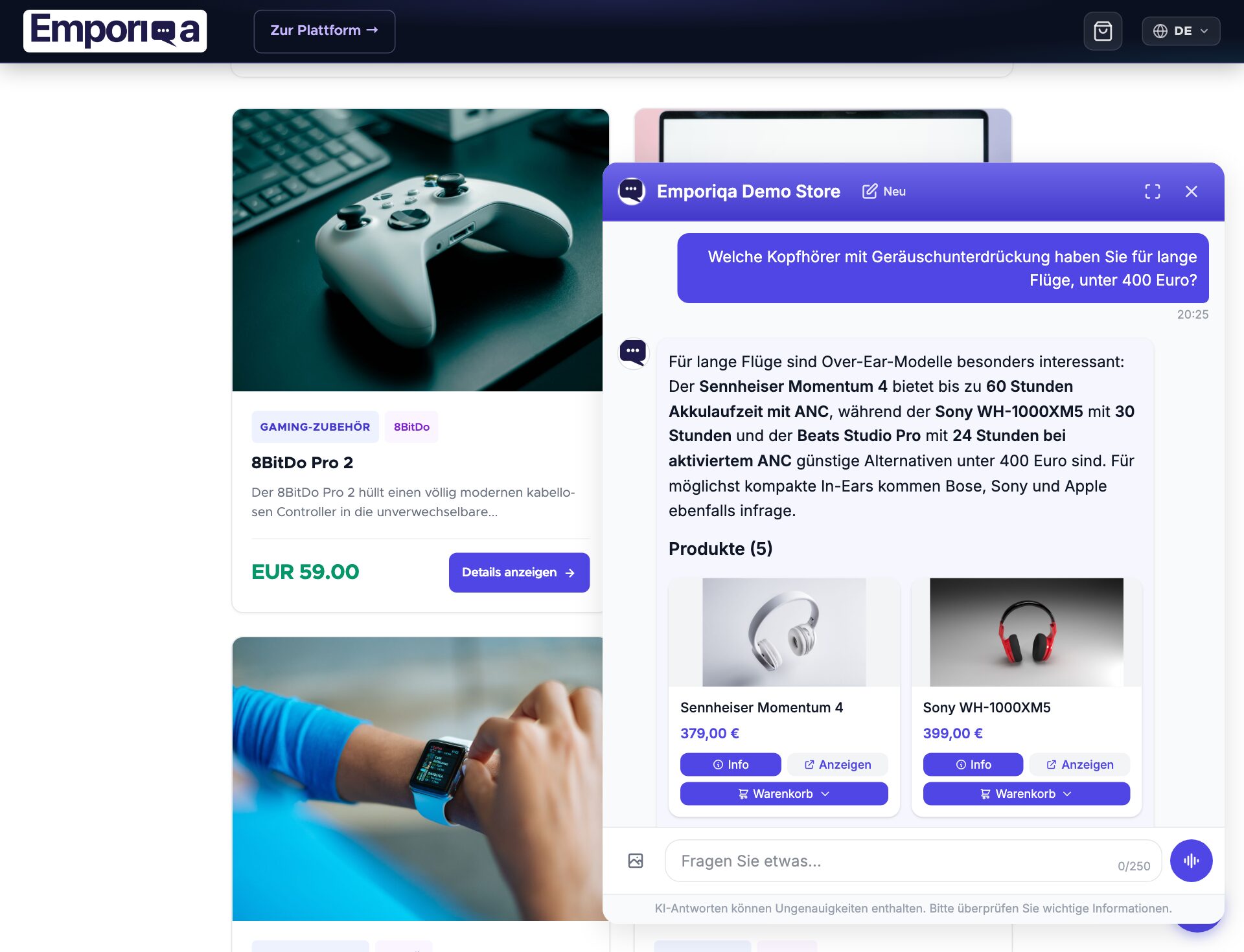
Sie sind online
- Produktaktualisierungen synchronisieren sich automatisch über Sylius-Ressourcen-Events
- Kunden können nach Produkten, Richtlinien und ihren Bestellungen fragen (sobald Sie die Regel „Order status“ hinzugefügt haben)
- Direkt im Chat in den Warenkorb legen; Kunden gehen weiter zu Ihrer Shop-Kasse
Danach kann der Shop-Inhaber das Postfach Ihres Shops unter Settings → Customer emails verbinden, und Emporiqa kann Ihre Antworten auf Kunden-E-Mails entwerfen, aus demselben Katalog und denselben Seiten, bei Gmail, Google Workspace und Microsoft (Outlook.com und Microsoft 365) auch aus Bestellungen. Anleitung zu Kunden-E-Mails. Sie nutzen Claude oder ChatGPT? Verbinden Sie es und fragen Sie, wie Ihr Shop läuft.
Sie möchten eigene Seiten-Entitäten synchronisieren, den Order-Provider dekorieren oder auf Warenkorb-Ereignisse reagieren?
Zur EntwicklerdokumentationDeveloper Documentation
Architecture, configuration reference, webhook payload schema, service decoration points, and Symfony events.
Architecture
Emporiqa uses your store catalog as its knowledge base: the plugin pushes products, variants, prices, stock and store pages over webhooks as you save them, so there is no separate knowledge base you have to write or keep up to date. For anything your shop pages never covered, you can write a page yourself on the Pages screen in the Emporiqa dashboard: a title and the text in your own words, in up to 10 languages on the same page. You write each language yourself, and any of them can carry a link to the same page on your site. The chat answers from it like it answers from any page your shop sent, and a sync never overwrites it. Up to 25 pages per store. On the Products screen you can set up to 50 products to Promoted or Top: the chat shows them first when they match what the shopper asked, Top before Promoted, and never shows them for unrelated questions. A sync never clears it.
The plugin is a Symfony bundle that hooks into Sylius via resource events (sylius.product.post_update, sylius.product_variant.post_update, etc.), Doctrine lifecycle events for page entities, and the Sylius checkout workflow (Symfony Workflow on 2.x, Winzou state machine on 1.x) for conversion tracking.
Webhook events use deferred delivery: event subscribers queue payloads in an in-memory WebhookEventQueue with deduplication, and the queue flushes to Emporiqa on kernel.terminate after the HTTP response is sent. Saving a product or completing checkout completes synchronously while the outbound HTTP call runs asynchronously. From version 1.11.1 a product or page batch Emporiqa did not accept (unreachable, or a wrong secret after a change) is kept in cache.app and sent first with the next request's changes; a newer change to the same product or page replaces the kept one. At most 500 events are kept, for at most 7 days, and a completed full sync clears them. A batch refused for its content (HTTP 400 or 413) is not kept.
All translations and channels for a single product or page consolidate into one webhook event. Variant changes cascade to the parent: editing a variant triggers a parent re-sync so search always sees the full catalog state. Every service that formats, resolves, looks up, or transports data ships behind an interface so you can decorate any part of the pipeline without patching plugin code.
Requirements
| Sylius | 1.12 or later 1.x, or 2.0 to 2.3 |
| Symfony | 6.4, 7.x or 8.x (Symfony 8 on Sylius 2.3) |
| PHP | 8.1 or higher (Sylius 2.3 needs 8.3, Symfony 8 needs 8.4) |
| Emporiqa account | Free Emporiqa account (free to start, no card) |
Checked with plugin 1.11.0 on Sylius 2.3 (Symfony 8.1, PHP 8.4), Sylius 2.2 (Symfony 7.4, PHP 8.3) and Sylius 1.12 (Symfony 6.4, PHP 8.1). Sylius 1.12 and 1.13 no longer get security fixes, and a current Composer refuses to install them unless their advisories are ignored.
Configuration Reference
Configuration lives in config/packages/emporiqa.yaml. Only store_id, webhook_url, and webhook_secret are required. Everything else has sensible defaults.
Settings
| Key | Type | Default | Description |
|---|---|---|---|
store_id |
string | required | Store identifier from the Emporiqa dashboard. |
webhook_url |
string | required | Emporiqa webhook endpoint. |
webhook_secret |
string | required | HMAC-SHA256 signing key for webhooks and for the Order status requests. |
base_url |
string | '' |
Absolute base URL for link generation when no HTTP request is available (used by console commands). |
media_base_path |
string | /media/image/ |
Base path for product image URLs. Override for CDN, S3, or LiipImagine setups. |
brand_attribute_code |
string | brand |
Product attribute code that holds brand/manufacturer data. |
min_order_quantity_attribute |
string | min_order_qty |
Product attribute code that holds the minimum order quantity. Stores without this attribute defined see a default minimum of 1. Listeners on MinOrderQuantityEvent may override the value. |
enabled_languages |
string[] | ['en_US', 'de_DE'] |
Sylius locale codes to sync. Codes are passed as-is; no truncation. |
sync.products |
bool | true |
Enable automatic product synchronization. |
sync.pages |
bool | true |
Enable automatic page synchronization (only fires for classes in page_entity_classes). |
page_entity_classes |
string[] | [] |
FQCNs of your page entities. Page sync is opt-in. If this list is empty, no page events fire and the PageFormatter, PageDoctrineListener, and PageUrlResolver services are not registered. |
cart.enabled |
bool | true |
Mounts the cart API and order completion subscriber. Disable to remove both. |
Full configuration example
# config/packages/emporiqa.yaml
emporiqa:
    store_id: '%env(EMPORIQA_STORE_ID)%'
    webhook_url: '%env(EMPORIQA_WEBHOOK_URL)%'
    webhook_secret: '%env(EMPORIQA_WEBHOOK_SECRET)%'
    base_url: 'https://myshop.com'
    media_base_path: '/media/image/'
    brand_attribute_code: 'brand'
    min_order_quantity_attribute: 'min_order_qty'
    enabled_languages: ['en_US', 'de_DE']
    sync:
        products: true
        pages: true
    page_entity_classes:
        - App\Entity\StaticPage
        - App\Entity\BlogPost
    cart:
        enabled: true
Page sync is opt-in. Sylius has no built-in page entity, so the plugin does not auto-detect your CMS pages. To sync policies, FAQ entries, or blog posts, implement Emporiqa\SyliusPlugin\Model\PageInterface on your entity and list its FQCN under page_entity_classes. See Customization.
Channels
The plugin uses the Sylius channel code directly as the Emporiqa channel identifier, no mapping configuration needed. Each channel's pricing, availability, and translations are consolidated into the same webhook event.
Features
Real-time Webhooks
Products sync via Sylius resource events (post_create, post_update, pre_delete). Variant changes cascade to the parent. Events are deduplicated in-request and flushed after the response via kernel.terminate.
Chat Widget
Embed via {{ emporiqa_cart_widget() }}. Locale, currency, channel, and a signed user_id token are injected from Sylius contexts. Anonymous pages are safe for Varnish/CDN caching.
Multi-Channel & Multi-Language
A single product event carries every channel's pricing, availability, and all translations for each configured locale. Sylius locale codes (en_US, de_DE) are passed through unchanged.
Cart & Checkout API
REST endpoints under /emporiqa/api/cart for add, update, remove, clear, view, and checkout URL. The chat widget calls these via window.EmporiqaCartHandler. CSRF-protected for authenticated users.
Order status
The signed endpoint behind the ready-made Order status rule, under /emporiqa/api/. Resolves Sylius payment and shipping states into a normalized status, with tracking numbers from the shipments. See Order status.
Console Commands
emporiqa:sync:all, emporiqa:sync:products, emporiqa:sync:pages, and emporiqa:test-connection. Memory-efficient batching with session-based reconciliation.
Conversion Tracking
order.completed webhooks on checkout completion. Subscribes to Symfony Workflow (Sylius 2.x) or Winzou state machine (Sylius 1.x). Reads the emporiqa_sid cookie for chat-to-purchase attribution.
Extensible by Design
Every formatter, resolver, provider, and sender ships behind an interface. Decorate them with your own implementation, or listen to PostFormatEvent, CartOperationEvent, and others for fine-grained control.
Minimum Order Quantity
Reads a configurable product attribute (default code min_order_qty) and ships it on every product and variation sync. Customize per product by listening to MinOrderQuantityEvent. The assistant blocks under-minimum cart actions and offers the merchant's minimum instead of failing silently.
Webhook Payload
Webhook requests are POSTed to the configured webhook_url with an X-Webhook-Signature header containing the HMAC-SHA256 signature of the raw body. Each request carries a batch of events.
Batch envelope
{
  "events": [
    {"type": "product.updated", "data": {...}},
    {"type": "product.updated", "data": {...}}
  ]
}
Event types
| Event | Trigger |
|---|---|
product.created / product.updated / product.deleted |
Sylius product or variant lifecycle events |
page.created / page.updated / page.deleted |
Doctrine lifecycle events on classes listed in page_entity_classes |
sync.start / sync.complete |
Console sync commands (reconciliation sessions) |
order.completed |
Sylius checkout workflow completes |
Product event
{
  "type": "product.updated",
  "data": {
    "identification_number": "product-123",
    "sku": "PROD-123",
    "channels": ["", "b2b"],
    "names":        {"": {"en_US": "Product Name", "de_DE": "Produktname"}, "b2b": {"en_US": "Product Name"}},
    "descriptions": {"": {"en_US": "Description...", "de_DE": "Beschreibung..."}},
    "links":        {"": {"en_US": "https://store.com/en_US/products/product-name", "de_DE": "https://store.com/de_DE/products/produktname"}},
    "categories":   {"": {"en_US": ["Electronics"], "de_DE": ["Elektronik"]}, "b2b": {"en_US": ["Electronics"]}},
    "attributes":   {"": {"en_US": {"Color": "Blue"}, "de_DE": {"Farbe": "Blau"}}},
    "brands":       {"": "Brand Name", "b2b": "Brand Name"},
    "prices":       {"": [{"currency": "EUR", "current_price": 79.99, "regular_price": 99.99}], "b2b": [{"currency": "USD", "current_price": 69.99, "regular_price": 89.99}]},
    "images":       {"": ["https://store.com/media/image/product.jpg"]},
    "availability_statuses": {"": "available", "b2b": "available"},
    "stock_quantities":      {"": 25, "b2b": 25},
    "min_order_quantities":  {"": 1, "b2b": 1},
    "max_order_quantities":  {"": null, "b2b": null},
    "available_for_order": true,
    "condition": null,
    "is_virtual": false,
    "parent_sku": null,
    "is_parent": false,
    "variation_attributes": {}
  }
}
Field structure
| Type | Pattern | Fields |
|---|---|---|
| Translatable | {channel: {locale: value}} |
names, descriptions, links, categories, attributes, variation_attributes |
| Shared | {channel: value} |
brands, prices, images, availability_statuses, stock_quantities, min_order_quantities, max_order_quantities |
| Flat | Direct value | identification_number, sku, channels, is_parent, parent_sku, available_for_order, condition, is_virtual |
For variable products, the parent ships with is_parent: true and variation_attributes containing translated option names. Each variant ships separately with parent_sku set and variation_attributes: {}. Delete events contain only identification_number.
Customization
Every behavior customization goes through standard Symfony mechanisms: service decoration for replacing pipeline components, and event listeners for reacting to the sync lifecycle. No plugin code gets patched.
Service interfaces you can decorate
| Interface | What you can change |
|---|---|
ProductFormatterInterface |
Product and variant payload shape, custom attributes, price logic. |
PageFormatterInterface |
Page payload shape and custom fields. |
PageUrlResolverInterface |
URL generation for page entities. Default returns '', decorate this to emit real URLs. |
WebhookSenderInterface |
HTTP transport, retry policy, logging. |
Symfony events you can listen to
| Event | When it fires |
|---|---|
PreSyncEvent |
Before each entity is formatted. Cancel sync for specific entities. |
PostFormatEvent |
After the payload is formatted. Mutate the formatted events before they're queued. |
PreWebhookSendEvent |
Right before a batch is POSTed. Filter or adjust the batch. |
CartOperationEvent |
Before add, update, remove, or clear. Cancel or enforce business rules. |
MinOrderQuantityEvent |
Before the minimum order quantity is set on the payload. Override the value read from the product attribute (default code min_order_qty, default value 1). |
OrderStatusEvent |
Before the Order status answer returns (emporiqa.order_status). Adjust the data, for example add a carrier tracking link. |
CustomerInfoEvent |
Before the customer info action's answer returns (emporiqa.customer_info), version 1.11.1 or newer. Remove a field, or add your own under extra. |
Example: add a carrier tracking link to Order status
namespace App\EventListener;

use Emporiqa\SyliusPlugin\Event\OrderStatusEvent;
use Symfony\Component\EventDispatcher\Attribute\AsEventListener;

#[AsEventListener(event: OrderStatusEvent::NAME)]
class TrackingLinkListener
{
    public function __invoke(OrderStatusEvent $event): void
    {
        $data = $event->getData();

        foreach ($data['tracking'] as &$parcel) {
            $parcel['url'] = 'https://track.example.com/?n=' . rawurlencode($parcel['number']);
        }

        $event->setData($data);
    }
}
Example: mutate product data before send
namespace App\EventListener;

use Emporiqa\SyliusPlugin\Event\PostFormatEvent;
use Symfony\Component\EventDispatcher\Attribute\AsEventListener;

#[AsEventListener(event: PostFormatEvent::NAME)]
class ExtraProductFieldsListener
{
    public function __invoke(PostFormatEvent $event): void
    {
        $events = $event->getFormattedEvents();

        foreach ($events as &$webhookEvent) {
            $webhookEvent['data']['sustainability_score'] = 'A+';
        }

        $event->setFormattedEvents($events);
    }
}
Page sync setup
Implement Emporiqa\SyliusPlugin\Model\PageInterface on your page entity (the translations must expose getTitle(), getContent(), getSlug(), getLocale()), list its FQCN under page_entity_classes, and decorate PageUrlResolverInterface to emit real URLs. Without the decorator, the default resolver returns an empty string.
Full decoration examples for PageUrlResolverInterface, ProductFormatterInterface, and more live in the plugin README on GitHub.
Console Commands
All commands use memory-efficient batching and can run in reconciliation sessions. Items not seen during the session can be marked deleted on the Emporiqa side.
| Command | What it does |
|---|---|
emporiqa:sync:all |
Full reconciliation of products and pages. |
emporiqa:sync:products |
Sync only products (and their variants). |
emporiqa:sync:pages |
Sync only page entities listed in page_entity_classes. |
emporiqa:test-connection |
Sends a real product in dry-run mode. Reports signature validation, detected languages, field coverage, and warnings. From version 1.11.1 it also says how many changes are waiting to be sent again. |
Shared flags
| Flag | Description |
|---|---|
--batch-size=50 |
Events per webhook request (default 50). |
--dry-run |
Format data without sending anything. Useful for validating output. |
--no-session |
Skip sync.start/sync.complete events. Use for incremental updates where you don't want deletion reconciliation. |
# Full reconciliation
bin/console emporiqa:sync:all

# Products only, small batches, no session markers
bin/console emporiqa:sync:products --batch-size=25 --no-session

# Validate payload without sending
bin/console emporiqa:sync:products --dry-run

# End-to-end connection test
bin/console emporiqa:test-connection -v
Order status
The ready-made Order status rule answers "Where is my order?" in the chat. Emporiqa asks your shop through the plugin's signed order_status endpoint and tells the shopper the status, the order date and the tracking number of each shipment. It needs plugin version 1.11.0 or newer.
What the shopper sees, what your team gets and how to write your own rules: Rules guide.
Set it up
- Set
framework.router.default_urito your shop's https address. Emporiqa only calls https addresses. - Run
bin/console emporiqa:test-connection. Under Ready-made rules it prints your Order status address and whether the rule is On. - In your Emporiqa dashboard, open Settings → Rules and add Order status. It asks for this address: paste it there, then click the link Emporiqa emails you to confirm it.
- Click Try it and ask about one of your recent orders. When it answers correctly, click Go live.
The Order status address looks like this:
https://your-store.com/emporiqa/api/
What the shopper gives
- Signed in to your shop: only the order number. The plugin answers only for that customer's own orders.
- Guest: the order number and the email used for the order.
Endpoint
POST /emporiqa/api/actions/order-status
Requests are signed with keys derived from your connection secret (X-Emporiqa-Action-Signature) and rejected after 5 minutes, and the plugin signs its answer back (X-Emporiqa-Response-Signature). An unknown order and a wrong email get the same answer, so the chat never reveals whether an order exists. Lookups are rate limited (10 per order number or email and 300 per store in 10 minutes), counted in cache.app, which must be shared (Redis or Memcached) when the shop runs on more than one server. To adjust the answer, listen to OrderStatusEvent.
Order status is optional. Without it, order questions go to the Customer Support agent instead.
Status mapping
| Sylius state | Returned status |
|---|---|
| Awaiting payment | pending_payment |
| Paid, not shipped | processing |
| Partially shipped | partially_shipped |
| Shipped | shipped |
| Refunded | refunded |
| Cancelled | cancelled |
Cart and Checkout
The plugin exposes a REST API for in-chat cart operations, so the shopper can add what the chat recommended and walk to checkout without leaving the conversation. The chat widget calls it through window.EmporiqaCartHandler, registered by the bundled emporiqa-cart.js.
Endpoints
| Method | Path | What it does |
|---|---|---|
GET |
/emporiqa/api/cart |
View the current cart. |
POST |
/emporiqa/api/cart/add |
Add items to the cart. |
POST |
/emporiqa/api/cart/update |
Update an item quantity. |
POST |
/emporiqa/api/cart/remove |
Remove an item from the cart. |
POST |
/emporiqa/api/cart/clear |
Clear all items. |
GET |
/emporiqa/api/cart/checkout-url |
Get the checkout URL. |
Cart response
Every cart endpoint returns the same JSON shape.
{
  "success": true,
  "checkoutUrl": "https://store.com/checkout",
  "cart": {
    "items": [
      {
        "product_id": "product-123",
        "variation_id": "variation-456",
        "name": "Product Name",
        "quantity": 1,
        "unit_price": 29.99,
        "image_url": "https://store.com/media/image/product.jpg",
        "product_url": "https://store.com/products/product-name"
      }
    ],
    "item_count": 1,
    "total": 29.99,
    "currency": "EUR"
  }
}
Add items request
{
  "items": [
    {"variation_id": 456, "quantity": 2}
  ]
}
EmporiqaCartHandler
The emporiqa-cart.js script registers window.EmporiqaCartHandler, which the embed script calls for cart operations. It handles:
- Action routing:
add,update,remove,clear,view,checkout. - ID extraction: strips prefixes from IDs (
"variation-456"→456). - Response normalization: returns consistent
{success, error, checkoutUrl, cart}objects.
CSRF protection is enforced on every cart write via the X-CSRF-Token header. Fetch a token from GET /emporiqa/api/csrf-token and include it in mutation requests. If the framework CSRF token manager is not wired in the container, the controller fails closed with 403 CSRF protection unavailable (as of v1.6.3; earlier versions silently bypassed validation in that edge case).
Disabling the cart API
emporiqa:
    cart:
        enabled: false
With the cart disabled, the CartController and OrderCompleteSubscriber services are removed from the container.
Order Completion
When a customer completes checkout, the plugin sends an order.completed webhook to Emporiqa so the sale can be attributed to the conversation that produced it.
Flow
- The Emporiqa embed script sets an
emporiqa_sidcookie holding the chat session ID. - When checkout completes, the subscriber reads the cookie and queues the webhook.
- An
order.completedwebhook is sent with the order data and the session ID. - Emporiqa uses the session ID to attribute the conversion to the chat interaction.
State machine engines
The subscriber works with both engines. On Sylius 2.x it listens to workflow.sylius_order_checkout.completed.complete (Symfony Workflow). On Sylius 1.x it listens to Winzou's winzou.state_machine.post_transition and acts on the sylius_order_checkout graph's complete transition (plugin 1.11.0 or newer; earlier versions never received it).
Webhook payload
{
  "type": "order.completed",
  "data": {
    "order_id": "000123",
    "total": 149.98,
    "currency": "EUR",
    "emporiqa_session_id": "abc123",
    "items": [
      {"product_id": "456", "quantity": 2, "price": 74.99}
    ]
  }
}
The emporiqa_sid cookie value is validated (alphanumeric plus _-., max 256 characters) and sanitized before it goes into the payload. Webhook failures are logged and never block the checkout flow. Orders with paymentState === 'cancelled' are skipped, since there is no conversion to attribute, and unit prices are handled null-safe so partial order data does not break the subscriber.
Signed-in customers
When a shopper is signed in to your store, the chat shows them their own prices and uses their account when it hands the conversation to your team. There is nothing to set up: it starts once the plugin is on the versions below. Guests see your public prices, as before.
- Their own prices, version 1.11.0 or newer: the price your channel pricing, and any price resolver you added, gives that customer. The chat asks your store through the signed
customer_pricesaction when it shows a product, and shows the answer to that customer only, on the cards, in quotes and in the product details. Coupons and cart rules apply at your checkout, as before, and a search with a price limit ("under 200") is applied to what the customer pays. - Their name and email, version 1.11.1 or newer (the Customer info action): the chat greets them by first name, and a handoff reaches your team with the name and email on their account, so they are not asked for them.
Both answer only for the customer the plugin signed in for this store, and only on that customer's own messages: a shopper who signs out is a guest from their next message. Per customer, prices are kept for 5 minutes and the account details for 30. Each customer is limited to 30 requests and each store to 600 every 10 minutes.
Customer info action
From version 1.11.1 the plugin answers a signed customer_info request about a shopper who is signed in to your shop: the name and email on their account and up to 10 of their placed orders in the channels the plugin syncs, newest first (order number, date, status, total and currency). Carts, guest orders placed with the same email, addresses, phone numbers and internal ids are never included. With it, a signed-in shopper who asks "where is my order?" without a number gets their newest order, as long as the Order status rule is on; there is nothing to set up.
POST /emporiqa/api/actions/customer-info
Requests are signed like Order status and limited to 30 per customer and 600 per store every 10 minutes, counted in cache.app. To remove a field or add your own under extra, listen to CustomerInfoEvent, which runs after the answer is built; getCustomer() gives the Sylius customer.
use Emporiqa\SyliusPlugin\Event\CustomerInfoEvent;
use Symfony\Component\EventDispatcher\Attribute\AsEventListener;

#[AsEventListener(event: CustomerInfoEvent::NAME)]
final class LoyaltyCustomerInfoListener
{
    public function __invoke(CustomerInfoEvent $event): void
    {
        $data = $event->getData();
        unset($data['customer']['email']);
        $data['extra']['loyalty_tier'] = 'gold';
        $event->setData($data);
    }
}
Troubleshooting
Connection test fails
- Run
bin/console emporiqa:test-connection -v. The command prints the actual reason from Emporiqa ("Invalid signature", validation errors, throttle hints) instead of a generic HTTP code. - Verify Store ID, webhook URL, and connection secret match the Emporiqa dashboard.
- Confirm your server can reach the webhook URL via outbound HTTPS.
- Check Symfony logs (
var/log/{env}.log) for HMAC or transport errors.
Products not syncing
- Confirm
sync.products: trueinconfig/packages/emporiqa.yaml. - Verify the product is enabled and has at least one enabled variant with a price. From version 1.11.1 a disabled product or variant is removed from Emporiqa (its shop page is a 404), and enabling it sends it again.
- Run
bin/console emporiqa:test-connection: from version 1.11.1 it says how many changes are waiting to be sent again after Emporiqa did not accept them. - Trigger a full sync:
bin/console emporiqa:sync:products. - Clear cache after config changes:
bin/console cache:clear.
Pages not syncing
- Confirm your entity class FQCN is listed in
page_entity_classes. - Ensure the entity implements
Emporiqa\SyliusPlugin\Model\PageInterfaceand its translations exposegetTitle(),getContent(),getSlug(),getLocale(). - Run
bin/console emporiqa:sync:pagesand check the output. A page whose entity hasisEnabled()answering false is removed from Emporiqa (from version 1.11.1). - If page URLs are empty, decorate
PageUrlResolverInterface.
Widget not appearing
- Did you press Go live? New stores start with the chat off until the owner presses Go live in the dashboard.
- Confirm
{{ emporiqa_cart_widget() }}is in your shop layout before</body>. - Run
bin/console assets:installsoemporiqa-cart.jsis published topublic/bundles/emporiqa/js/. - View page source and look for the
<script async src="...emporiqa.com/chat/embed/...">tag. - Check the browser console for JavaScript errors.
Cart operations fail with 403
- Every cart write must carry a valid
X-CSRF-Token, fetch one fromGET /emporiqa/api/csrf-token. - If the response says
CSRF protection unavailable, the framework's CSRF token manager isn't wired in your container. Enableframework.csrf_protection: true(or installsymfony/security-csrf) and clear the cache. As of v1.6.3 the controller fails closed in this case instead of silently bypassing CSRF. - Confirm
cart.enabled: truein config. - Check that routes are imported via
config/routes/emporiqa.yaml.
Related Articles
Chat for Sylius
Symfony bundle architecture, event subscribers, service decoration.
Multilingual Chat Support
Cross-language search, answers in the shopper's language, how translations sync.
5 Questions Before You Pay
Evaluation checklist: data sync, handoff, pricing, languages, attribution.
Conversion Tracking
Prove chat ROI: session to cart to purchase attribution.
Answer accuracy: the chat answers from your synced catalog and store pages. It does not invent products, prices, or discount codes; when it is unsure, it says so and offers to bring in your team. You can check this yourself on the live demo store: demo.emporiqa.com.
Reviewed before listing: the WooCommerce, PrestaShop, Magento and Drupal plugins pass the platform's own review process before they are published on WordPress.org, PrestaShop Addons, Adobe Commerce Marketplace, and drupal.org. Your developer can read the source before installing: WooCommerce on WordPress.org, Drupal on drupal.org, and PrestaShop, Shopware and Sylius on GitHub (Shopware and Sylius also on Packagist). The Magento module is distributed through the Adobe Commerce Marketplace.
Who makes Emporiqa: Emporiqa is built by Rosel Group LTD, an EU company based in Sofia, Bulgaria, founded by Rosen Hristov, who has built e-commerce software for more than 15 years. It is GDPR-compliant and never uses your data to train AI models. Emporiqa runs on self-hosted platforms (WooCommerce, Magento and Adobe Commerce, PrestaShop, Drupal Commerce, Shopware 6, Sylius); it does not run on Shopify.