Picture the search box on a store that sells kitchenware. A customer types "a gift for someone who likes cooking." The search bar returns zero results. The customer leaves.
You'll never see this in your analytics. There's no "frustrated search" metric in Google Analytics. The customer didn't bounce from a product page. They bounced from search. It looks like a normal exit.
But that was a buyer, and your search bar sent them away.
Why "Gift for Dad" Returns Zero Results
Most e-commerce search works by matching words. The customer's query gets broken into tokens, and the search engine looks for products with matching tokens in the title, description, or tags.
This works when customers type exactly what you named the product:
- "Nike Air Max 90" → finds it
- "Bosch drill 18V" → finds it
- "iPhone 15 Pro case" → finds it
This fails when customers describe what they want:
- "something waterproof for cycling" → nothing
- "a quiet fan for a small bathroom" → nothing
- "gift for a 5 year old who likes dinosaurs" → nothing
With 500 products, customers can browse categories. With 5,000 or 50,000, they depend on search. And search is failing them.
You Can Measure This in Google Analytics
Before you fix anything, measure the problem. Most e-commerce platforms track search queries. Look for three things:
Zero-result searches. What percentage of searches return nothing? Check your site search reports. If a significant chunk of searches hit dead ends, those are potential buyers you're turning away.
Search exit rate. How many customers leave immediately after searching? A high exit rate after search means people tried to find something, failed, and gave up.
Search refinements. How many customers search, get bad results, and search again with different words? That's friction you're adding to the buying process.
If you have site search tracking enabled in Google Analytics (GA4: Admin → Data Streams → Enhanced Measurement → Site Search), you can see this data in the Search Terms report.
What Natural Language Search Looks Like
| Customer types | Keyword search returns | Natural language search returns |
|---|---|---|
| "something lightweight for trail running" | Nothing (no product has these exact words) | Lightweight running shorts, breathable trail shoes |
| "gift for a coffee lover" | Nothing | Coffee grinders, pour-over sets, specialty beans |
| "quiet bathroom fan" | 47 fans (no relevance ranking) | Quiet-rated extractor fans sorted by noise level |
| "warme Winterjacke für Wandern" | Nothing (wrong language) | Insulated hiking jackets from your English catalog |
The last row matters if you sell across borders. A German customer searching your English store should still find products.
I Built Keyword Search First. It Wasn't Enough.
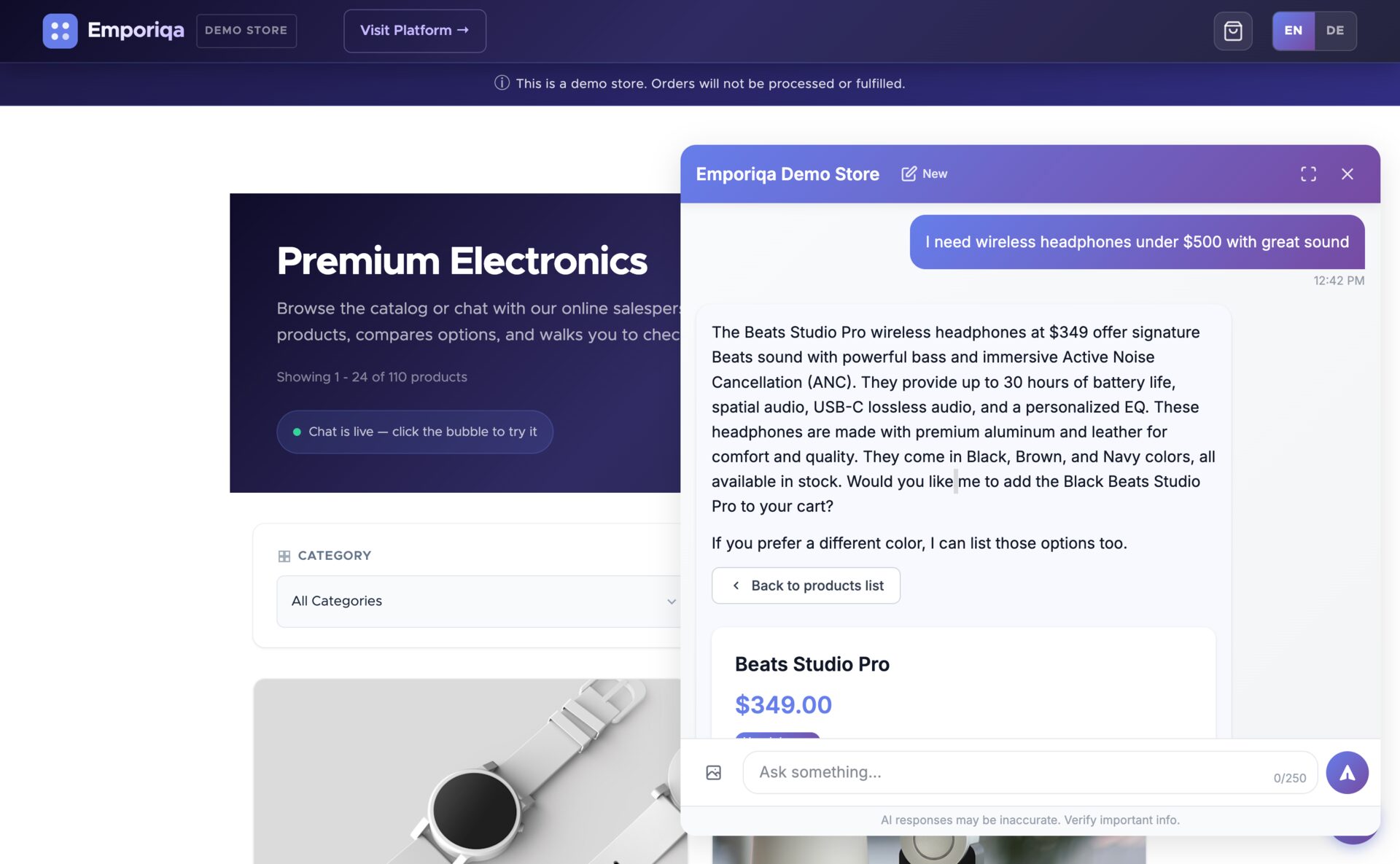
Emporiqa's first version used standard keyword search only. It worked well for exact queries: SKUs, brand names, specific product titles. But when I started testing with natural language queries ("something warm for hiking," "gift under 50 euros"), the results were bad. Queries that made perfect sense to a human returned nothing because no product had those exact words in its description.
I added meaning-based search on top of keyword matching, and the difference was immediate. The same queries that returned nothing now returned relevant products. But pure vector search had its own problem: it was too fuzzy for exact matches. Someone searching "Bosch GBH 2-26" would get random Bosch products instead of that specific model. That's why exact identifiers get their own lookup path, separate from the meaning-based search that does the rest of the finding.
Your Search Engine Doesn't Know What "Gift for Dad" Means
The core issue is that keyword search has no concept of meaning. It matches strings, not intent. When someone types "gift for dad," keyword search looks for products with "gift," "for," and "dad" in the title or description. Unless you've tagged products as gifts (and most stores haven't), nothing comes back.
Natural language search works differently. It goes beyond matching words. "Gift for dad" gets matched to grilling tools, whiskey glasses, and leather wallets because the search connects meaning, not just keywords.
This combines meaning-based matching with traditional keyword search, so customers get relevant results whether they type exact product names or describe what they want.
Your French Customers Can't Search Your English Catalog
If you sell across Europe, your customers speak dozens of languages. Your product catalog is probably in one, maybe two. When a French customer searches your English store for "veste chaude pour la randonnée," keyword search returns nothing.
The search handles meaning regardless of language. The French query and the English product description get matched because they mean the same thing. No translation setup needed. I wrote more about this in the multilingual support post.
72% of consumers prefer to buy in their native language (CSA Research, "Can't Read, Won't Buy" study). If your search only works in your catalog language, customers who would have bought are leaving instead.
What This Doesn't Solve
I'm not going to pretend natural language search fixes everything:
- Bad product data stays bad. If your product descriptions are empty or wrong, no search technology will save you. Garbage in, garbage out.
- No substitute for good navigation. Search is one way customers find products. Category navigation, filters, and recommendations still matter.
- Won't fix pricing or trust issues. If customers find the product but don't buy, the problem is downstream of search.
- Not magic. It's better than keywords, but vague queries are still vague. "Something nice" won't return great results with any technology.
Three Ways to Improve
1. Fix your keyword search first (free). Add more synonyms, improve product descriptions, tag products properly. This gets you incremental improvement with zero cost.
2. Add autocomplete and suggestions. Most e-commerce platforms have plugins for this. It nudges customers toward queries that return results. Reduces zero-result searches but doesn't solve the fundamental problem.
3. Move to natural language search. This is what I built Emporiqa to do. A chat assistant that sits on your store and lets customers describe what they want in plain language. It searches your actual catalog by meaning and returns relevant products even when the words don't match exactly. Works across 65+ languages.
Want to see this working on a real catalog? Create a free Emporiqa account with $25 of signup credit (about 100 conversations), no card required, and test it on your own store. Or try the live demo first. The demo is a stocked electronics store, and the chat behaves the same on any catalog.